Salar Cafe Regression Diagnostics, Residual Independence and Autocorrelation
Durbin Watson Test: Formula, SPSS Output, Python, R and Excel Autocorrelation Guide
Durbin Watson Test is a regression diagnostic used to check whether residuals are independent or show first-order autocorrelation. This Salar Cafe guide explains the Durbin-Watson statistic, formula, hypotheses, SPSS output interpretation, Python residual charts, R validation charts, Excel workflow, APA reporting, common mistakes and related regression-assumption resources.
Quick Answer: Durbin Watson Test Result
The verified SPSS output for the Durbin Watson Test uses a regression model predicting G3 final grade from G1, G2, studytime, failures and absences. The model is strong overall, with R = .922, R Square = .851, Adjusted R Square = .849, and standard error of the estimate = 1.254. The ANOVA table reports F(5, 643) = 731.966, p < .001, meaning the regression model explains a statistically significant amount of variation in G3.
The manual Durbin-Watson output reports N = 649, sum of squared residuals = 1010.68, sum of squared residual differences = 1877.18, and Durbin-Watson statistic = 1.85735. A Durbin-Watson value close to 2 usually indicates little or no first-order autocorrelation. The approximate lag-1 residual correlation is .07133, and the residual-lag correlation table reports r = .071, p = .072.
Final interpretation: The Durbin-Watson statistic of 1.85735 is close to 2, so the residuals do not show strong first-order autocorrelation. The approximate lag-1 residual correlation is small and positive (about .071), and the lag residual correlation is not statistically significant at the .05 level (p = .072). Therefore, the independence of residuals assumption is not seriously violated in this regression diagnostic.
Important note: The Durbin Watson Test depends on the order of the observations. It is most meaningful when the dataset has a logical time, sequence or repeated-order structure. In ordinary cross-sectional student data, the result should be described as a residual sequence diagnostic rather than proof of time-series independence.
Table of Contents
- What Is the Durbin Watson Test?
- Durbin Watson Test Formula
- Null and Alternative Hypotheses
- Dataset and Variables Used
- Verified SPSS Output Interpretation
- Python Chart-by-Chart Interpretation
- R Chart-by-Chart Validation
- SPSS, Python, R and Excel Workflows
- SPSS Syntax, Python Code, R Code and Excel Formulas
- APA Reporting Wording
- Common Mistakes
- When to Use Durbin Watson Test
- Downloads and Resources
- Related Internal Links
- FAQs
What Is the Durbin Watson Test?
Durbin Watson Test, often written as the Durbin-Watson test, is a regression diagnostic used to detect first-order autocorrelation in residuals. In regression, residuals should ideally be independent. If residuals are positively autocorrelated, one residual tends to be followed by a residual with the same sign. If residuals are negatively autocorrelated, one residual tends to be followed by a residual with the opposite sign.
The Durbin-Watson statistic usually ranges from 0 to 4. A value near 2 indicates little or no first-order autocorrelation. A value clearly below 2 suggests positive autocorrelation. A value clearly above 2 suggests negative autocorrelation. In this guide, the observed value is 1.85735, which is close to 2 and therefore does not indicate a serious residual autocorrelation problem.
Durbin-Watson belongs to the family of regression diagnostics. It should be interpreted with other regression checks such as residual histograms, residuals-versus-fitted plots, observed-versus-fitted plots, model specification checks such as the Ramsey RESET test, and heteroscedasticity checks such as the Goldfeld-Quandt test. If you are checking distribution assumptions before regression, also compare this guide with Q-Q plot normality check, P-P plot normality check, Kolmogorov-Smirnov test, Lilliefors test, D’Agostino-Pearson test, Cramer-von Mises test, and Ryan-Joiner test.
Practical meaning: The Durbin Watson Test answers this question: “Do regression residuals follow each other in a pattern, or are they roughly independent across the observation sequence?” A value close to 2 supports residual independence; a value far below or above 2 suggests autocorrelation that may affect standard errors, p-values and model interpretation.
Durbin Watson Test Formula
The Durbin-Watson statistic compares the squared difference between consecutive residuals with the total squared residual variation. The formula is:
DW = Σ(eₜ − eₜ₋₁)² / Σeₜ²Here, eₜ is the residual at position t, and eₜ₋₁ is the residual immediately before it in the ordered dataset. If consecutive residuals are very similar, the numerator becomes smaller and the Durbin-Watson statistic moves below 2. If consecutive residuals frequently move in opposite directions, the numerator becomes larger and the statistic can move above 2.
For the verified SPSS output in this guide:
DW = 1877.18 / 1010.68

DW ≈ 1.85735
An approximate relationship between Durbin-Watson and lag-1 residual autocorrelation is:
r₁ ≈ 1 − (DW / 2)r₁ ≈ 1 − (1.85735 / 2)

r₁ ≈ .07133
| Durbin-Watson Range | Common Interpretation | Meaning for Regression Residuals |
|---|---|---|
| Near 2 | No serious first-order autocorrelation | Residuals are approximately independent across the sequence. |
| Clearly below 2 | Positive autocorrelation | Positive residuals tend to follow positive residuals, and negative residuals tend to follow negative residuals. |
| Clearly above 2 | Negative autocorrelation | Positive residuals tend to alternate with negative residuals. |
| Close to 0 or 4 | Strong autocorrelation pattern | The residual independence assumption may be seriously violated. |
Null and Alternative Hypotheses for the Durbin Watson Test
The Durbin Watson Test is usually framed around first-order residual autocorrelation. In a regression model, the residuals should be independent. The hypotheses can be written as follows:
Null Hypothesis
H0: The regression residuals have no first-order autocorrelation.
H0: ρ = 0Alternative Hypothesis
H1: The regression residuals have first-order autocorrelation.
H1: ρ ≠ 0Some Durbin-Watson applications use a one-sided alternative, especially when the researcher is mainly concerned about positive autocorrelation. In this guide, the observed statistic of 1.85735 is slightly below 2, so the approximate residual autocorrelation is slightly positive. However, the approximate lag-1 correlation is small (.07133), and the residual-lag correlation is not significant at the .05 level (p = .072).
Decision in this example: The Durbin-Watson statistic is close to 2, so the null hypothesis of no serious first-order residual autocorrelation is retained for practical reporting. There is no strong evidence that residual independence is violated.
Dataset and Variables Used
The worked example uses a student performance regression model. The dependent variable is G3, which represents the final grade. The predictors are G1, G2, studytime, failures, and absences. The Durbin Watson Test is applied to the regression residuals from this model.
| Element | Variable / Output | Role in the Analysis | Interpretation |
|---|---|---|---|
| Dependent variable | G3 | Regression outcome | Final grade predicted by earlier grade and student variables. |
| Main academic predictors | G1 and G2 | Prior grade predictors | Strong predictors of G3 in the SPSS coefficient table. |
| Behavior/study predictors | studytime, failures, absences | Additional predictors | Used to improve the G3 regression model and residual diagnostics. |
| Diagnostic variable | resid_G3 | Regression residual | Used to compute residual sequence, lag residual scatter and Durbin-Watson statistic. |
| Lag diagnostic | lag_resid_G3 | Previous residual | Used to inspect first-order residual autocorrelation. |
Before interpreting regression diagnostics, it is helpful to understand the dataset with descriptive statistics, frequency distribution, five-number summary, box plot interpretation, histogram interpretation, confidence interval, and effect size reporting.
Verified SPSS Output Interpretation
The verified SPSS output PDF for this guide is available here: Durbin Watson Test SPSS Output PDF. The output includes the regression model, model summary, ANOVA table, coefficient table, residual statistics, manual Durbin-Watson calculation, residual descriptives, normality diagnostics and lag-residual correlation.
SPSS Regression Model Summary
| SPSS Output Item | Value | Interpretation |
|---|---|---|
| Dependent variable | G3 | The model predicts final grade. |
| Predictors | G1, G2, studytime, failures, absences | All requested predictors were entered into the model. |
| R | .922 | The observed and predicted G3 values have a strong relationship. |
| R Square | .851 | The model explains about 85.1% of the variance in G3. |
| Adjusted R Square | .849 | The explained variance remains very high after adjustment for predictors. |
| Standard error of estimate | 1.254 | The typical prediction error is about 1.254 G3 units. |
| ANOVA result | F(5, 643) = 731.966, p < .001 | The regression model is statistically significant overall. |
SPSS Coefficient Interpretation
| Predictor | B | Beta | t | Sig. | Interpretation |
|---|---|---|---|---|---|
| Constant | -.155 | — | -.600 | .549 | The intercept is not statistically significant. |
| G1 | .139 | .119 | 3.849 | < .001 | G1 is a significant positive predictor of G3. |
| G2 | .886 | .799 | 26.107 | < .001 | G2 is the strongest positive predictor of G3. |
| studytime | .097 | .025 | 1.564 | .118 | Studytime is not significant after controlling for the other predictors. |
| failures | -.218 | -.040 | -2.402 | .017 | Failures have a small significant negative association with G3. |
| absences | .023 | .034 | 2.165 | .031 | Absences have a small significant positive coefficient in this controlled model. |
SPSS Durbin-Watson Manual Statistic
| Manual Output Item | Value | Meaning |
|---|---|---|
| Number of cases | 649 | The residual diagnostic uses 649 cases. |
| Sum of squared residuals | 1010.68 | Total residual variation in the regression model. |
| Sum of squared residual differences | 1877.18 | Variation in differences between consecutive residuals. |
| Durbin-Watson statistic | 1.85735 | Close to 2, suggesting no serious first-order autocorrelation. |
| Approximate lag-1 residual correlation | .07133 | A small positive residual autocorrelation estimate. |
SPSS Residual Diagnostics
| Residual Output | Value | Interpretation |
|---|---|---|
| Residual mean | .0000000 | Residuals are centered around zero, as expected in ordinary least squares regression. |
| Residual standard deviation | 1.24887559 | Residual spread is close to the model standard error. |
| Residual minimum | -9.07158 | There are some large negative residuals. |
| Residual maximum | 5.80683 | There are also positive residuals, but the negative side is more extreme. |
| Residual skewness | -2.844 | Residuals are left-skewed. |
| Residual kurtosis | 18.545 | Residuals show heavy-tail behavior. |
| Kolmogorov-Smirnov test | D = .154, p < .001 | Formal residual normality is rejected. |
| Shapiro-Wilk test | W = .757, p < .001 | Formal residual normality is rejected. |
| Lag residual correlation | r = .071, p = .072 | The lag-1 residual association is small and not significant at .05. |
SPSS reporting conclusion: The Durbin-Watson statistic was 1.85735, close to the no-autocorrelation reference value of 2. The approximate lag-1 residual correlation was small (.07133), and the residual-lag correlation was not significant at .05 (p = .072). Therefore, the residual independence assumption is not seriously violated. However, residual normality diagnostics show skewness and heavy tails, so residual distribution should also be discussed.
Because regression diagnostics involve more than one assumption, the Durbin Watson result should be combined with residual distribution checks, residuals-versus-fitted plots, and additional assumption guides such as Ramsey RESET test, Goldfeld-Quandt test, Q-Q plot normality check, and histogram interpretation.
Python Chart-by-Chart Interpretation
The Python charts explain the Durbin Watson Test visually. They show observed versus fitted values, residual sequence behavior, lag-1 residual relationship, residual autocorrelation by lag, residual distribution, Durbin-Watson reference distribution and residuals versus fitted values.
Python Chart 1: Observed vs Fitted Values
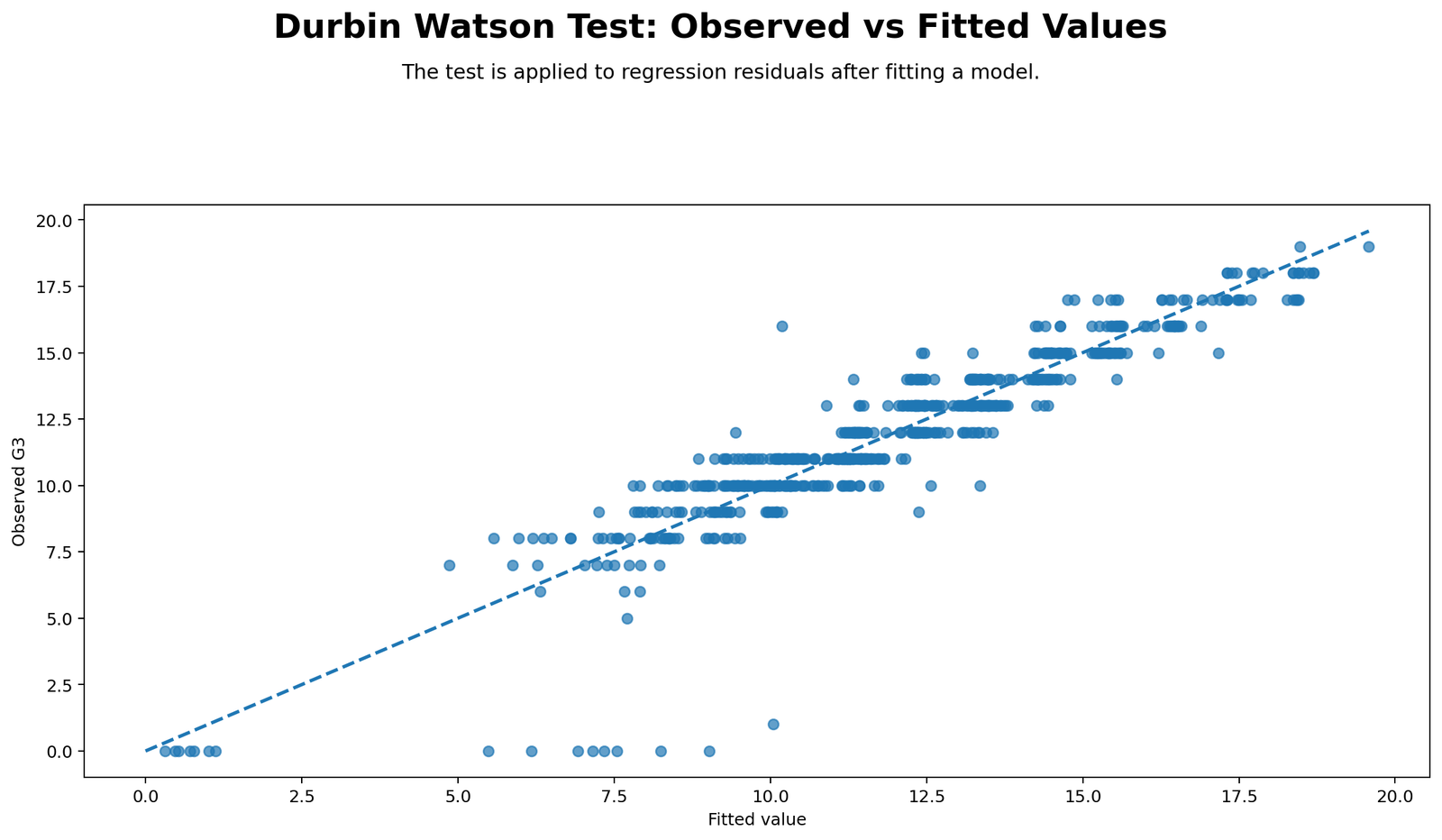
Detailed interpretation
This chart checks the overall prediction quality of the regression model before focusing on autocorrelation. When points fall close to the diagonal pattern, fitted values are close to observed values. The SPSS model has R Square = .851, so the model explains a large share of G3 variation.
Observed-versus-fitted plots do not directly calculate the Durbin-Watson statistic, but they help show whether residuals are likely to be small or large. A strong fitted relationship makes the residual diagnostics more meaningful because the residuals represent what the model has not explained.
Python Chart 2: Residual Sequence Plot
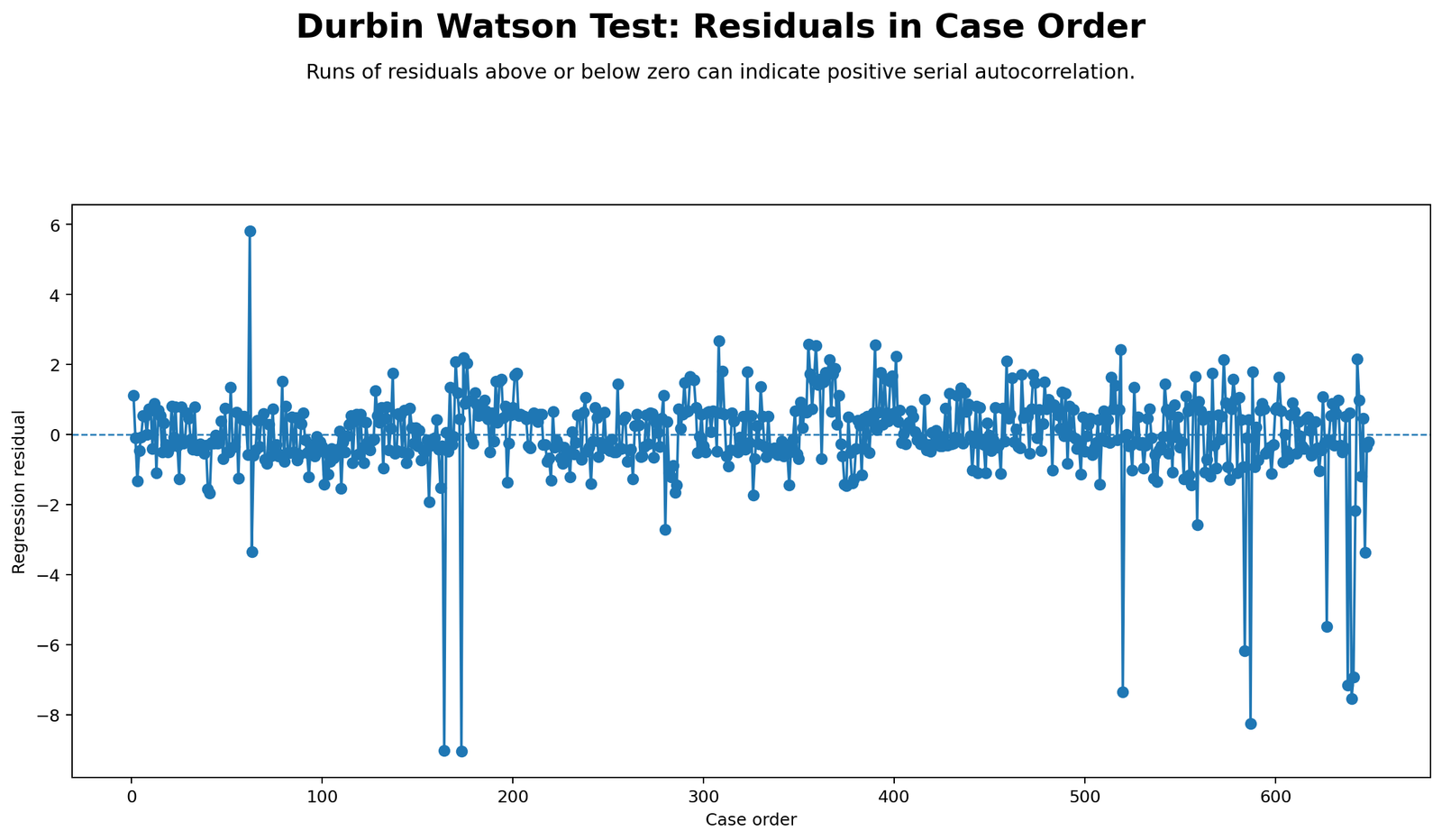
Detailed interpretation
The residual sequence plot is central to Durbin-Watson interpretation because the test depends on consecutive residuals. If residuals appear in long runs above or below zero, that may indicate positive autocorrelation. If residuals alternate sharply between positive and negative values, that may indicate negative autocorrelation.
In this example, the residuals fluctuate around zero without an obvious long repeating wave pattern. Some residuals are large, especially on the negative side, which agrees with the SPSS residual minimum of -9.07158. However, large residuals are not the same as serial autocorrelation.
Python Chart 3: Lag-1 Residual Scatter
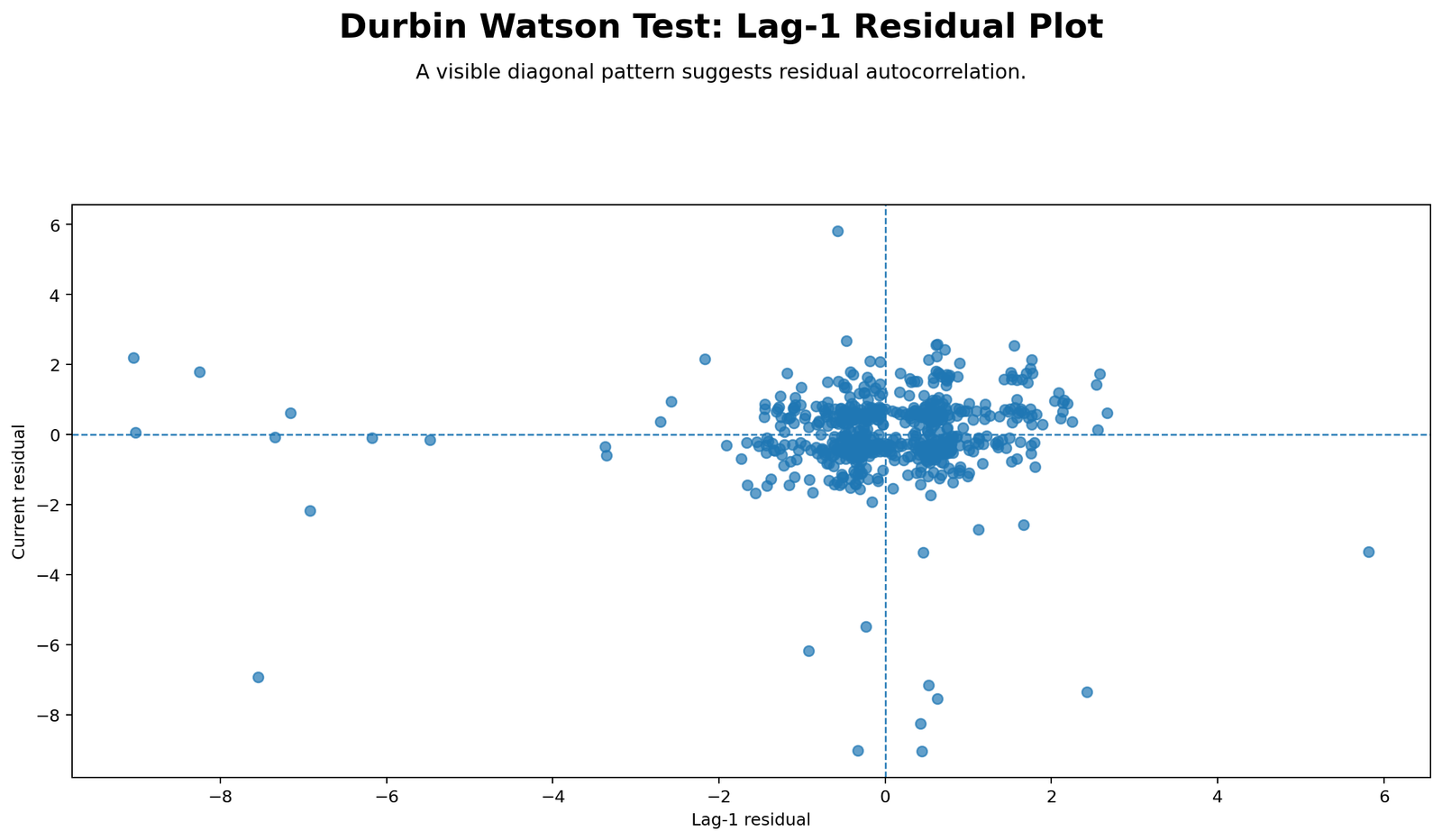
Detailed interpretation
The lag-1 residual scatter plot directly visualizes first-order residual autocorrelation. If the points form a strong upward pattern, residuals are positively autocorrelated. If they form a strong downward pattern, residuals are negatively autocorrelated. A scattered cloud around zero indicates weak or no lag-1 autocorrelation.
The SPSS output reports an approximate lag-1 residual correlation of .07133, and the residual-lag correlation table reports r = .071, p = .072. This is a small positive relationship, not a strong autocorrelation pattern.
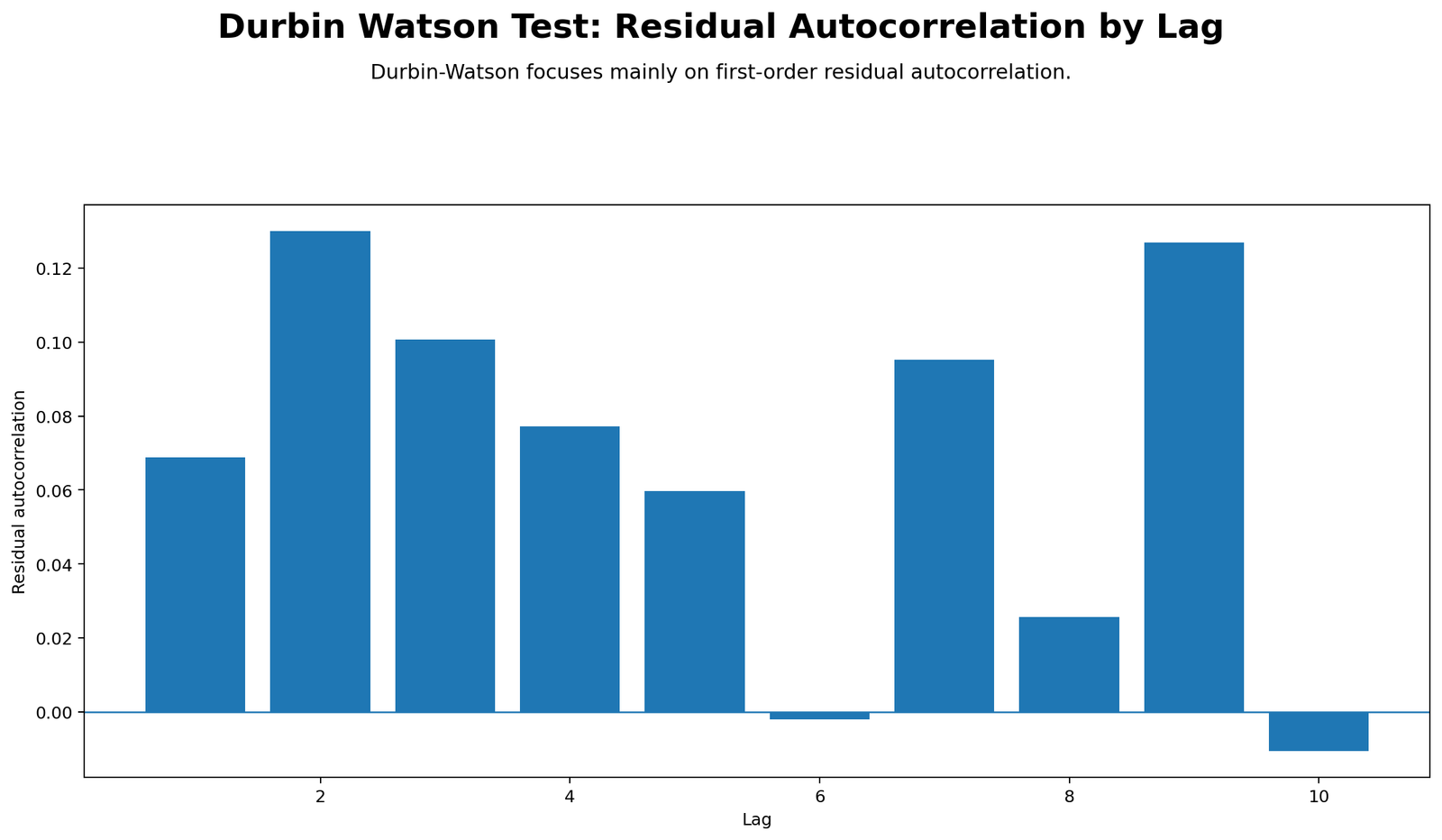
Python Chart 4: Residual Autocorrelation by Lag
Detailed interpretation
Although the Durbin Watson Test focuses mainly on first-order autocorrelation, the residual autocorrelation chart provides a wider diagnostic view. It shows whether residuals are related not only to the previous residual but also to residuals several positions earlier.
When autocorrelation bars stay close to zero and do not form a consistent pattern, the residual sequence does not show strong serial dependence. If several lags were large, a time-series or repeated-order model might be needed.
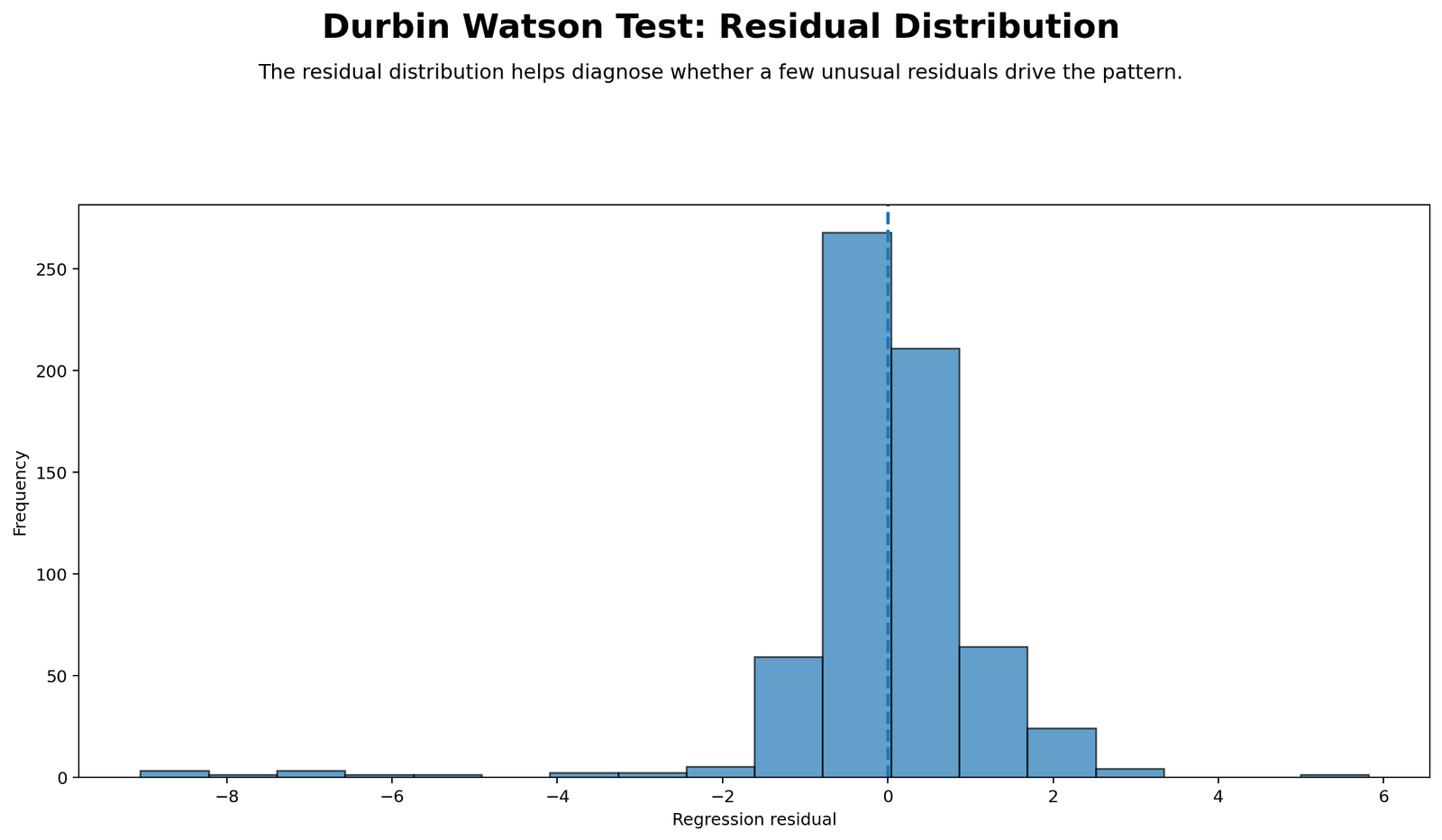
Python Chart 5: Residual Histogram
Detailed interpretation
This residual histogram checks the distribution shape of residuals. Durbin-Watson focuses on residual independence, not residual normality, but both are important regression diagnostics. The SPSS residual descriptives show residual mean near zero, standard deviation about 1.2489, skewness -2.844, and kurtosis 18.545.
The histogram helps explain why normality tests are significant even though autocorrelation is not severe. The residuals are centered near zero but have heavy tails and some extreme negative values.
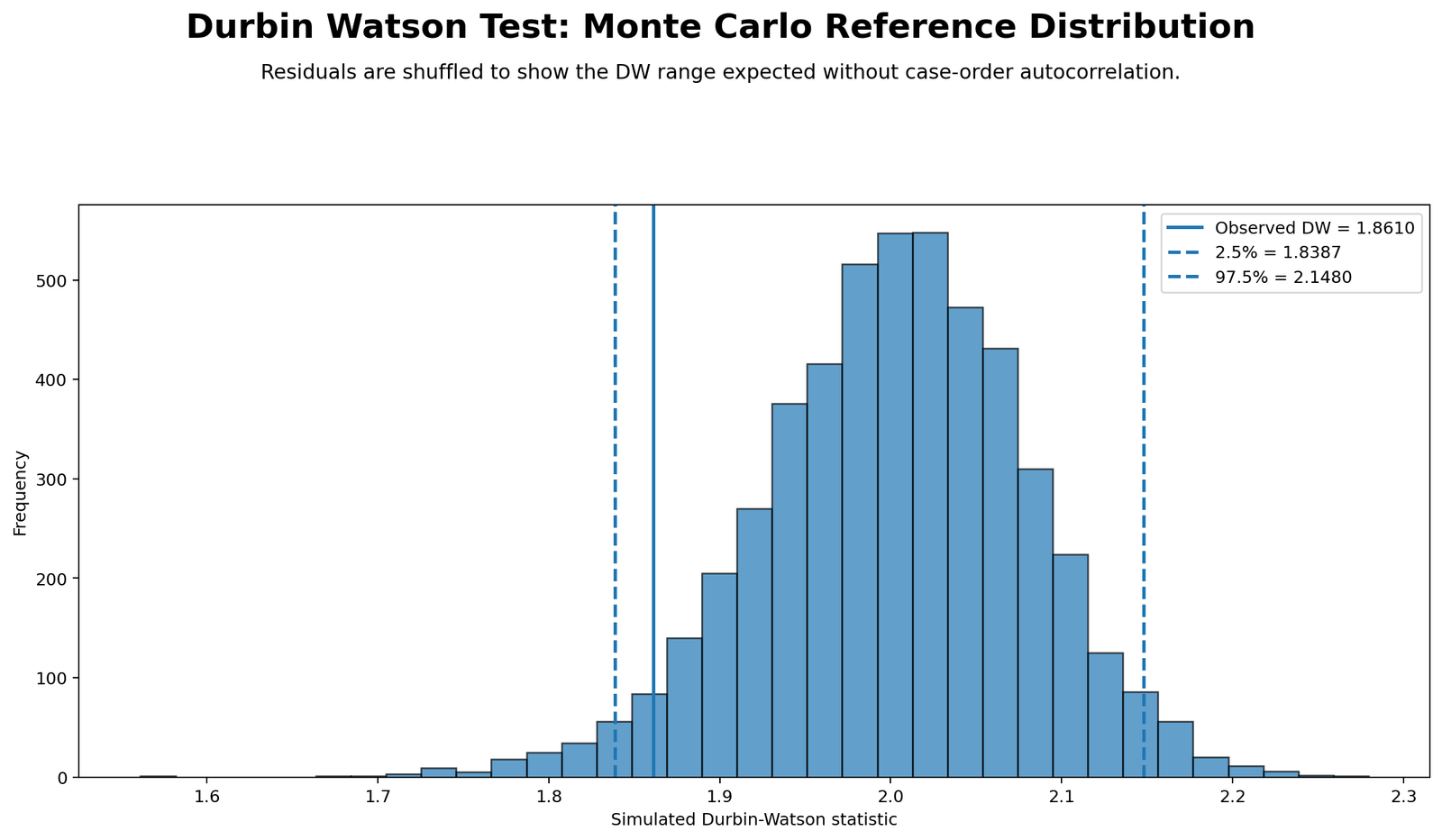
Python Chart 6: Durbin Watson Reference Distribution
Detailed interpretation
The reference distribution chart shows where the observed Durbin-Watson statistic sits relative to values expected under weak or no autocorrelation. The observed value of approximately 1.85735 is close to the central no-autocorrelation reference value of 2.
This visual display makes the interpretation easier for students and readers. A statistic near 2 is generally treated as acceptable, while values far below or far above 2 require additional investigation.
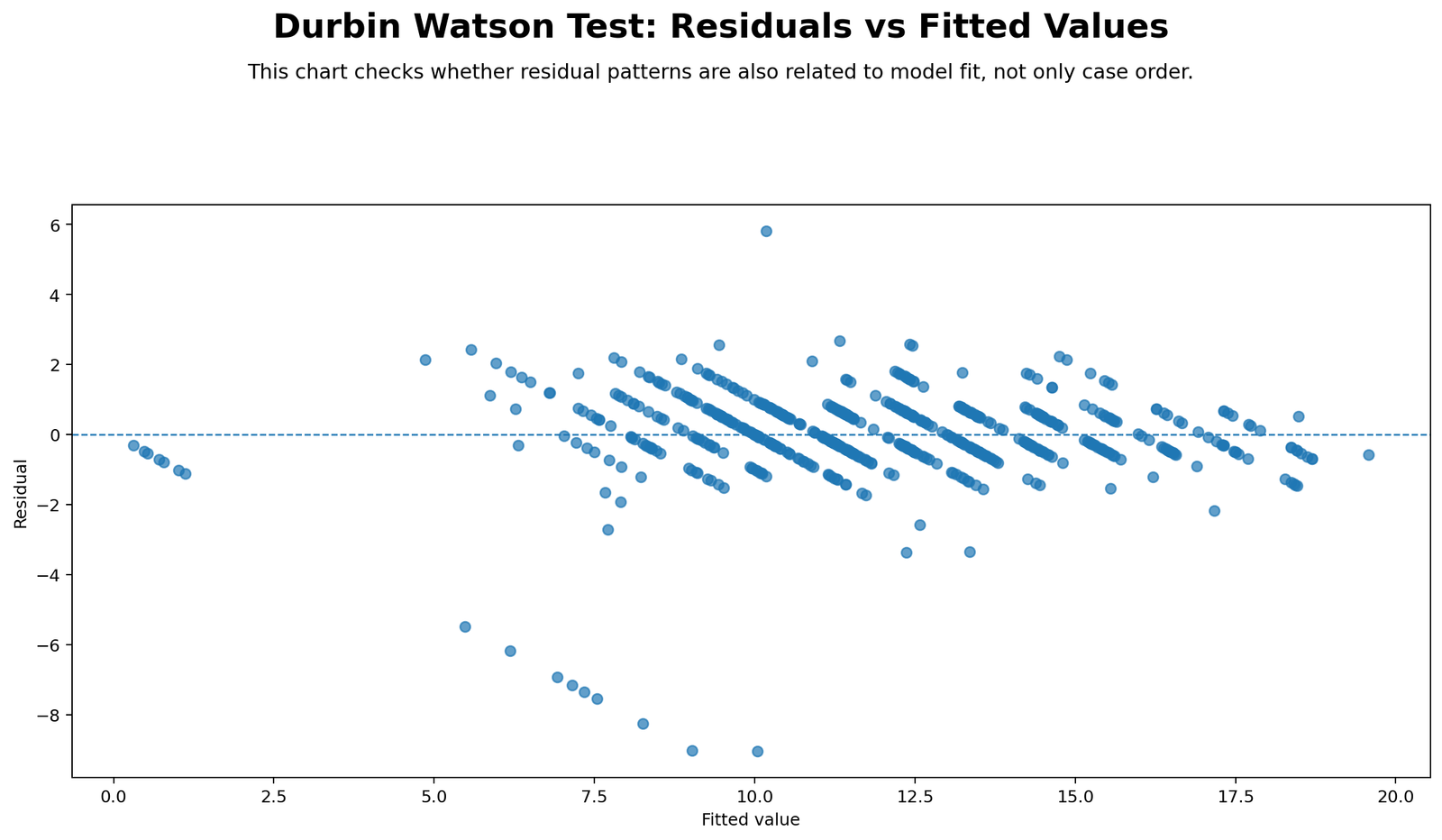
Python Chart 7: Residuals vs Fitted Values
Detailed interpretation
The residuals-versus-fitted plot checks whether residuals show nonlinearity, unequal spread or other systematic model patterns. Durbin-Watson focuses on residual order, but residuals-versus-fitted focuses on whether errors behave similarly across predicted values.
If residuals show a funnel shape, the model may have heteroscedasticity. If residuals show a curve, the model may be misspecified. This is why a complete regression report should not rely only on the Durbin Watson Test.
R Chart-by-Chart Validation
The R charts validate the same Durbin Watson Test interpretation using an independent workflow. This confirms that the Python charts and SPSS output tell the same story: the model fits G3 strongly, the Durbin-Watson statistic is close to 2, and there is no serious first-order residual autocorrelation.
R Chart 1: Observed vs Fitted Values
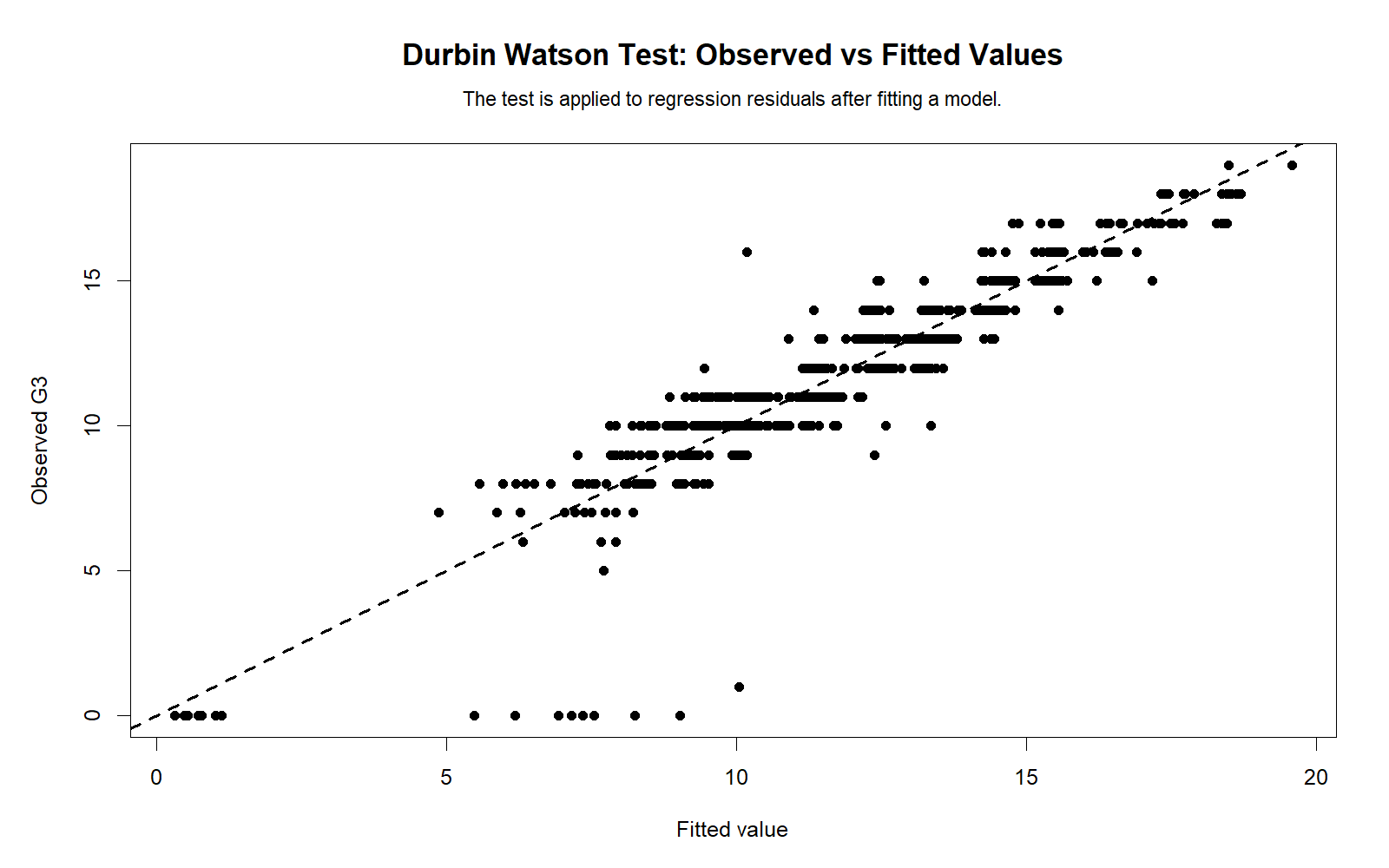
Detailed interpretation
The R chart confirms that fitted G3 values align strongly with observed G3 values. This is consistent with the SPSS model summary, where R Square is .851. Strong model fit does not guarantee perfect residual behavior, but it provides the foundation for residual diagnostics.
R Chart 2: Residual Sequence Plot
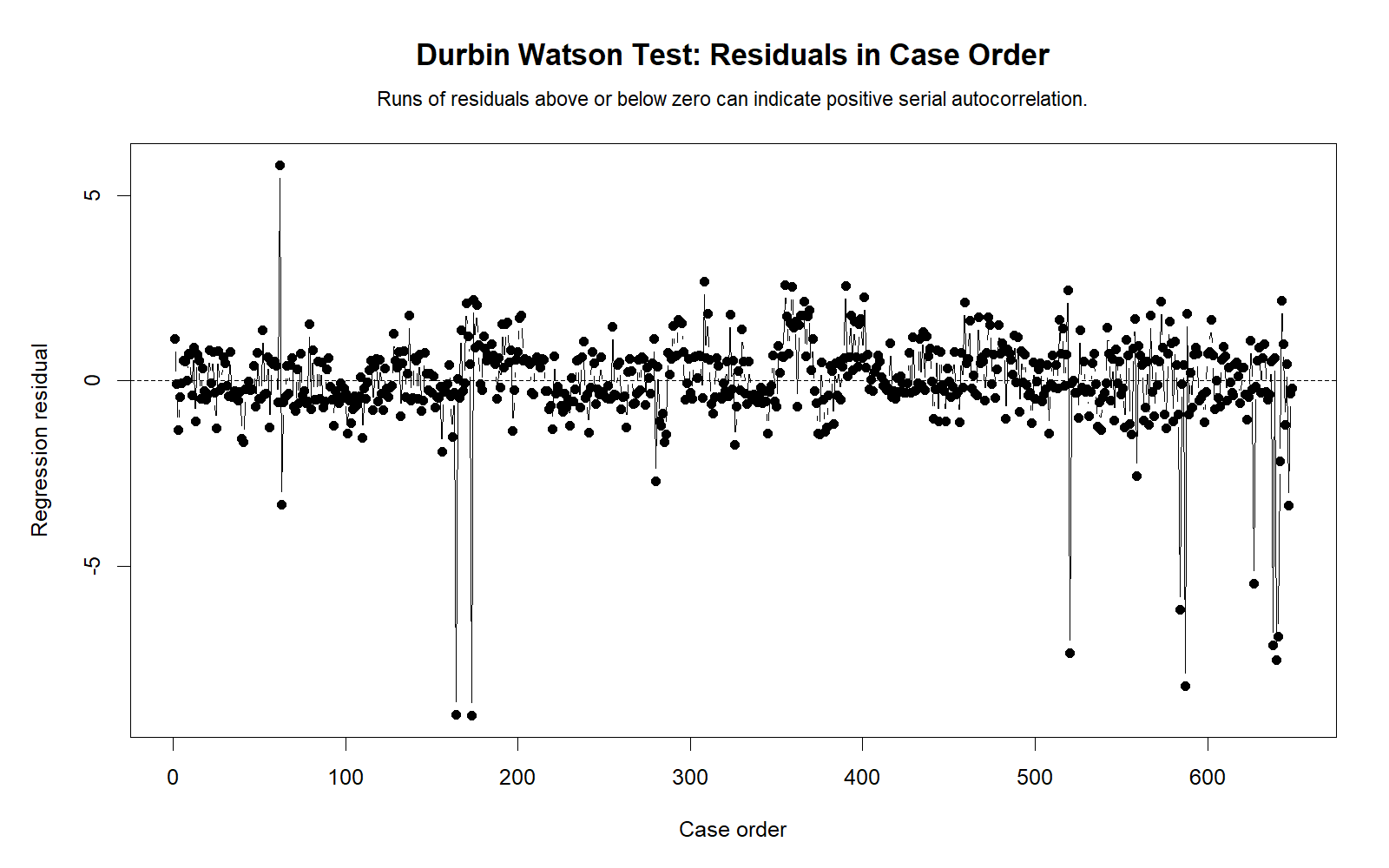
Detailed interpretation
The R residual sequence plot shows residuals fluctuating around zero. A severe autocorrelation problem would usually show long runs, waves or repeated clusters. The visual pattern is consistent with a Durbin-Watson statistic close to 2.
R Chart 3: Lag-1 Residual Scatter
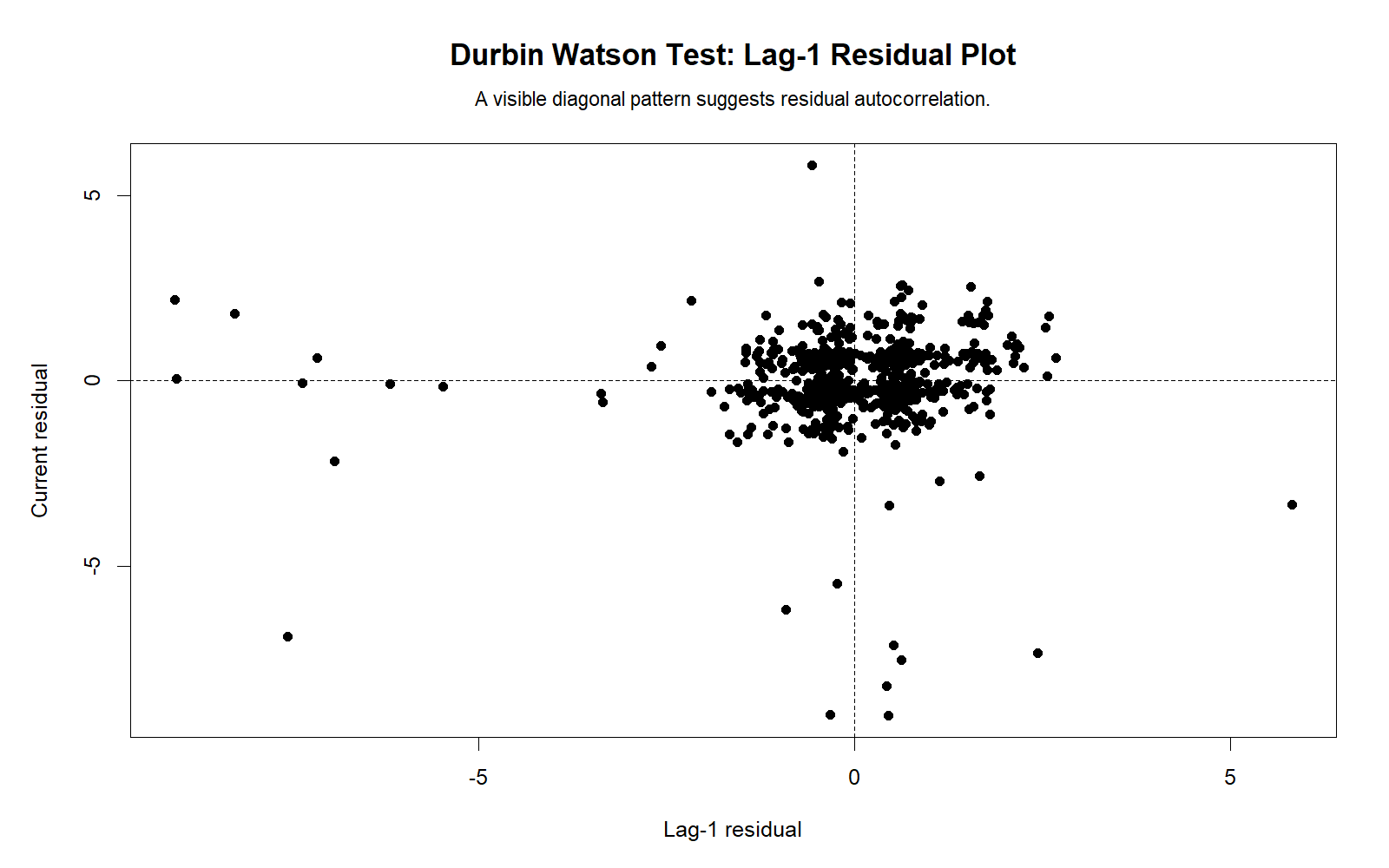
Detailed interpretation
This R chart confirms that the lag-1 residual relationship is weak. The SPSS diagnostic reports a small lag residual correlation of approximately .071, which is not significant at the .05 level.
R Chart 4: Residual Autocorrelation by Lag
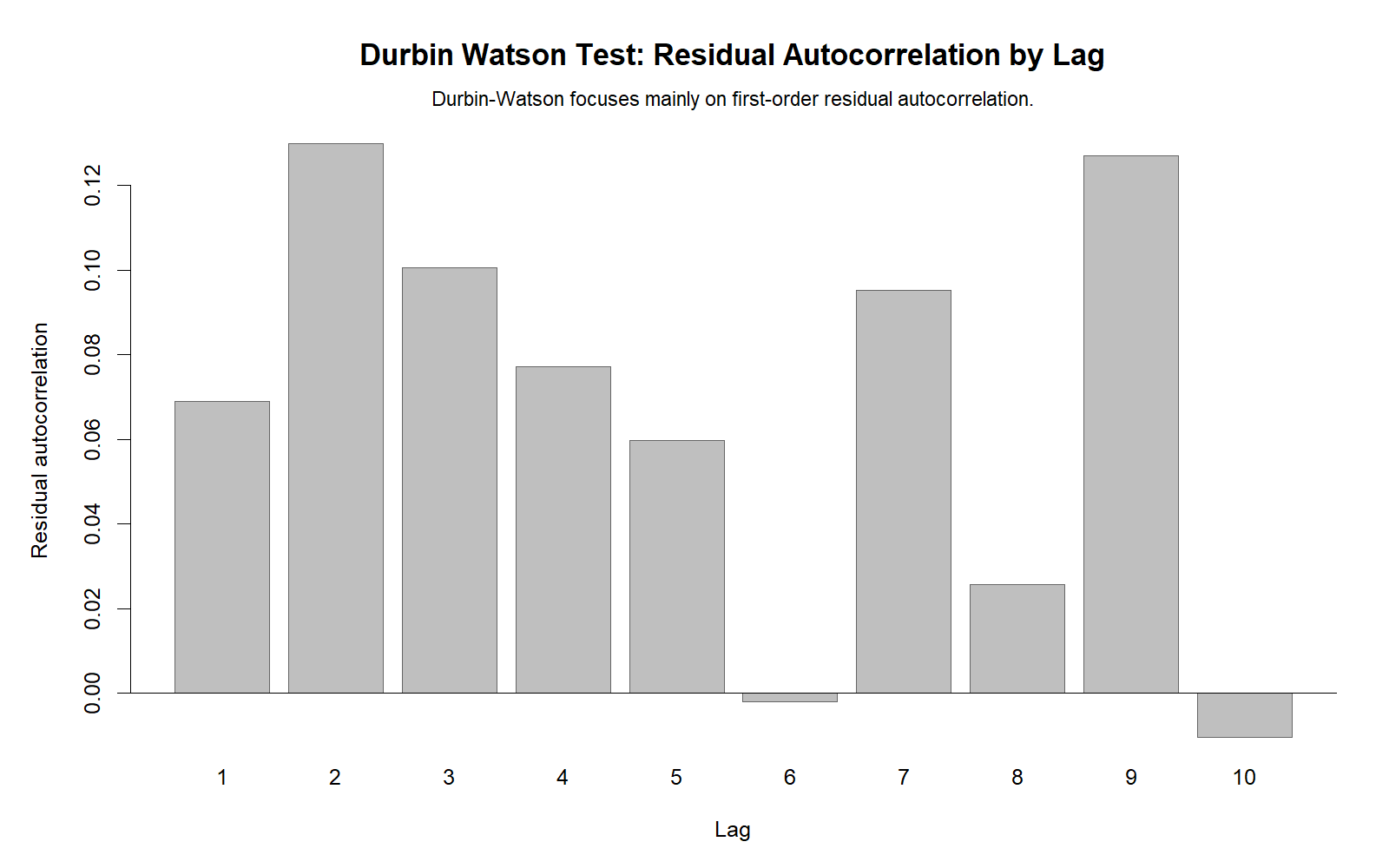
Detailed interpretation
The R autocorrelation-by-lag chart checks whether residual dependence appears beyond the first lag. Durbin-Watson focuses on lag 1, but multiple lag checks are useful when the observation order has time or sequence meaning.
R Chart 5: Residual Histogram
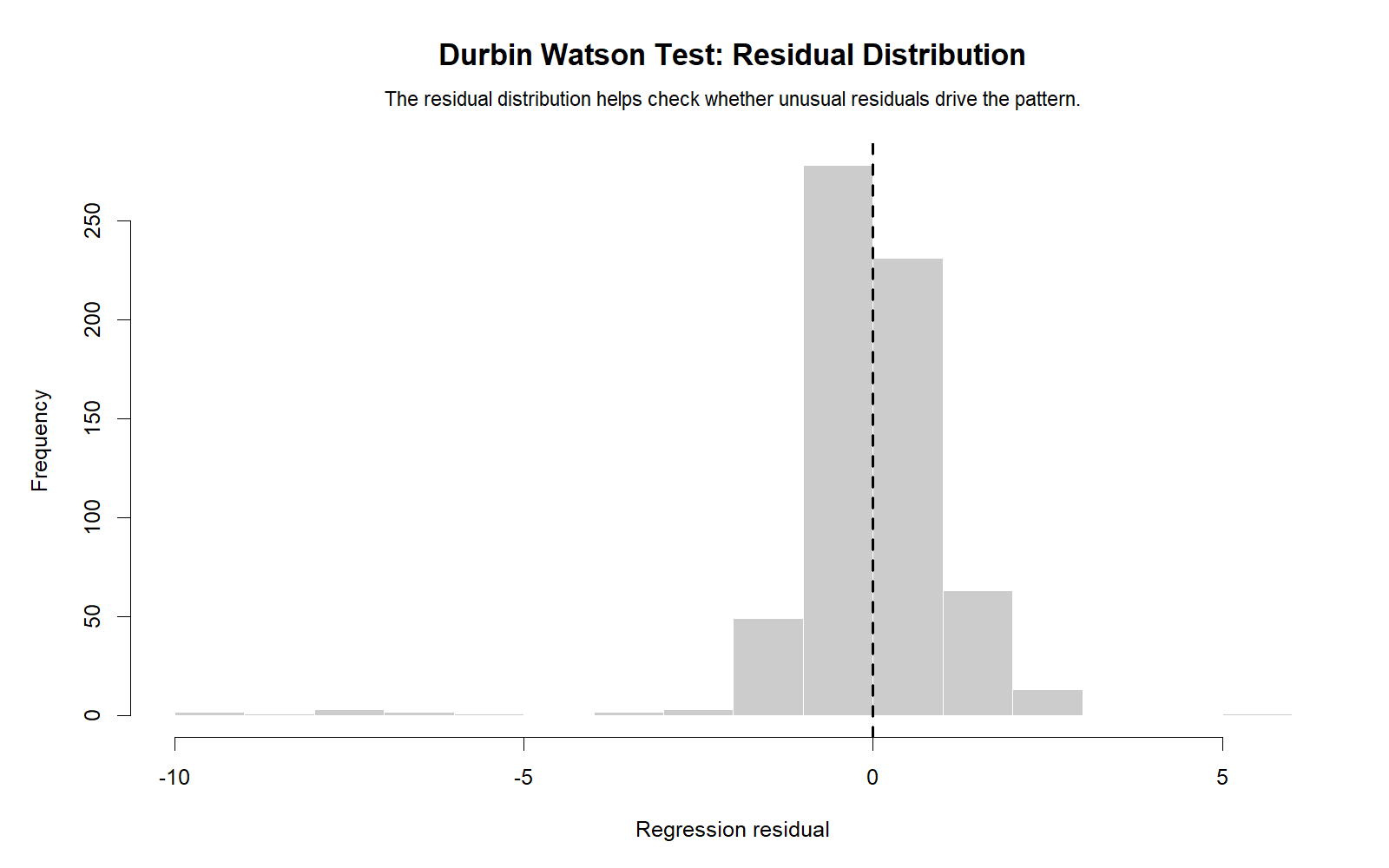
Detailed interpretation
The R residual histogram confirms that residuals are centered near zero but not perfectly normal. This agrees with the SPSS residual normality results, where both Kolmogorov-Smirnov and Shapiro-Wilk tests reject normality at p < .001.
R Chart 6: Durbin Watson Reference Distribution
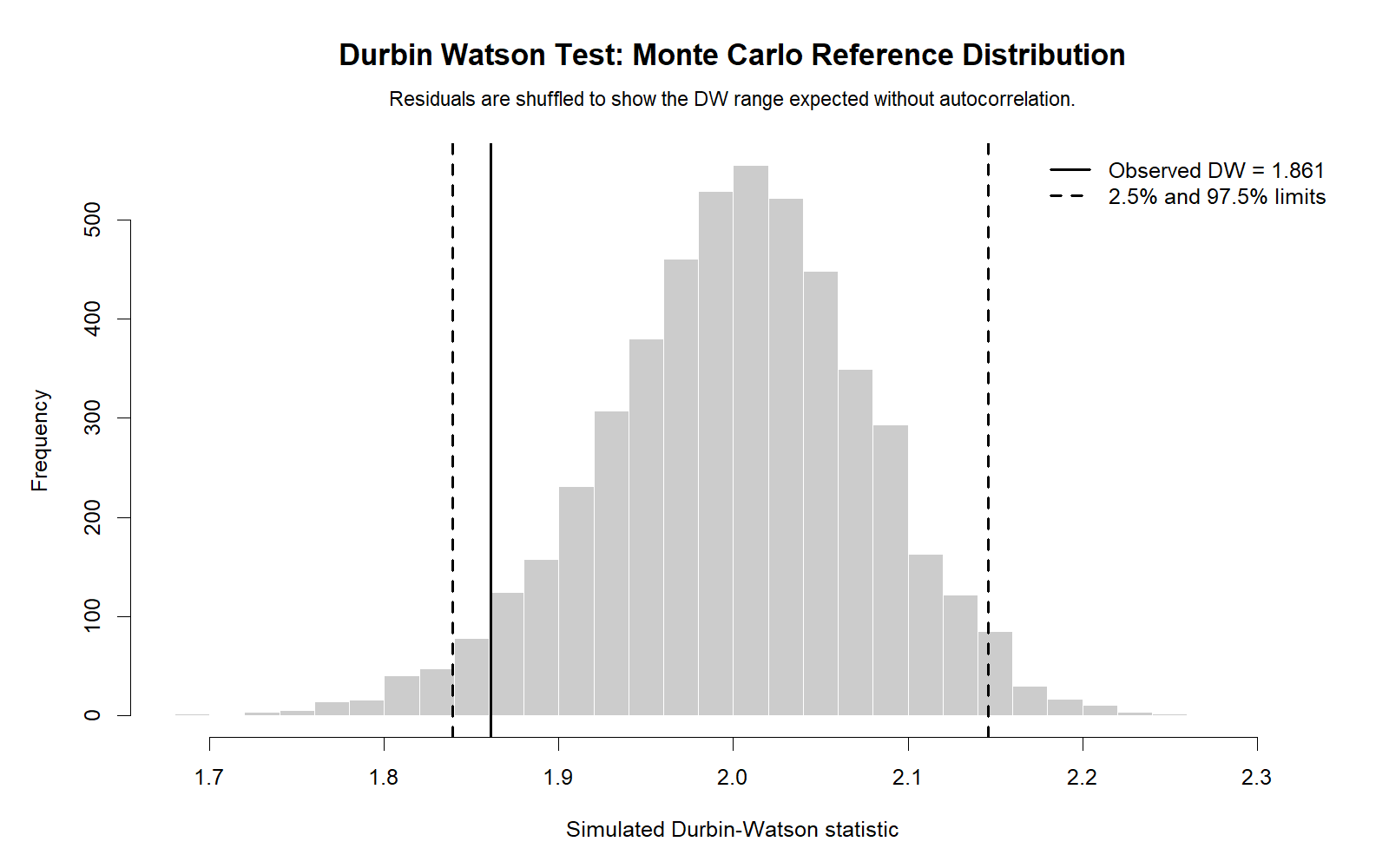
Detailed interpretation
The R reference distribution confirms that the observed Durbin-Watson statistic is close to the no-autocorrelation value of 2. A value of 1.85735 is slightly below 2 but not far enough to suggest serious positive autocorrelation.
R Chart 7: Residuals vs Fitted Values
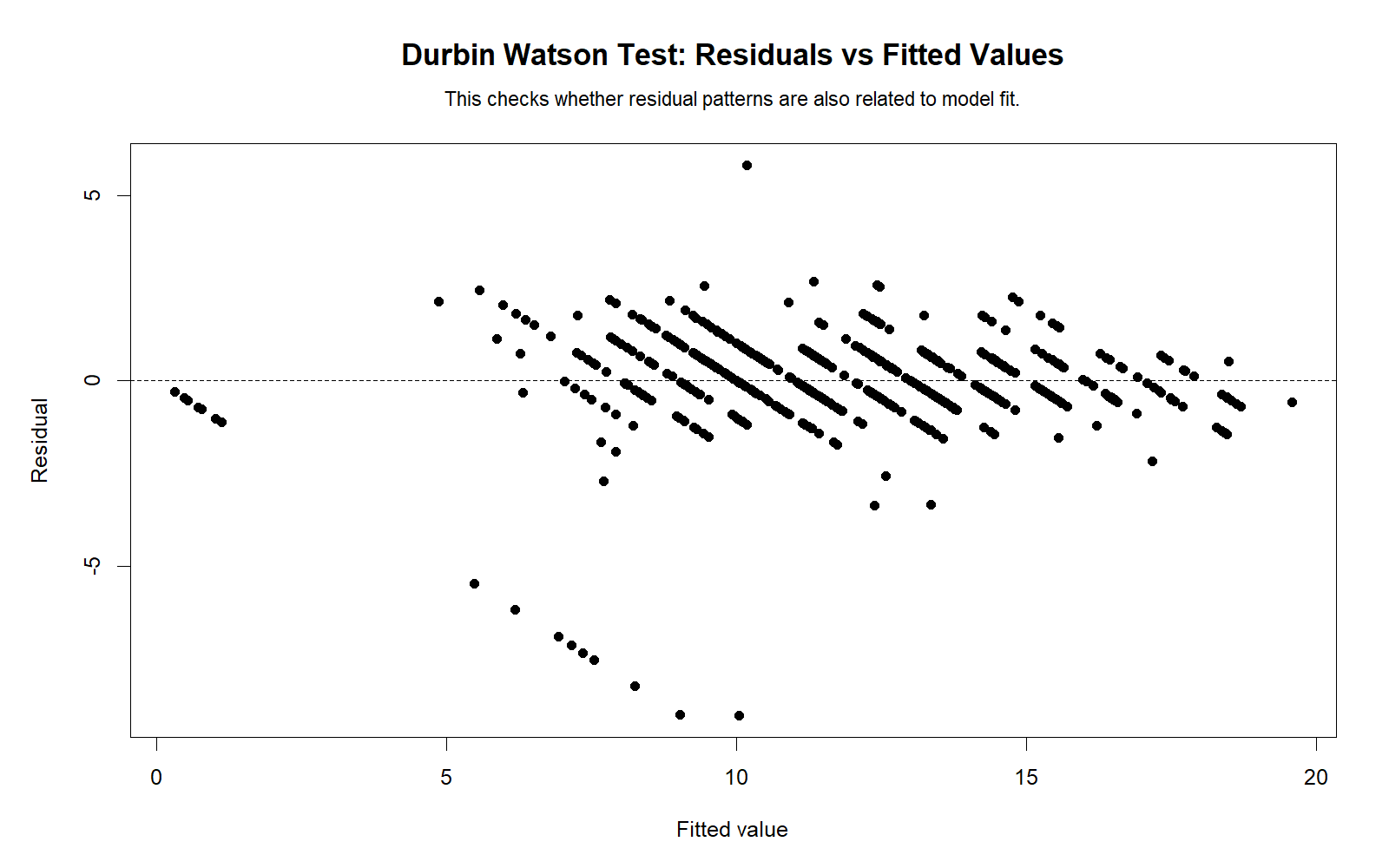
Detailed interpretation
The residuals-versus-fitted chart checks whether residuals remain randomly scattered across predicted G3 values. This chart is not the Durbin-Watson statistic itself, but it helps detect model pattern, unequal variance or nonlinearity that may affect interpretation.
SPSS, Python, R and Excel Workflows for Durbin Watson Test
SPSS Workflow
- Open the cleaned dataset in SPSS.
- Go to Analyze > Regression > Linear.
- Place G3 in the dependent variable box.
- Place G1, G2, studytime, failures and absences in the independent variables box.
- Open Statistics and select Durbin-Watson if using the built-in option.
- Save predicted values and residuals if you need manual residual diagnostics.
- Compute lagged residuals and residual differences if you want a manual Durbin-Watson calculation.
- Export the SPSS output PDF for reporting.
Python Workflow
- Load the dataset with pandas.
- Fit an OLS regression model using statsmodels.
- Extract residuals and fitted values.
- Calculate Durbin-Watson with
statsmodels.stats.stattools.durbin_watson(). - Create observed-versus-fitted, residual sequence, lag residual scatter, ACF, histogram and residuals-versus-fitted charts.
- Report whether the statistic is close to 2.
R Workflow
- Load the dataset with
read.csv(). - Fit the model using
lm(G3 ~ G1 + G2 + studytime + failures + absences). - Extract residuals and fitted values.
- Calculate Durbin-Watson using a package function or the manual formula.
- Create residual diagnostic charts.
- Compare R results with SPSS and Python outputs.
Excel Workflow
- Fit a regression model using Excel Data Analysis ToolPak or imported predicted values.
- Create a residual column: observed G3 minus fitted G3.
- Create a lag residual column by shifting residuals down one row.
- Create a residual difference column: current residual minus lag residual.
- Square residuals and residual differences.
- Compute Durbin-Watson as sum of squared residual differences divided by sum of squared residuals.
SPSS Syntax, Python Code, R Code and Excel Formulas
SPSS Syntax for Durbin Watson Test
* Durbin Watson Test in SPSS.
* Dependent variable: G3.
* Predictors: G1, G2, studytime, failures, absences.

SET PRINTBACK=OFF MPRINT=OFF.

TITLE "Durbin Watson Test Regression for G3".

REGRESSION
  /DEPENDENT G3
  /METHOD=ENTER G1 G2 studytime failures absences
  /STATISTICS COEFF OUTS R ANOVA CHANGE DW
  /SAVE PRED(pred_G3) RESID(resid_G3).

* Create sequential case id.
COMPUTE case_id = $CASENUM.
EXECUTE.

SORT CASES BY case_id.

* Create lag residual and residual difference.
CREATE lag_resid_G3 = LAG(resid_G3).
COMPUTE resid_diff_G3 = resid_G3 - lag_resid_G3.
COMPUTE sq_resid_G3 = resid_G3 ** 2.
COMPUTE sq_resid_diff_G3 = resid_diff_G3 ** 2.
EXECUTE.

* Manual Durbin-Watson components.
AGGREGATE
  /OUTFILE=* MODE=ADDVARIABLES
  /BREAK=
  /dw_n = N(resid_G3)
  /sum_sq_resid = SUM(sq_resid_G3)
  /sum_sq_resid_diff = SUM(sq_resid_diff_G3).

COMPUTE durbin_watson = sum_sq_resid_diff / sum_sq_resid.
COMPUTE approx_lag1_resid_corr = 1 - (durbin_watson / 2).
EXECUTE.

REPORT FORMAT=LIST AUTOMATIC ALIGN(CENTER)
  /VARIABLES=dw_n sum_sq_resid sum_sq_resid_diff durbin_watson approx_lag1_resid_corr
  /TITLE "Manual Durbin Watson Statistic".

DESCRIPTIVES VARIABLES=pred_G3 resid_G3 lag_resid_G3 resid_diff_G3
  /STATISTICS=MEAN STDDEV MIN MAX.

EXAMINE VARIABLES=resid_G3
  /PLOT BOXPLOT HISTOGRAM NPPLOT
  /STATISTICS DESCRIPTIVES
  /CINTERVAL 95
  /MISSING LISTWISE
  /NOTOTAL.

CORRELATIONS
  /VARIABLES=resid_G3 lag_resid_G3
  /PRINT=TWOTAIL NOSIG
  /MISSING=PAIRWISE.

OUTPUT EXPORT
  /CONTENTS EXPORT=VISIBLE
  /PDF DOCUMENTFILE="Durbin-Watson-Test-SPSS-Output.pdf".
Python Code for Durbin Watson Test
import pandas as pd
import numpy as np
import statsmodels.api as sm
from statsmodels.stats.stattools import durbin_watson
from scipy import stats

df = pd.read_csv("spss_ready_data.csv")

variables = ["G3", "G1", "G2", "studytime", "failures", "absences"]
data = df[variables].dropna().copy()

y = data["G3"]
X = data[["G1", "G2", "studytime", "failures", "absences"]]
X = sm.add_constant(X)

model = sm.OLS(y, X).fit()

fitted = model.fittedvalues
resid = model.resid

dw = durbin_watson(resid)
approx_lag1_corr = 1 - (dw / 2)

print(model.summary())
print("Durbin-Watson statistic:", dw)
print("Approximate lag-1 residual correlation:", approx_lag1_corr)

# Manual Durbin-Watson calculation
resid_diff = np.diff(resid)
manual_dw = np.sum(resid_diff ** 2) / np.sum(resid ** 2)
print("Manual Durbin-Watson:", manual_dw)

# Lag-1 residual correlation
current_resid = resid.iloc[1:].reset_index(drop=True)
lag_resid = resid.iloc[:-1].reset_index(drop=True)
r, p = stats.pearsonr(current_resid, lag_resid)

print("Lag-1 residual correlation:", r)
print("Lag-1 residual p-value:", p)

if 1.5 < dw < 2.5:
    print("No serious first-order autocorrelation indicated.")
elif dw <= 1.5:
    print("Possible positive autocorrelation.")
else:
    print("Possible negative autocorrelation.")
R Code for Durbin Watson Test
# Durbin Watson Test in R

df <- read.csv("spss_ready_data.csv")

data <- na.omit(df[, c("G3", "G1", "G2", "studytime", "failures", "absences")])

model <- lm(G3 ~ G1 + G2 + studytime + failures + absences, data = data)

summary(model)

resid_values <- residuals(model)
fitted_values <- fitted(model)

# Manual Durbin-Watson statistic
resid_diff <- diff(resid_values)
dw_manual <- sum(resid_diff^2) / sum(resid_values^2)
approx_lag1_corr <- 1 - (dw_manual / 2)

cat("Manual Durbin-Watson:", dw_manual, "\n")
cat("Approximate lag-1 residual correlation:", approx_lag1_corr, "\n")

# Lag residual correlation
current_resid <- resid_values[-1]
lag_resid <- resid_values[-length(resid_values)]
lag_cor <- cor.test(current_resid, lag_resid)

print(lag_cor)

# Optional package method
# install.packages("lmtest")
library(lmtest)
dwtest(model)

# Basic diagnostic plots
plot(fitted_values, resid_values,
     xlab = "Fitted values",
     ylab = "Residuals",
     main = "Residuals vs Fitted Values")
abline(h = 0, lty = 2)

plot(seq_along(resid_values), resid_values,
     xlab = "Observation order",
     ylab = "Residuals",
     main = "Residual Sequence Plot")
abline(h = 0, lty = 2)

hist(resid_values,
     main = "Residual Histogram",
     xlab = "Residuals")

acf(resid_values,
    main = "Residual Autocorrelation by Lag")
Excel Formulas for Durbin Watson Test
Assume:

A = observation order
B = observed G3
C = fitted G3
D = residual
E = lag residual
F = residual difference
G = squared residual
H = squared residual difference

Residual in D2:
=B2-C2

Lag residual in E3:
=D2

Residual difference in F3:
=D3-E3

Squared residual in G2:
=D2^2

Squared residual difference in H3:
=F3^2

Sum of squared residuals:
=SUM(G2:G650)

Sum of squared residual differences:
=SUM(H3:H650)

Durbin-Watson statistic:
=SUM(H3:H650)/SUM(G2:G650)

Approximate lag-1 residual correlation:
=1-(DurbinWatsonCell/2)

Interpretation:
DW near 2 = no serious autocorrelation.
DW below 2 = possible positive autocorrelation.
DW above 2 = possible negative autocorrelation.
APA Reporting Wording for Durbin Watson Test
When reporting the Durbin Watson Test, include the regression model, dependent variable, predictors, Durbin-Watson statistic and residual independence conclusion. If you also computed lag residual correlation, report it as supporting evidence.
APA-Style Report
A multiple regression model was fitted to predict G3 from G1, G2, studytime, failures and absences. The model was significant, F(5, 643) = 731.966, p < .001, and explained 85.1% of the variance in G3, R2 = .851. The Durbin-Watson statistic was 1.85735, which is close to the reference value of 2 and indicates no serious first-order residual autocorrelation. The approximate lag-1 residual correlation was small, r = .071, p = .072. Therefore, the residual independence assumption was considered acceptable for practical reporting.
Short Report Sentence
The Durbin-Watson statistic was 1.857, indicating no serious first-order autocorrelation in the regression residuals.
Careful Report Sentence for Cross-Sectional Data
Because the dataset is not a true time-series design, the Durbin-Watson statistic was interpreted as a residual sequence diagnostic. The value of 1.857 was close to 2, suggesting no obvious first-order residual dependence in the current observation order.
Common Mistakes in Durbin Watson Test Interpretation
| Mistake | Why It Is a Problem | Correct Practice |
|---|---|---|
| Interpreting Durbin-Watson without considering observation order | The statistic depends on the sequence of residuals. | Use it mainly when the order has time, sequence or repeated-order meaning. |
| Thinking Durbin-Watson checks normality | Durbin-Watson checks autocorrelation, not normality. | Use histograms, Q-Q plots and normality tests for residual normality. |
| Using only Durbin-Watson for all regression assumptions | Regression assumptions include independence, linearity, normality and equal variance. | Use residuals-versus-fitted plots, normality checks and heteroscedasticity tests too. |
| Calling 1.857 a serious problem just because it is below 2 | Small deviations from 2 are common. | Interpret the size of deviation and supporting lag correlation. |
| Ignoring residual distribution issues | Autocorrelation may be acceptable while residual normality is not. | Report residual skewness, kurtosis and normality diagnostics separately. |
| Using Durbin-Watson for models where it is not appropriate | Some designs require different autocorrelation or clustered-error methods. | For time series, panels or clustered data, consider specialized diagnostics and robust errors. |
Key reminder: Durbin-Watson is a residual independence diagnostic. It should be combined with residual plots, model specification checks and distribution diagnostics before making a complete regression-assumption conclusion.
When to Use Durbin Watson Test
Use the Durbin Watson Test when you have a regression model and need to check whether residuals are autocorrelated across an ordered sequence. It is especially useful in time-series regression, ordered observations, repeated measurements, and models where the independence of errors is a key assumption.
| Use Case | Why Durbin Watson Helps | Example from This Guide |
|---|---|---|
| Regression residual independence check | Shows whether adjacent residuals are related. | DW = 1.85735 suggests no serious first-order autocorrelation. |
| Time-ordered data | Detects positive or negative serial correlation. | A value far below 2 would suggest positive autocorrelation. |
| Model diagnostics after OLS regression | Supports validity of standard regression inference. | G3 regression residuals show weak lag-1 relationship. |
| Teaching regression assumptions | The formula is simple and easy to explain with residuals. | DW = sum squared residual differences / sum squared residuals. |
For a full assumption-checking workflow, use Durbin-Watson with histogram interpretation, Q-Q plot normality check, box plot interpretation, coefficient of variation, central limit theorem, Goldfeld-Quandt test, and Ramsey RESET test.
Downloads and Resources for Durbin Watson Test
The resources below include the verified SPSS output PDF, Python charts and R validation charts used in this Salar Cafe Durbin Watson Test guide.
Download SPSS Output PDF
Verified SPSS output for Durbin Watson Test, G3 regression, residual diagnostics and lag residual correlation.
Copy SPSS, Python, R and Excel Code
Use the code section to reproduce the Durbin-Watson workflow in multiple tools.
Python Reference Distribution Chart
Visual reference for interpreting the observed Durbin-Watson statistic.
R Reference Distribution Chart
Independent R validation chart for the Durbin-Watson statistic.
FAQs About Durbin Watson Test
What is the Durbin Watson Test?
The Durbin Watson Test is a regression diagnostic used to detect first-order autocorrelation in residuals. It checks whether residuals are independent across an ordered sequence.
What is the Durbin Watson formula?
The formula is DW = Σ(eₜ − eₜ₋₁)² / Σeₜ², where eₜ is the current residual and eₜ₋₁ is the previous residual.
How do I interpret a Durbin Watson statistic of 1.85735?
A value of 1.85735 is close to 2, which suggests no serious first-order autocorrelation. In this guide, the approximate lag-1 residual correlation is small, about .07133.
What does a Durbin Watson value near 2 mean?
A Durbin Watson value near 2 generally means the regression residuals do not show serious positive or negative first-order autocorrelation.
What does a Durbin Watson value below 2 mean?
A value below 2 suggests possible positive autocorrelation. The farther below 2 the value is, the stronger the concern may be.
What does a Durbin Watson value above 2 mean?
A value above 2 suggests possible negative autocorrelation, meaning residuals may alternate signs more than expected under independence.
Does the Durbin Watson Test check residual normality?
No. The Durbin Watson Test checks residual autocorrelation, not residual normality. Residual normality should be checked with histograms, Q-Q plots, P-P plots and formal normality tests.
What is the conclusion for this Durbin Watson Test example?
The conclusion is that the residuals do not show serious first-order autocorrelation. The Durbin-Watson statistic is 1.85735, which is close to 2, and the lag residual correlation is small and not significant at .05.