Normality Diagnostics, Probability-Probability Plot, Cumulative Probability and Assumption Checking
P-P Plot Normality Check: Interpretation, SPSS, Python, R and Excel Guide
P-P Plot Normality Check is a visual diagnostic that compares observed cumulative probabilities with expected cumulative probabilities from a normal distribution. If the points follow the diagonal reference line, the variable is close to normal. If the points bend away from the line, the variable may have skewness, heavy tails, outliers, or other non-normal behavior. This guide explains P-P Plot Normality Check with verified SPSS output, Python charts, R validation charts, Excel workflow, P-P differences, detrended P-P plots, APA reporting wording, common mistakes, and downloadable resources.
Quick Answer: P-P Plot Normality Check Result
The verified SPSS output checks normal probability behavior for five numeric variables: G3, G2, G1, age, and absences. Each variable has N = 649 valid cases and 0 missing cases. For the main G3 final grade variable, SPSS reports mean = 11.91, standard deviation = 3.231, skewness = -0.913, and kurtosis = 2.712. This means the P-P plot should show visible probability departures from perfect normality, although the P-P plot usually emphasizes the center of the distribution more than the extreme tails.
The manual P-P calculation for G3 gives pp_n = 649, pp_mean = 11.91, pp_sd = 3.23, maximum absolute P-P difference = .12275, and mean absolute P-P difference = .03317. These values show that the observed cumulative probabilities do not perfectly match the expected normal probabilities. The first sorted cases include repeated G3 scores of 0, which creates lower-tail probability differences.
Hypothesis-style interpretation: A P-P plot is visual, so it does not directly produce a p-value. However, the same SPSS output includes formal normality tests. For G3, the Shapiro-Wilk statistic is .926 and p < .001. Therefore, the formal normality decision is to reject normality. The P-P plot supports this decision by showing that observed cumulative probabilities do not perfectly follow the expected normal probability line.
Final interpretation: The P-P Plot Normality Check shows that G3 is not perfectly normal. The observed cumulative probabilities depart from the normal reference line, the detrended P-P plot shows visible deviations, and the formal normality tests reject normality. However, the P-P plot should be interpreted practically: it is strongest for checking cumulative probability alignment and center-region fit, while a Q-Q plot is usually better for tail departures.
Important note: A P-P plot is a visual diagnostic, not a standalone significance test. Use it together with the Shapiro-Wilk Test, Kolmogorov-Smirnov Test, Q-Q Plot Normality Check, Skewness and Kurtosis Normality Check, histogram, and sample-size context.
Table of Contents
- What Is P-P Plot Normality Check?
- P-P Plot Formula and Probability Calculation
- Null and Alternative Hypothesis for P-P Plot Normality
- Dataset and Variables Used
- Verified SPSS Output Interpretation
- Python Chart-by-Chart Interpretation
- R Chart-by-Chart Validation
- SPSS, R, Python and Excel Workflows
- Code Blocks for P-P Plot Normality Check
- APA Reporting Wording
- Common Mistakes
- When to Use P-P Plot Normality Check
- Downloads and Resources
- Related Guides
- FAQs
What Is P-P Plot Normality Check?
P-P Plot Normality Check compares observed cumulative probabilities with expected cumulative probabilities from a theoretical normal distribution. The term P-P means probability-probability. In a normal P-P plot, the diagonal line represents perfect agreement between observed and expected normal cumulative probabilities.
If the data are approximately normal, the plotted points should follow the diagonal line closely. If the points curve away from the line, the distribution may be skewed, heavy-tailed, light-tailed, or affected by outliers. P-P plots are often useful for seeing how well the cumulative distribution fits the normal model, especially around the middle of the distribution.
In this guide, the main example is G3 final grade. The SPSS output shows that G3 has mean = 11.91, SD = 3.231, skewness = -0.913, and kurtosis = 2.712. These values explain why the P-P plot does not perfectly follow the diagonal line. The data have negative skew and heavy-tail behavior, so observed cumulative probabilities differ from expected normal probabilities.
Practical meaning: The P-P plot answers this question: “Do the observed cumulative probabilities match the cumulative probabilities expected under a normal distribution?” If yes, the points follow the line. If no, the points show systematic probability differences.
P-P Plot Formula and Probability Calculation
A P-P plot is built by sorting the observed values, calculating the observed cumulative probability, and comparing it with the expected normal cumulative probability for each value.
Here, rank is the ordered position of the value and n is the sample size. The expected normal probability is calculated from the normal distribution after standardizing the observed value:
The P-P difference compares the observed cumulative probability with the expected normal probability:
| P-P Plot Element | Formula or Meaning | Interpretation |
|---|---|---|
| Sorted observed value | x(i) | The actual data value after sorting from smallest to largest. |
| Observed cumulative probability | (rank − 0.5) / n | The empirical cumulative probability for the ranked observation. |
| Standardized z value | (x − mean) / SD | The observed value converted to the standard normal scale. |
| Expected normal probability | Φ(z) | The cumulative probability expected under normality. |
| P-P difference | Observed probability − expected probability | Positive or negative difference from normal probability expectation. |
| Absolute P-P difference | |Observed − Expected| | Size of probability departure from normal expectation. |
Formula caution: Different software may use slightly different plotting positions, but the interpretation remains the same. Points close to the diagonal line support approximate normality; systematic departures suggest non-normality.
Null and Alternative Hypothesis for P-P Plot Normality
A P-P plot is visual and does not directly test a hypothesis. However, it supports the same normality hypothesis used in formal tests such as Shapiro-Wilk and Kolmogorov-Smirnov.
| Statement | Decision Logic | Meaning in This Output |
|---|---|---|
| Normality null hypothesis | H0: the variable follows a normal distribution | P-P points should follow the normal probability reference line closely. |
| Normality alternative hypothesis | H1: the variable does not follow a normal distribution | P-P points show systematic departures from the line. |
| Formal test support | Use Shapiro-Wilk or Kolmogorov-Smirnov p-value | SPSS reports p < .001 for the selected variables. |
| Visual test support | Use P-P plot, detrended P-P plot and P-P differences | G3 has maximum absolute P-P difference of .12275. |
Hypothesis-style decision: For G3, the formal normality tests reject normality, and the P-P plot supports that result visually. The conclusion is that G3 does not perfectly follow a normal distribution. The most important practical evidence is the cumulative probability departure, the detrended P-P pattern, and the P-P difference summary.
Interpretation nuance: A P-P plot should not be judged by one small deviation. Look for systematic curvature, repeated probability differences, and meaningful departures from the diagonal line. Mild departures may be acceptable in many large-sample analyses, especially when the method is robust.
Dataset and Variables Used
The worked example uses student performance variables. The full-sample P-P plot normality check includes G3, G2, G1, age, and absences. SPSS also provides a group-level normality context for G3 by sex.
| Variable | N | Mean | Standard Deviation | Skewness | Kurtosis | P-P Plot Meaning |
|---|---|---|---|---|---|---|
| G3 | 649 | 11.91 | 3.231 | -.913 | 2.712 | Main final grade variable; negative skew and heavy tails create visible probability departures. |
| G2 | 649 | 11.57 | 2.914 | -.360 | 1.662 | Mild negative skew and positive kurtosis cause moderate P-P departures. |
| G1 | 649 | 11.40 | 2.745 | -.003 | .037 | Closest to normal shape by skewness and kurtosis. |
| age | 649 | 16.74 | 1.218 | .417 | .072 | Age is discrete and restricted, so probability steps may appear. |
| absences | 649 | 3.66 | 4.641 | 2.021 | 5.781 | Strong right skew and heavy tails produce the strongest probability departures. |
For descriptive context before interpreting P-P plots, review descriptive statistics, frequency distribution, histogram interpretation, box plot interpretation, and five-number summary.
Verified SPSS Output Interpretation
The SPSS output provides normality plots, detrended normality plots, descriptives, tests of normality, manual P-P probability values, and group normality context. The main variable is G3 final grade, but the output also includes G2, G1, age, and absences.
SPSS Case Processing Summary
| Variable | Valid N | Missing N | Total N | Interpretation |
|---|---|---|---|---|
| G3 | 649 | 0 | 649 | All cases are included in the main P-P plot normality check. |
| G2 | 649 | 0 | 649 | Complete second-period grade data. |
| G1 | 649 | 0 | 649 | Complete first-period grade data. |
| age | 649 | 0 | 649 | Complete age data. |
| absences | 649 | 0 | 649 | Complete absences data. |
SPSS Descriptive Statistics for P-P Plot Context
| Variable | Mean | SD | Minimum | Maximum | Range | Skewness | Kurtosis |
|---|---|---|---|---|---|---|---|
| G3 | 11.91 | 3.231 | 0 | 19 | 19 | -.913 | 2.712 |
| G2 | 11.57 | 2.914 | 0 | 19 | 19 | -.360 | 1.662 |
| G1 | 11.40 | 2.745 | 0 | 19 | 19 | -.003 | .037 |
| age | 16.74 | 1.218 | 15 | 22 | 7 | .417 | .072 |
| absences | 3.66 | 4.641 | 0 | 32 | 32 | 2.021 | 5.781 |
SPSS Tests of Normality
| Variable | Kolmogorov-Smirnov | Shapiro-Wilk | Formal Decision | P-P Plot Meaning |
|---|---|---|---|---|
| G3 | D = .124, p < .001 | W = .926, p < .001 | Reject normality. | P-P plot probability departures are expected. |
| G2 | D = .088, p < .001 | W = .962, p < .001 | Reject normality. | Mild-to-moderate P-P deviations. |
| G1 | D = .086, p < .001 | W = .986, p < .001 | Reject normality formally. | Closest practical probability pattern among selected variables. |
| age | D = .175, p < .001 | W = .916, p < .001 | Reject normality. | Restricted discrete ages create probability step patterns. |
| absences | D = .215, p < .001 | W = .772, p < .001 | Reject normality strongly. | Strong right-skewed probability departure. |
Manual P-P Plot Calculation for G3
| Manual P-P Output Item | Value | Interpretation |
|---|---|---|
| P-P sample size | 649 | The manual P-P calculation uses the full G3 sample. |
| P-P mean | 11.91 | Expected normal probabilities are calculated from the G3 mean. |
| P-P standard deviation | 3.23 | Expected normal probabilities use the G3 standard deviation. |
| Maximum absolute P-P difference | .12275 | The largest observed-to-expected cumulative probability difference is about 12.3 percentage points. |
| Mean absolute P-P difference | .03317 | The average absolute probability difference is about 3.3 percentage points. |
First 20 Sorted G3 P-P Cases
| Rank Example | Observed G3 | Expected Probability | Observed Probability | P-P Difference | Interpretation |
|---|---|---|---|---|---|
| Rank 1 | 0 | .00077 | .00011 | -.00066 | The lowest observed score has slightly lower observed probability than expected. |
| Rank 5 | 0 | .00693 | .00011 | -.00682 | Repeated zero values begin to create lower-tail probability difference. |
| Rank 10 | 0 | .01464 | .00011 | -.01452 | The observed probability remains below the expected normal probability. |
| Rank 15 | 0 | .02234 | .00011 | -.02223 | The zero cluster continues the lower-tail probability gap. |
| Rank 16 | 1 | .02388 | .00037 | -.02351 | The observed low score still falls below expected normal probability. |
| Rank 17 | 5 | .02542 | .01627 | -.00915 | The observed and expected probabilities become closer after the lowest values. |
| Rank 18 | 6 | .02696 | .03377 | .00680 | The observed probability moves slightly above the expected normal probability. |
| Rank 20 | 6 | .03005 | .03377 | .00372 | The observed and expected cumulative probabilities are closer in this rank area. |
SPSS Group P-P Plot Normality Context for G3 by Sex
| Group | N | Mean | SD | Skewness | Kurtosis | Shapiro-Wilk | P-P Plot Interpretation |
|---|---|---|---|---|---|---|---|
| Female | 383 | 12.25 | 3.124 | -.857 | 2.683 | W = .934, p < .001 | Reject normality; P-P plot shows non-normal probability behavior. |
| Male | 266 | 11.41 | 3.321 | -.980 | 2.803 | W = .913, p < .001 | Reject normality; slightly stronger departure than female group. |
SPSS interpretation summary: The P-P plot and detrended P-P plot support the formal normality-test results. G3 is not perfectly normal, with visible cumulative probability differences. Absences shows the strongest non-normal pattern, while G1 is closest to normal shape among the selected variables.
Python Chart-by-Chart Interpretation
The Python charts show the P-P Plot Normality Check visually. They include the main P-P plot, detrended P-P plot, histogram with normal curve, Q-Q plot comparison, P-P difference comparison across variables, skewness/kurtosis context, and group P-P difference comparison.
Python Chart 1: P-P Plot Normality Check
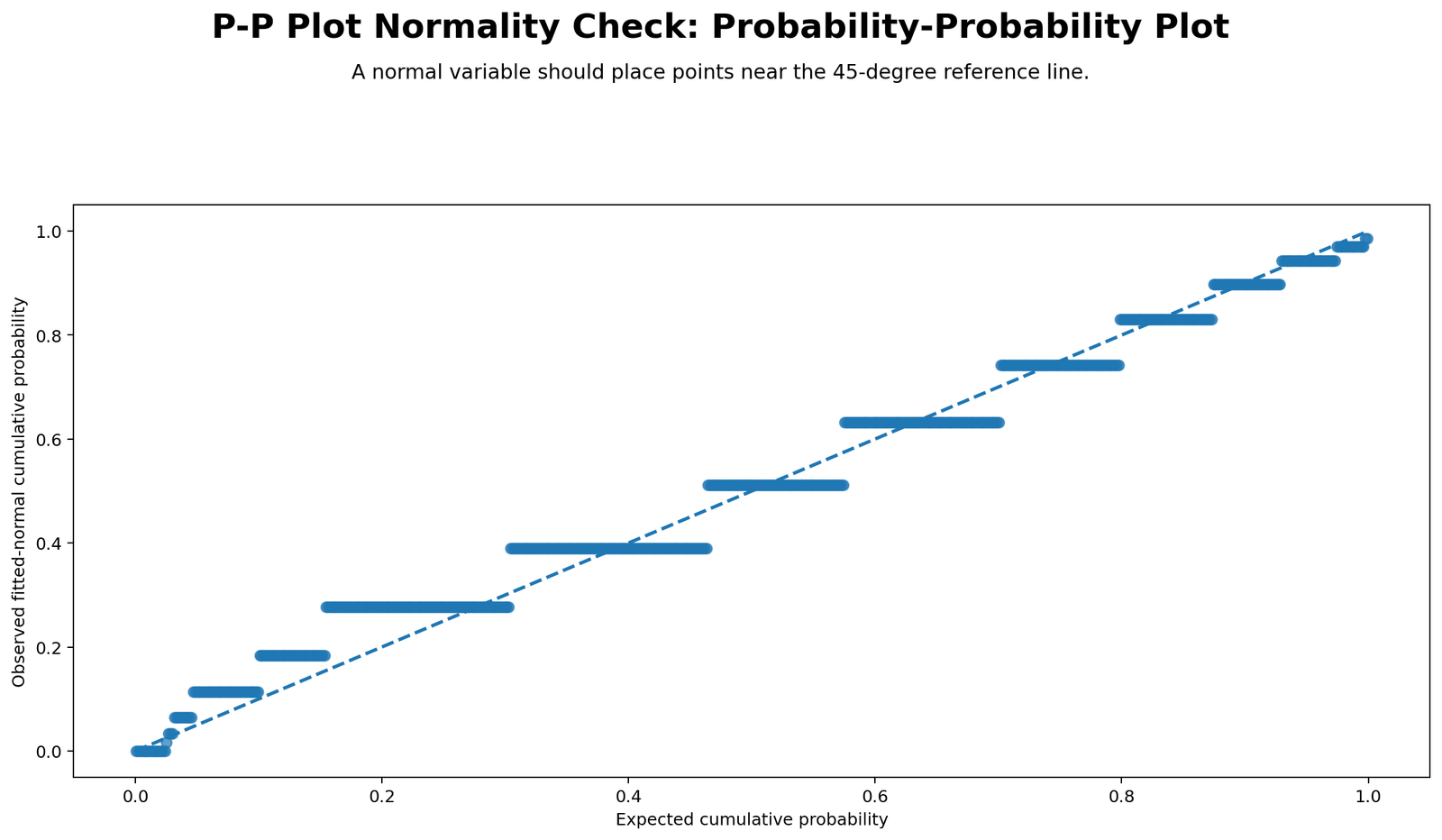
This chart is the main P-P Plot Normality Check. If G3 followed a perfect normal distribution, the points would stay close to the diagonal reference line. Instead, the points show visible departures, which agrees with the SPSS Shapiro-Wilk result of W = .926 and p < .001.
The P-P plot is useful because it shows cumulative probability agreement. It is often easier to read around the middle of the distribution than the extreme tails. For G3, the plot shows that the observed cumulative probabilities do not perfectly match expected normal probabilities.
Python Chart 2: Detrended P-P Plot
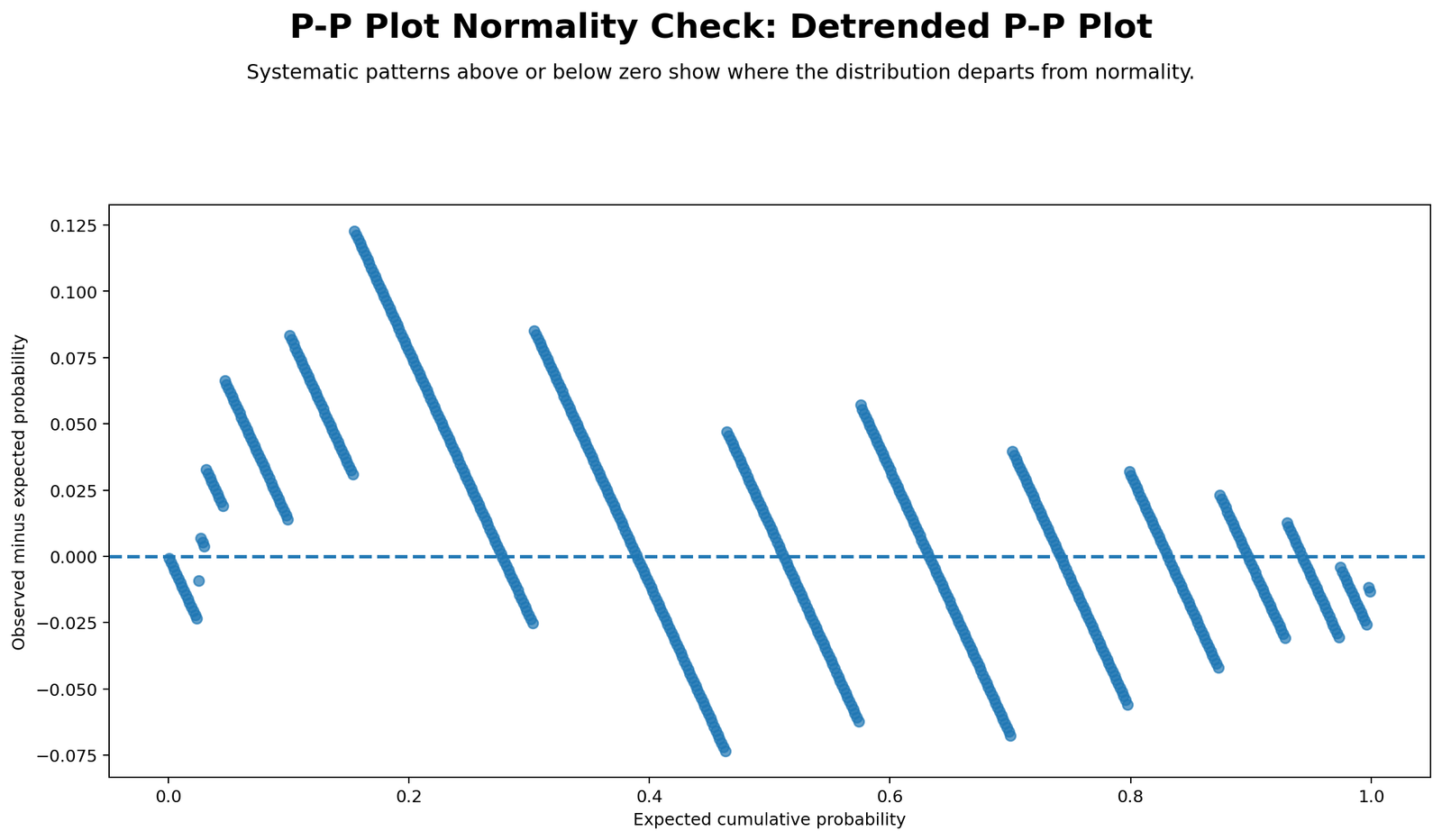
The detrended P-P plot displays the difference between observed and expected probabilities. Values close to zero indicate good normal probability alignment. Values above or below zero show where the observed cumulative probability differs from the normal model.
For G3, the detrended plot confirms that the probability differences are not only random noise. The manual P-P output reports a maximum absolute difference of .12275 and a mean absolute difference of .03317, which helps quantify the visual departure.
Python Chart 3: Distribution with Normal Curve
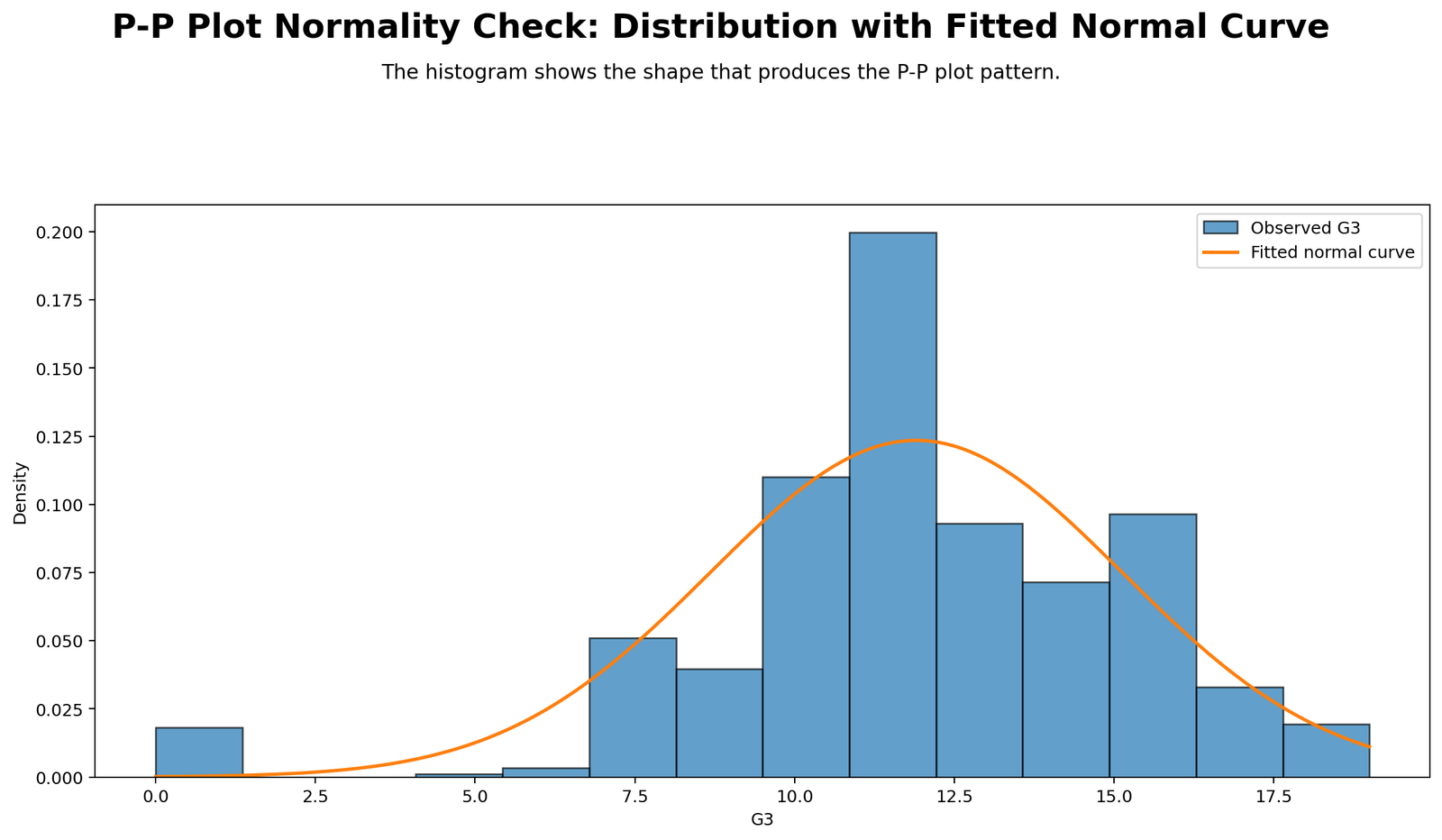
This chart shows the observed distribution with a normal curve overlay. The histogram helps explain why the P-P plot departs from the line. G3 has a mean of 11.91, standard deviation of 3.231, skewness of -.913, and kurtosis of 2.712. These values indicate non-perfect normal shape.
The histogram and P-P plot should be interpreted together. The histogram shows the overall distribution shape, while the P-P plot shows cumulative probability alignment.
Python Chart 4: Q-Q Plot Comparison
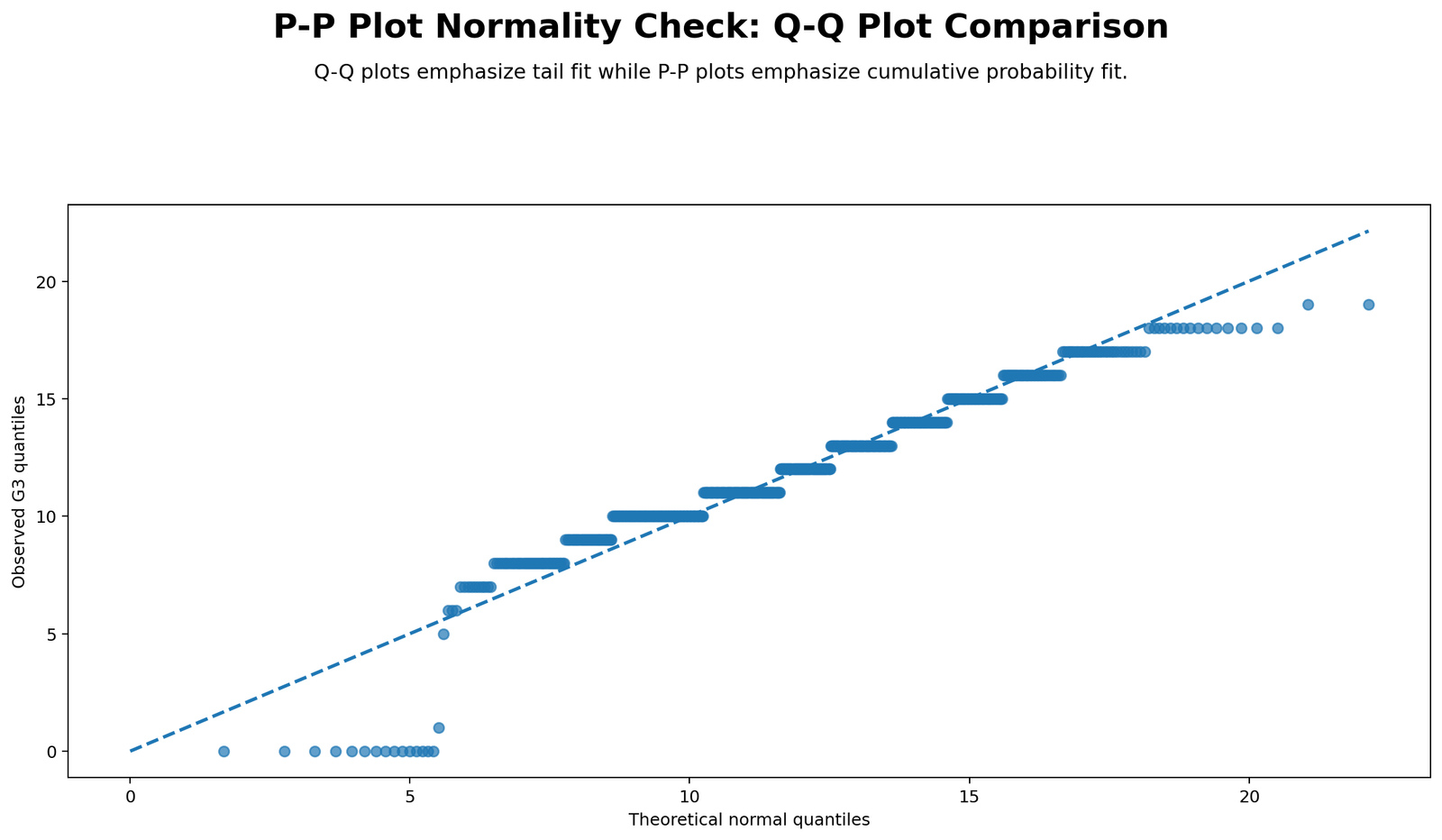
The Q-Q plot comparison helps distinguish two related normality plots. A P-P plot compares cumulative probabilities and often emphasizes the center. A Q-Q plot compares quantiles and is usually more sensitive to tail behavior. This chart shows why both can be useful.
For G3, the Q-Q comparison is helpful because low scores and tail behavior are part of the normality issue. The P-P plot confirms probability departure, while the Q-Q plot helps locate tail-level deviation.
Python Chart 5: P-P Differences Across Variables
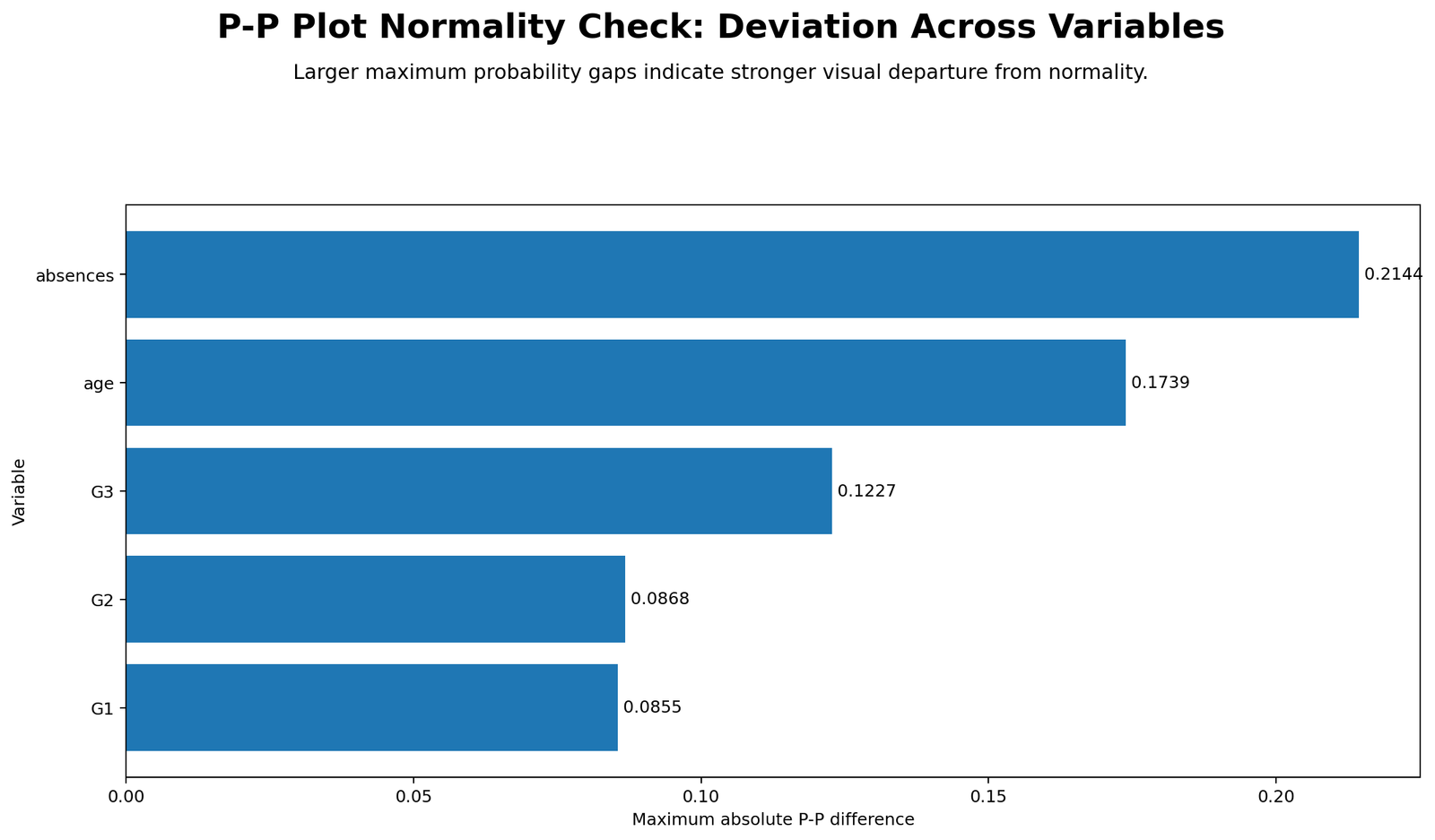
This chart compares P-P difference patterns across G3, G2, G1, age, and absences. Variables with larger P-P differences depart more from expected normal cumulative probabilities. Based on SPSS shape values, absences should show the strongest departure because it has skewness = 2.021 and kurtosis = 5.781. G1 should show the closest probability alignment because its skewness and kurtosis are near zero.
The P-P difference comparison is useful because it summarizes normality visually across multiple variables. Instead of looking only at one P-P plot, the chart helps identify which variables need more attention, transformation, or robust methods.
Python Chart 6: Skewness and Kurtosis Context
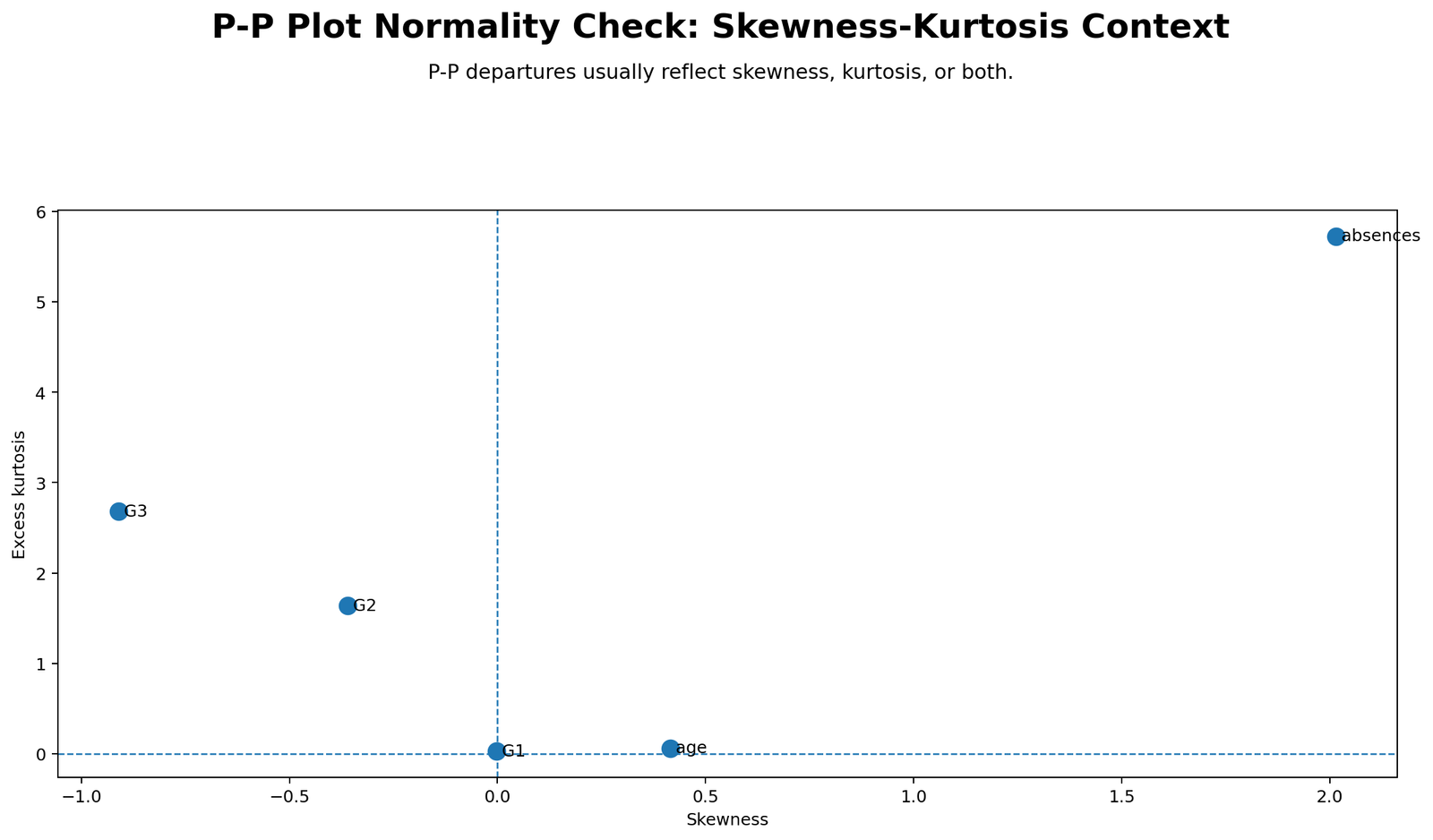
This chart explains why P-P plot departures happen. Skewness tells whether the distribution is asymmetric, while kurtosis tells whether the distribution has unusual peak or tail behavior. G3 has negative skewness and positive kurtosis, so its cumulative probability pattern differs from the perfect normal line. Absences has strong positive skewness and high kurtosis, so it should show even stronger departure.
This chart is important for teaching interpretation. A P-P plot shows probability behavior, but skewness and kurtosis explain the distribution-shape reason behind that behavior.
Python Chart 7: Group P-P Difference Comparison
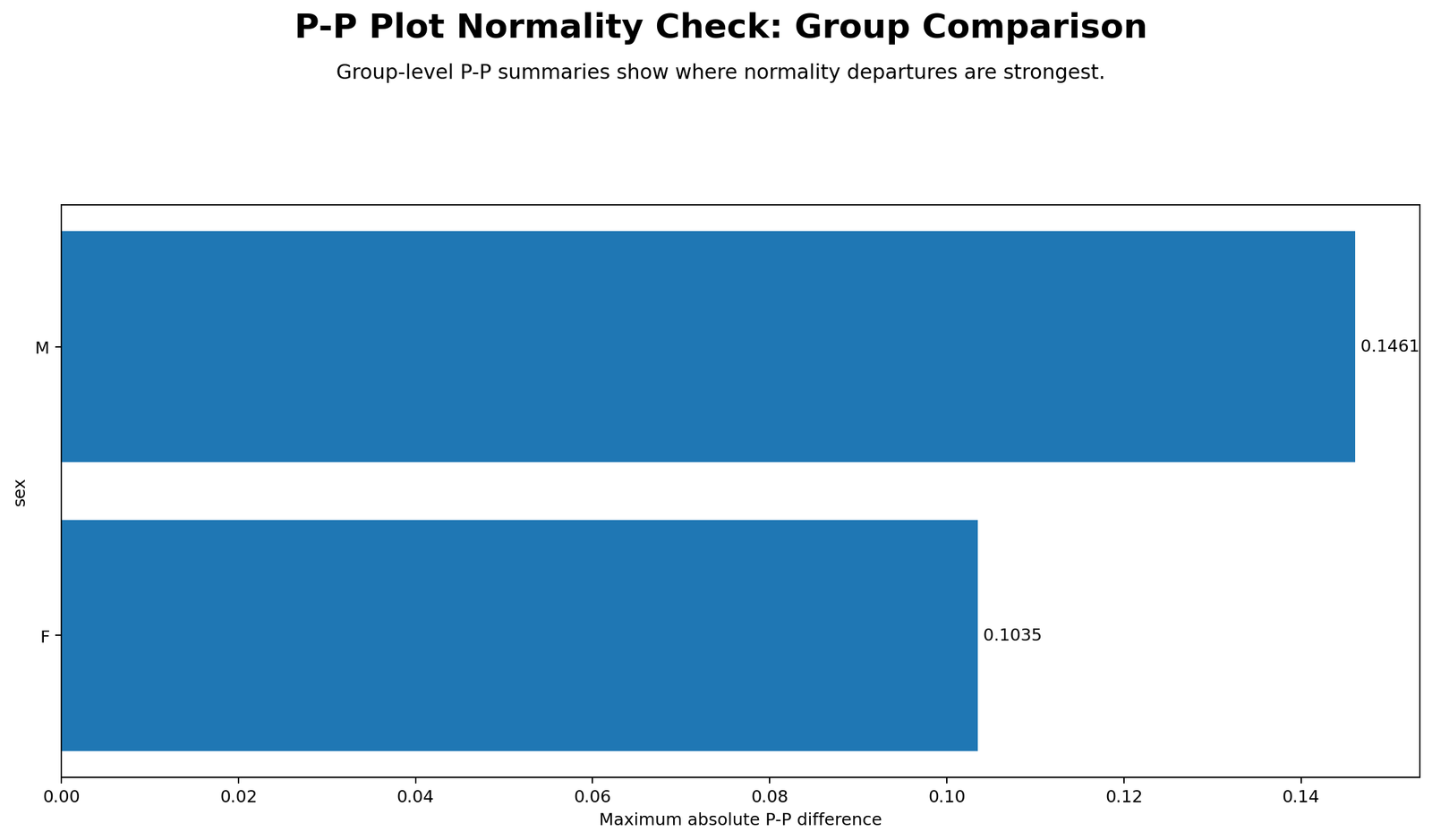
This chart compares P-P differences for G3 by sex group. SPSS shows that female students have N = 383, mean = 12.25, SD = 3.124, and Shapiro-Wilk W = .934. Male students have N = 266, mean = 11.41, SD = 3.321, and Shapiro-Wilk W = .913. Both groups reject normality at p < .001.
The group comparison matters because many statistical tests require checking assumptions within groups, not only in the total sample. The male group has a slightly lower W statistic and slightly larger standard deviation, suggesting slightly stronger departure from normality than the female group.
R Chart-by-Chart Validation
The R charts validate the same P-P Plot Normality Check using a separate software workflow. The R results confirm the Python and SPSS interpretation: G3 departs from perfect normality, the detrended P-P plot shows systematic deviations, and group-level probability behavior should be checked when comparing groups.
R Chart 1: P-P Plot Normality Check
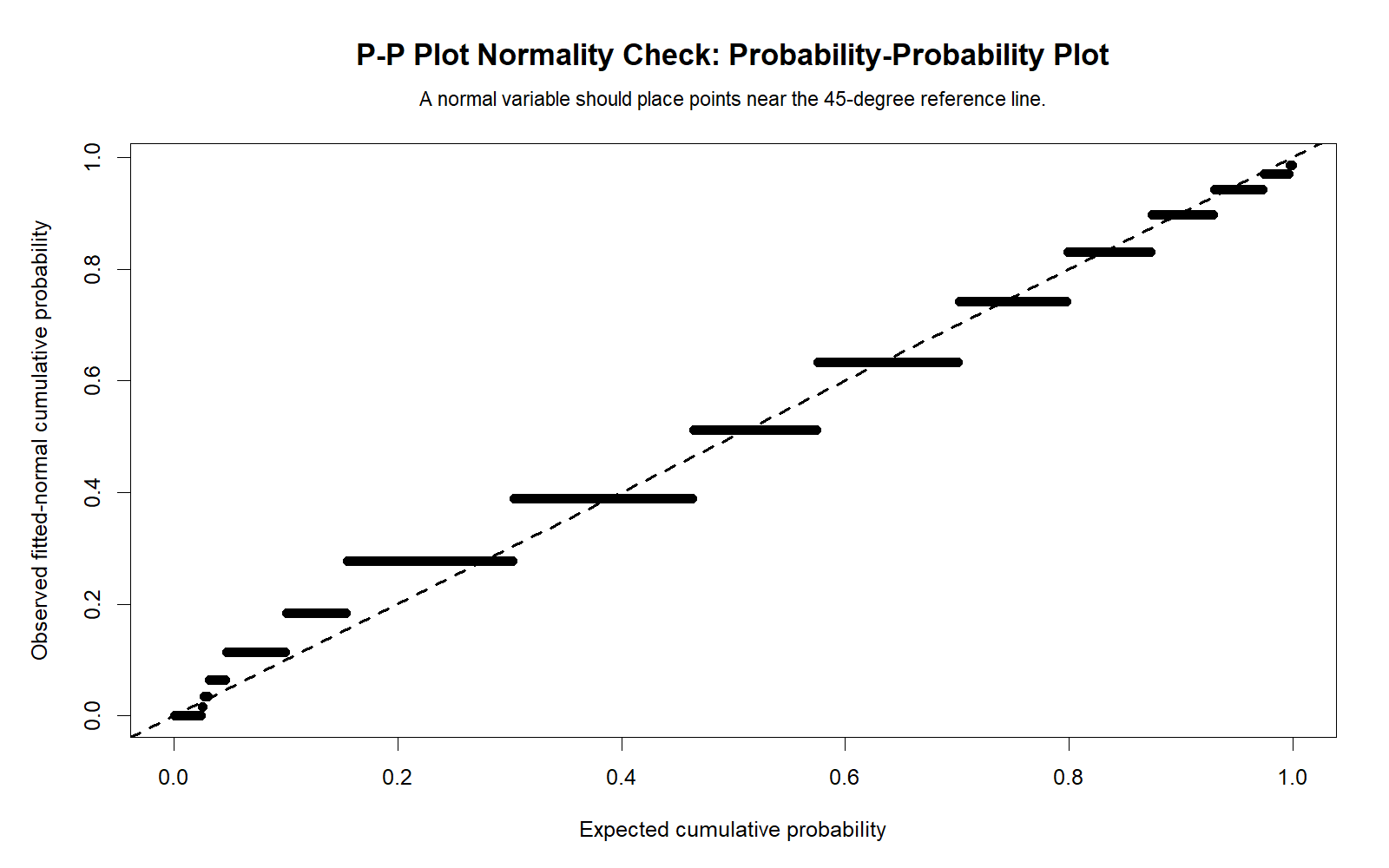
The R P-P plot validates the Python P-P plot. The points do not perfectly follow the diagonal line, which supports the SPSS conclusion that G3 is formally non-normal.
R Chart 2: Detrended P-P Plot
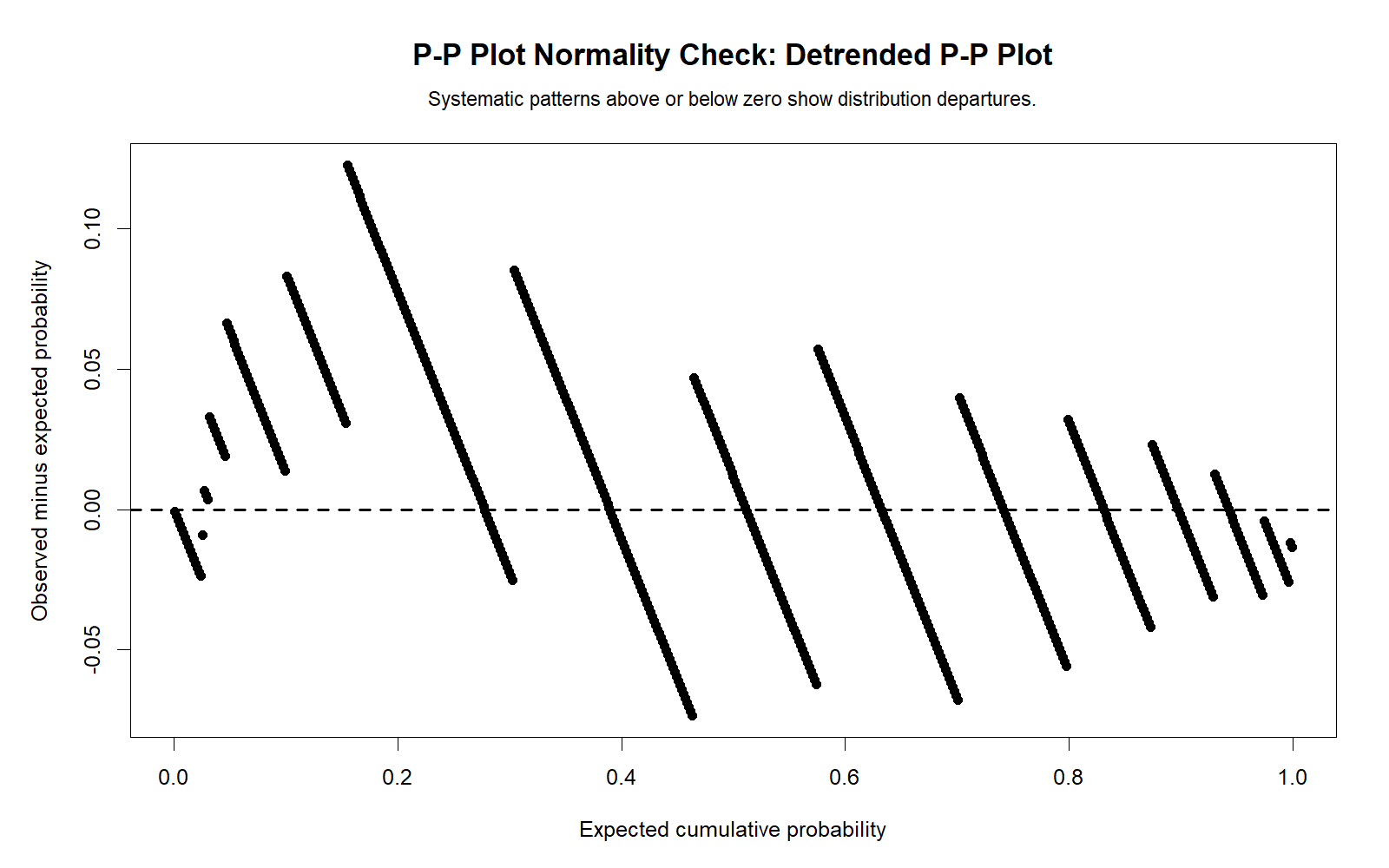
The R detrended P-P plot confirms the same probability-deviation pattern as Python and SPSS. Values away from zero show that the observed data do not fully match expected normal cumulative probabilities.
R Chart 3: Distribution with Normal Curve
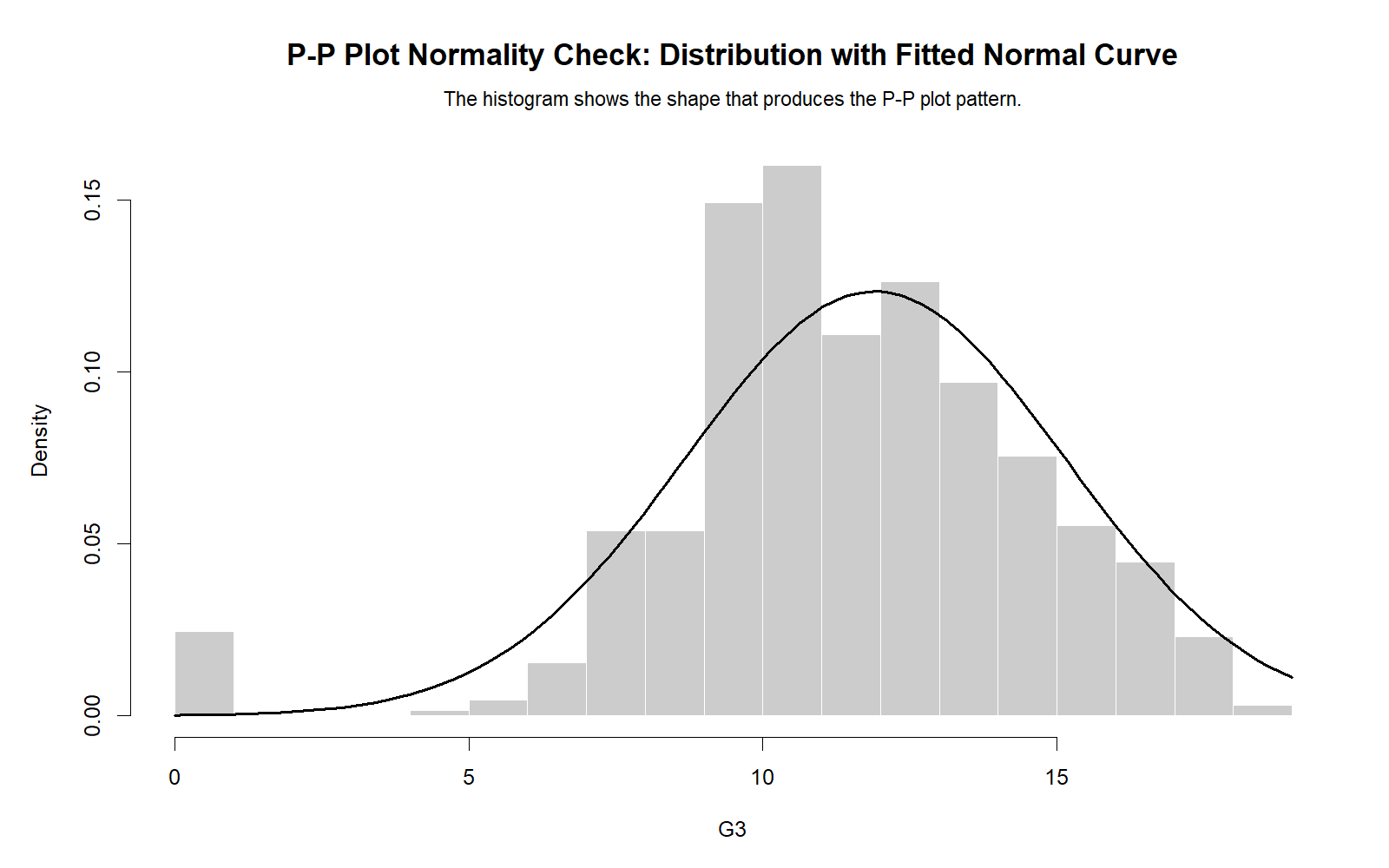
The R distribution chart confirms that the observed G3 distribution is not a perfect normal bell shape. The histogram supports the P-P plot by showing the overall distribution pattern.
R Chart 4: Q-Q Plot Comparison
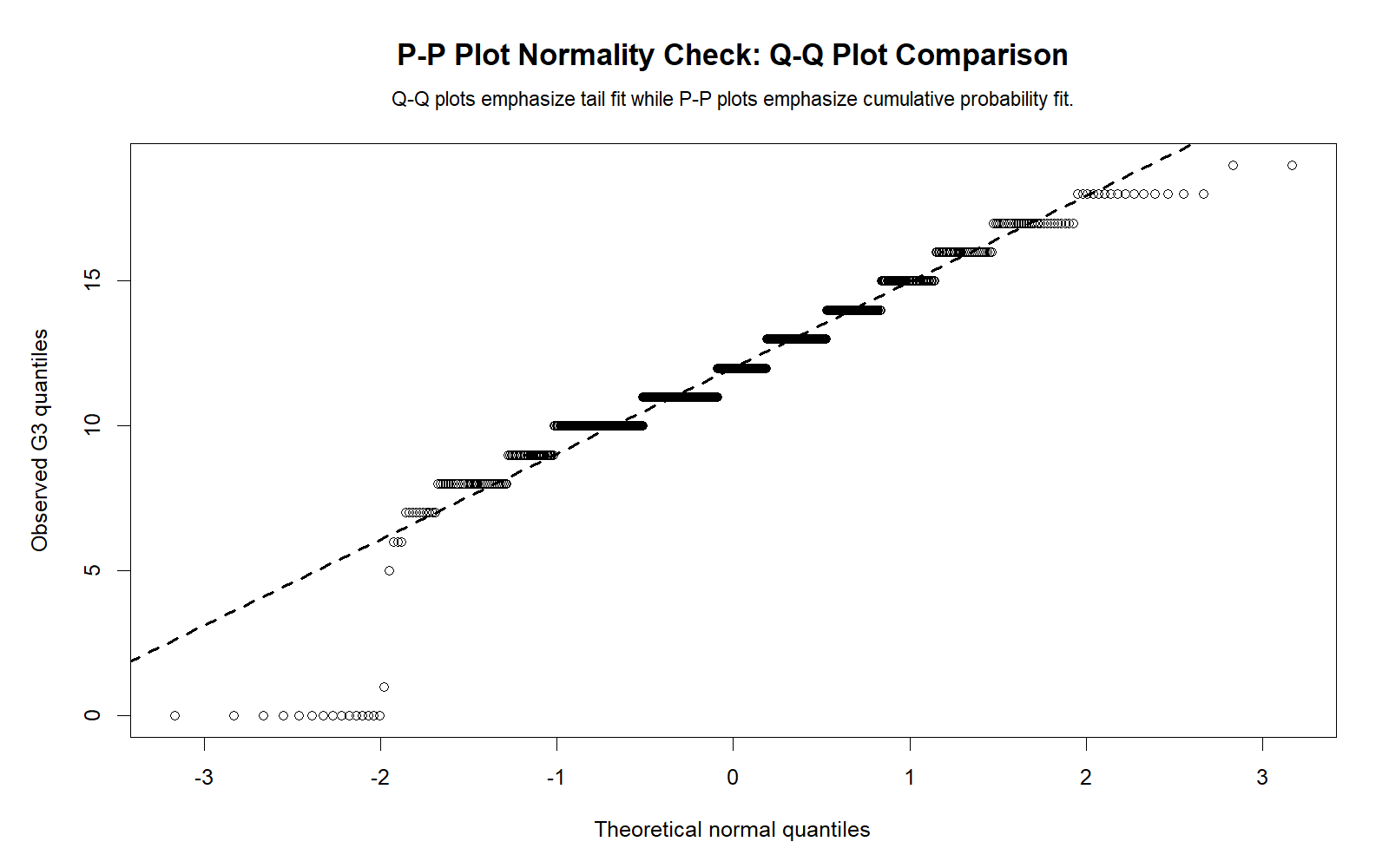
The R Q-Q comparison confirms that P-P and Q-Q plots emphasize different parts of the distribution. The P-P plot is useful for cumulative probability fit, while the Q-Q plot is especially useful for tail and quantile behavior.
R Chart 5: P-P Differences Across Variables
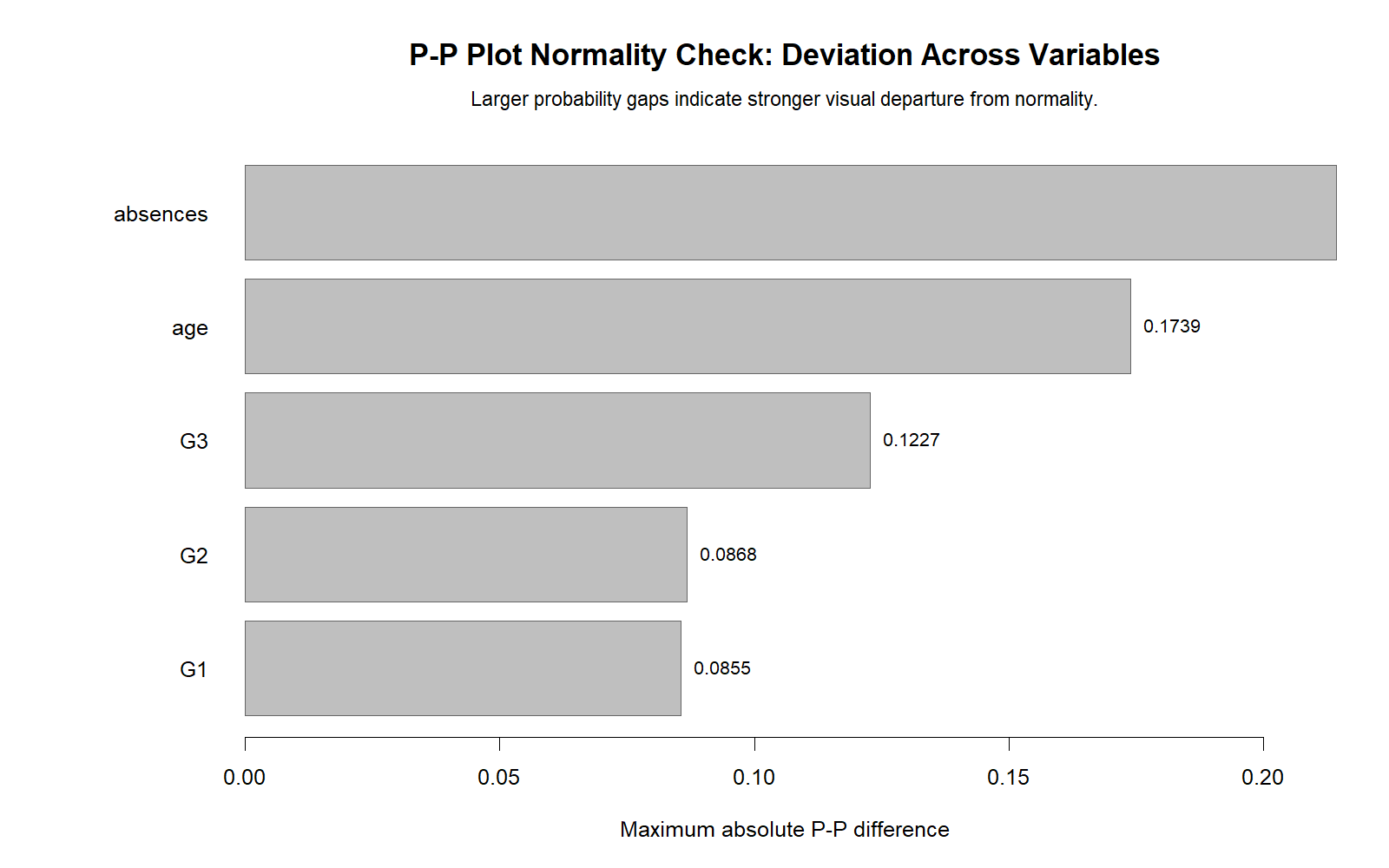
The R difference comparison validates the Python difference chart. Variables with stronger skewness and kurtosis show larger P-P departures. Absences is expected to be the strongest case, while G1 is closest to normal.
R Chart 6: Skewness and Kurtosis Context
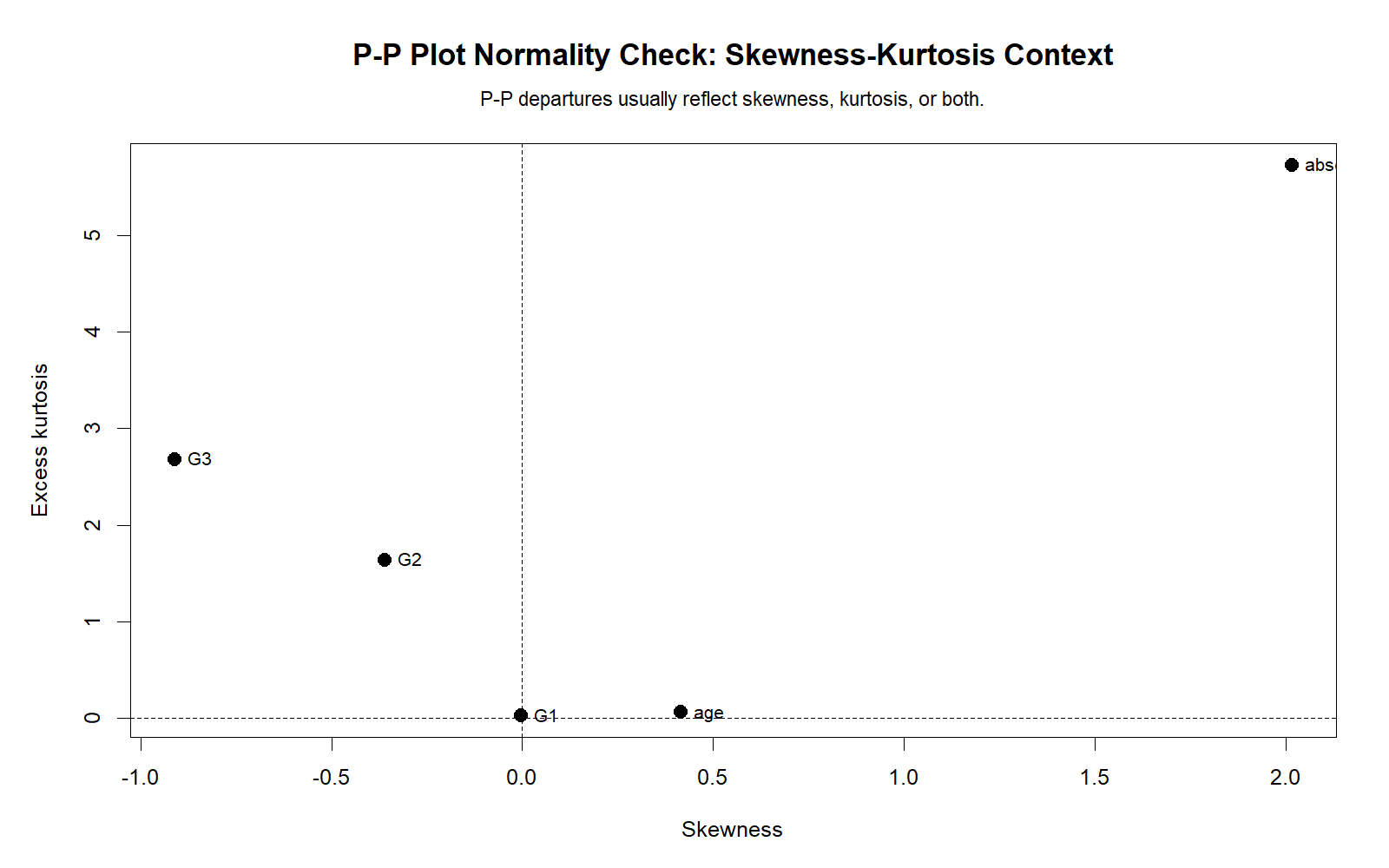
The R skewness-kurtosis chart validates the explanation for the P-P plot deviations. Shape statistics explain why some variables depart more strongly from the normal probability line than others.
R Chart 7: Group P-P Difference Comparison
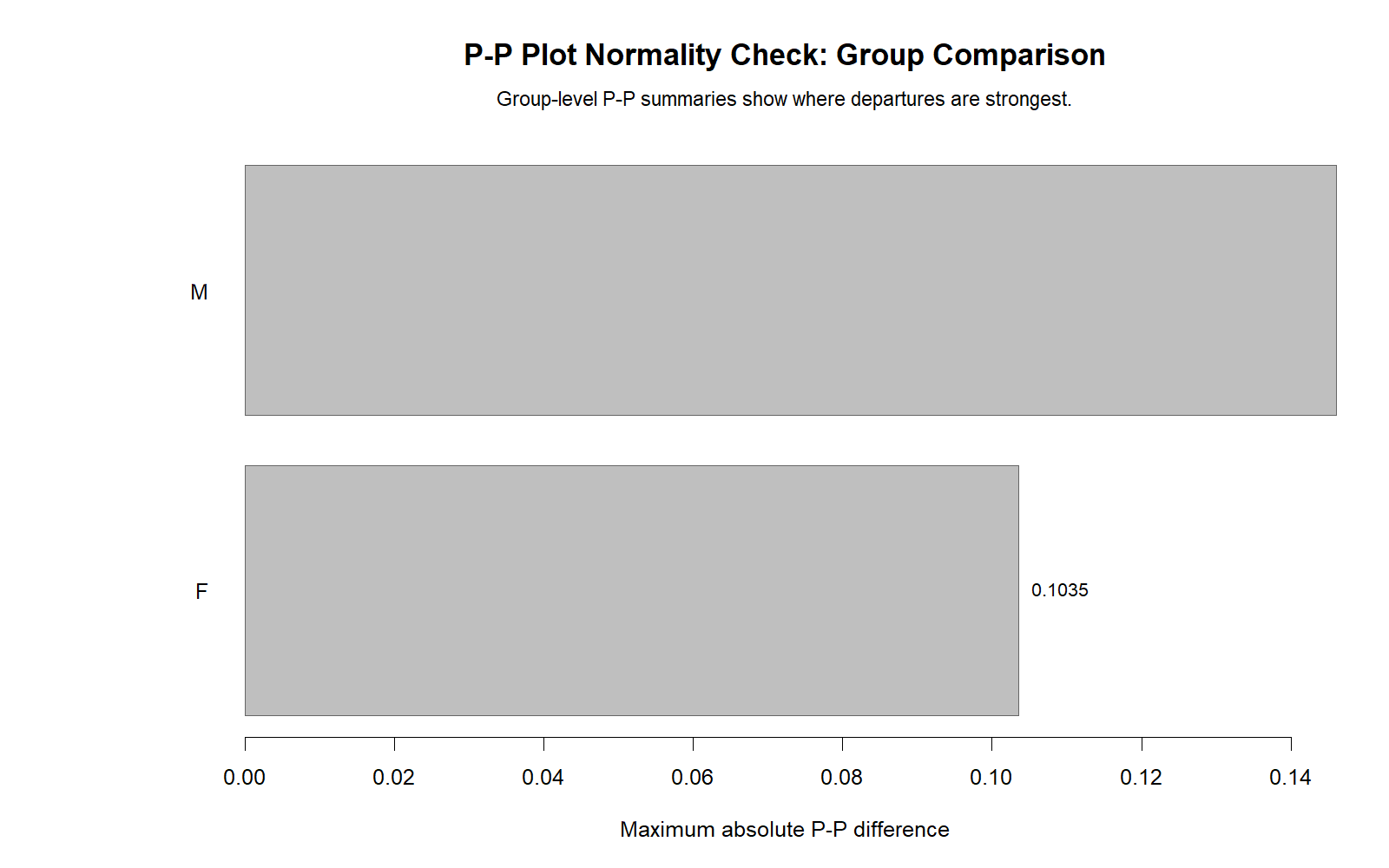
The R group comparison confirms the SPSS group normality context. Both female and male groups show non-normality for G3. This supports checking grouped P-P plots when the later analysis compares groups.
SPSS, R, Python and Excel Workflows for P-P Plot Normality Check
The same P-P Plot Normality Check can be created in SPSS, R, Python, and Excel. SPSS creates normality plots directly through Explore. R and Python can calculate observed and expected cumulative probabilities. Excel can build a manual P-P plot using sorted values, plotting probabilities, z scores, and normal cumulative probabilities.
SPSS Workflow
| Step | SPSS Menu or Syntax | Purpose |
|---|---|---|
| Open dataset | File > Open > Data | Load the SPSS-ready dataset. |
| Run Explore | Analyze > Descriptive Statistics > Explore | Prepare normality plots and descriptive statistics. |
| Add variables | Dependent List | Add G3, G2, G1, age and absences. |
| Request normality plots | Plots > Normality plots with tests | Create normal plots and formal tests. |
| Group normality plots | Add factor such as sex | Check normality separately across groups. |
| Export output | File > Export or OUTPUT EXPORT | Save SPSS output PDF for reporting. |
R Workflow
| Step | R Action | Purpose |
|---|---|---|
| Read data | read.csv() | Load the dataset. |
| Select variable | na.omit(df$G3) | Remove missing values before plotting. |
| Sort values | sort(x) | Prepare ordered values. |
| Observed probability | (rank - .5) / n | Create empirical cumulative probability. |
| Expected probability | pnorm((x - mean(x)) / sd(x)) | Create expected normal probability. |
| P-P plot | plot(expected, observed) | Compare expected and observed cumulative probabilities. |
Python Workflow
| Step | Python Action | Purpose |
|---|---|---|
| Read data | pandas.read_csv() | Load the dataset into a DataFrame. |
| Select variable | pd.to_numeric(...).dropna() | Clean the numeric variable. |
| Sort values | np.sort(x) | Prepare ordered observed values. |
| Observed probability | (rank - 0.5) / n | Create empirical cumulative probability. |
| Expected probability | stats.norm.cdf(z) | Create expected normal probability. |
| Create charts | matplotlib | Generate WordPress-ready P-P plots and difference charts. |
Excel Workflow
| Excel Task | Formula or Tool | Purpose |
|---|---|---|
| Sort values | Data > Sort | Sort observed values from smallest to largest. |
| Create rank | =ROW()-1 | Generate rank order for each sorted value. |
| Observed probability | =(rank-0.5)/N | Calculate empirical cumulative probability. |
| Z value | =(observed-mean)/sd | Standardize the observed value. |
| Expected normal probability | =NORM.S.DIST(z,TRUE) | Calculate expected normal cumulative probability. |
| P-P plot | Insert > Scatter Plot | Plot expected probability against observed probability. |
Code Blocks for P-P Plot Normality Check
SPSS Syntax for P-P Plot Normality Check
* P-P Plot Normality Check in SPSS.
* Variables: G3 G2 G1 age absences.

TITLE "P-P Plot Normality Check".

EXAMINE VARIABLES=G3 G2 G1 age absences
  /PLOT BOXPLOT HISTOGRAM NPPLOT
  /COMPARE GROUPS
  /STATISTICS DESCRIPTIVES
  /CINTERVAL 95
  /MISSING LISTWISE
  /NOTOTAL.

* Group normality context for G3 by sex.
EXAMINE VARIABLES=G3 BY sex
  /PLOT BOXPLOT HISTOGRAM NPPLOT
  /COMPARE GROUPS
  /STATISTICS DESCRIPTIVES
  /CINTERVAL 95
  /MISSING LISTWISE
  /NOTOTAL.

OUTPUT EXPORT
  /CONTENTS EXPORT=VISIBLE
  /PDF DOCUMENTFILE="P-P-Plot-Normality-Check-SPSS-Output.pdf".
Python Code for P-P Plot Normality Check
import pandas as pd
import numpy as np
from scipy import stats
import matplotlib.pyplot as plt

df = pd.read_csv("dataset.csv")

x = pd.to_numeric(df["G3"], errors="coerce").dropna()
n = len(x)

# Formal normality support test
w_stat, p_value = stats.shapiro(x)
print("Shapiro-Wilk W:", w_stat)
print("p-value:", p_value)

# Manual P-P values
observed_values = np.sort(x.to_numpy())
rank = np.arange(1, n + 1)
observed_probability = (rank - 0.5) / n

z_values = (observed_values - x.mean()) / x.std(ddof=1)
expected_probability = stats.norm.cdf(z_values)

pp_difference = observed_probability - expected_probability
abs_difference = np.abs(pp_difference)

pp_summary = {
    "n": n,
    "mean": x.mean(),
    "sd": x.std(ddof=1),
    "max_abs_difference": abs_difference.max(),
    "mean_abs_difference": abs_difference.mean()
}

print(pp_summary)

pp_table = pd.DataFrame({
    "rank": rank,
    "observed_value": observed_values,
    "observed_probability": observed_probability,
    "z_value": z_values,
    "expected_probability": expected_probability,
    "pp_difference": pp_difference,
    "abs_difference": abs_difference
})

print(pp_table.head(20))

# P-P plot
fig, ax = plt.subplots(figsize=(8, 6))
ax.scatter(expected_probability, observed_probability, s=18)
ax.plot([0, 1], [0, 1], linestyle="--")
ax.set_xlabel("Expected normal cumulative probability")
ax.set_ylabel("Observed cumulative probability")
ax.set_title("P-P Plot Normality Check for G3")
plt.tight_layout()
plt.show()
R Code for P-P Plot Normality Check
# P-P Plot Normality Check in R

df <- read.csv("dataset.csv")

x <- as.numeric(df$G3)
x <- x[!is.na(x)]
n <- length(x)

# Formal normality support test
print(shapiro.test(x))

observed_values <- sort(x)
rank <- seq_along(observed_values)
observed_probability <- (rank - 0.5) / n

z_values <- (observed_values - mean(x)) / sd(x)
expected_probability <- pnorm(z_values)

pp_difference <- observed_probability - expected_probability
abs_difference <- abs(pp_difference)

pp_summary <- data.frame(
  n = n,
  mean = mean(x),
  sd = sd(x),
  max_abs_difference = max(abs_difference),
  mean_abs_difference = mean(abs_difference)
)

print(pp_summary)

pp_table <- data.frame(
  rank = rank,
  observed_value = observed_values,
  observed_probability = observed_probability,
  z_value = z_values,
  expected_probability = expected_probability,
  pp_difference = pp_difference,
  abs_difference = abs_difference
)

print(head(pp_table, 20))

plot(expected_probability, observed_probability,
     main = "P-P Plot Normality Check for G3",
     xlab = "Expected normal cumulative probability",
     ylab = "Observed cumulative probability")
abline(0, 1, lty = 2)
Excel Formulas for Manual P-P Plot
Assume sorted observed values are in A2:A650.

Step 1: Sort the variable from smallest to largest.

Step 2: Create rank in B2:
=ROW()-1

Step 3: Calculate sample size in a fixed cell, for example E1:
=COUNT(A2:A650)

Step 4: Calculate observed cumulative probability in C2:
=(B2-0.5)/$E$1

Step 5: Calculate sample mean in E2:
=AVERAGE($A$2:$A$650)

Step 6: Calculate sample standard deviation in F2:
=STDEV.S($A$2:$A$650)

Step 7: Calculate z value in D2:
=(A2-$E$2)/$F$2

Step 8: Calculate expected normal probability in G2:
=NORM.S.DIST(D2,TRUE)

Step 9: Calculate P-P difference in H2:
=C2-G2

Step 10: Calculate absolute difference in I2:
=ABS(H2)

Step 11: Create P-P plot:
Insert a scatter plot using expected normal probability and observed cumulative probability.

Interpretation:
Points close to the diagonal line support approximate normality.
Systematic curves or large probability differences suggest non-normality.
APA Reporting Wording for P-P Plot Normality Check
When reporting a P-P Plot Normality Check, describe the visual probability pattern and support it with formal tests or shape statistics. Do not report the P-P plot as if it directly gives a p-value. Instead, say what the plot showed and how that agrees or disagrees with Shapiro-Wilk, Kolmogorov-Smirnov, skewness, and kurtosis.
APA-Style P-P Plot Report
Normality was evaluated using P-P plots, detrended P-P plots, histograms, skewness, kurtosis, and formal normality tests. For G3, the P-P plot showed visible departures from the normal probability reference line. The manual P-P calculation showed a maximum absolute probability difference of .12275 and a mean absolute probability difference of .03317. Formal normality tests also rejected normality for G3, Shapiro-Wilk W = .926, p < .001. Therefore, G3 did not meet the normality assumption perfectly.
APA-Style Group P-P Plot Report
G3 normality was also checked by sex group. The female group had M = 12.25, SD = 3.124, skewness = -0.857, kurtosis = 2.683, and Shapiro-Wilk W = .934, p < .001. The male group had M = 11.41, SD = 3.321, skewness = -0.980, kurtosis = 2.803, and Shapiro-Wilk W = .913, p < .001. P-P plots indicated non-normality in both groups, with slightly stronger departure in the male group.
Student-Friendly Report Example
The P-P plot showed that G3 scores were not perfectly normal because the observed cumulative probabilities did not stay on the diagonal line. The detrended P-P plot also showed visible probability differences. The formal Shapiro-Wilk test confirmed this result with p < .001. Therefore, the G3 distribution should be described as non-normal, mainly because observed probabilities differ from expected normal probabilities.
Common Mistakes in P-P Plot Normality Check
| Mistake | Why It Is a Problem | Correct Practice |
|---|---|---|
| Expecting every point to sit exactly on the line | Real data almost never match a perfect normal probability line exactly. | Look for systematic curves and meaningful probability differences. |
| Using P-P plot as a p-value test | The P-P plot is visual and does not directly produce a p-value. | Use Shapiro-Wilk or K-S tests for formal p-values. |
| Ignoring detrended P-P plots | Ordinary P-P plots may hide smaller probability differences. | Use detrended P-P plots to inspect deviations from the diagonal line. |
| Ignoring Q-Q plots | P-P plots may underemphasize tail problems. | Use Q-Q plots when tail behavior is important. |
| Checking only the total sample | Group-based tests often require group-level normality checks. | Check P-P plots by group when using t-tests or ANOVA. |
| Confusing P-P plots with Q-Q plots | They compare different things and emphasize different distribution areas. | Use P-P plots for cumulative probabilities; use Q-Q plots for quantiles and tails. |
Key reminder: A P-P plot is one part of normality checking. It should be interpreted with histograms, Q-Q plots, skewness, kurtosis, Shapiro-Wilk, Kolmogorov-Smirnov, and the statistical test you plan to use.
When to Use P-P Plot Normality Check
Use P-P Plot Normality Check when you need to visually inspect whether observed cumulative probabilities match expected normal cumulative probabilities. It is especially useful before parametric tests, regression diagnostics, ANOVA, t-tests, correlation, and transformation decisions.
| Use P-P Plot When | Why It Helps | Example from This Guide |
|---|---|---|
| You need visual probability evidence | P-P plots show whether cumulative probabilities follow the normal reference line. | G3 probabilities depart from the line. |
| You want to check center-region probability fit | P-P plots often emphasize the cumulative fit around the middle. | G3 has mean absolute P-P difference of .03317. |
| You compare variables | P-P differences show which variables are more non-normal. | Absences departs more than G1. |
| You compare groups | Group P-P plots show within-group assumption patterns. | Female and male G3 both reject normality. |
| You plan transformations | P-P plots show whether transformation improves probability alignment. | Absences may need square root transformation. |
For a complete normality workflow, combine this guide with Q-Q Plot Normality Check, Shapiro-Wilk Test, Kolmogorov-Smirnov Test, Lilliefors Test, D’Agostino-Pearson Test, and Skewness and Kurtosis Normality Check.
Downloads and Resources for P-P Plot Normality Check
The resources below include the SPSS output PDF, Python charts, and R validation charts used in this guide.
Download SPSS Output PDF
Verified SPSS output for P-P plots, detrended probability plots, manual P-P values, normality tests and group normality context.
Copy P-P Plot Code
Use the SPSS, Python, R and Excel code blocks to reproduce the P-P Plot Normality Check.
Python Chart 1: P-P Plot
Main P-P plot comparing observed probabilities with expected normal probabilities.
Python Chart 2: Detrended P-P Plot
Probability-difference plot showing deviations from normality.
FAQs About P-P Plot Normality Check
What is a P-P Plot Normality Check?
A P-P Plot Normality Check compares observed cumulative probabilities with expected cumulative probabilities from a normal distribution.
What does P-P mean?
P-P means probability-probability. The plot compares probabilities from observed data with probabilities from a theoretical distribution.
How do I interpret a normal P-P plot?
Points close to the diagonal line support approximate normality. Curved patterns or large probability differences suggest non-normality.
What was the P-P Plot result for G3 in this example?
The G3 P-P plot showed visible departure from normality. The manual P-P calculation reported a maximum absolute difference of .12275 and a mean absolute difference of .03317.
Did formal tests support the P-P Plot result?
Yes. For G3, the Shapiro-Wilk test was W = .926 with p < .001, so formal normality was rejected.
What is a detrended P-P plot?
A detrended P-P plot shows deviations between observed and expected probabilities. Values close to zero support normality, while systematic deviations suggest non-normality.
What is a P-P difference?
A P-P difference is the difference between observed cumulative probability and expected normal cumulative probability. Larger differences indicate stronger departure from normal expectation.
Which variable was closest to normal in this output?
G1 was closest to normal shape because its skewness was -0.003, kurtosis was 0.037, and Shapiro-Wilk W was .986.
Which variable was most non-normal in this output?
Absences was most non-normal because it had strong positive skewness of 2.021, high kurtosis of 5.781, and a low Shapiro-Wilk W statistic of .772.
Is a P-P plot the same as a Q-Q plot?
No. A P-P plot compares cumulative probabilities and often emphasizes the center. A Q-Q plot compares quantiles and is especially useful for tail behavior.
How do I create a P-P plot in SPSS?
Use Analyze > Descriptive Statistics > Explore, place the variable in the Dependent List, click Plots, and select Normality plots with tests.
How do I create a P-P plot in Python?
Sort the values, calculate observed cumulative probabilities, calculate expected normal probabilities with scipy.stats.norm.cdf(), and create a scatter plot.
How do I create a P-P plot in R?
Sort the values, calculate observed probabilities, calculate expected probabilities with pnorm(), and plot expected probability against observed probability.
How do I create a P-P plot in Excel?
Sort the observed values, calculate observed cumulative probabilities, calculate z values, convert them to expected normal probabilities using NORM.S.DIST(), and create a scatter plot.