
Chemical Equation Balancer — Balance Chemical Equations Online
Use the chemical equation balancer to write, label and balance chemical equations from formulas or chemical names. Enter subscripts, ionic charges, catalysts and conditions, then receive the smallest whole-number coefficients with compound names, molar masses, atom counts and charge verification.
How to use this chemical equation balancer
This chemical equation calculator combines an exact coefficient solver with labels, reaction patterns, formula interpretation and a printable study guide.
- Enter each reactant and product as a formula or recognized chemical name.
- Use the notation keyboard for subscripts, superscript charges, hydrates and physical states.
- Select Balance and identify to solve the exact conservation matrix.
- Read the coefficient, compound-name, molar-mass, atom and charge checks in the result report.
- Edit the reaction skeleton when chemistry, conditions or product selectivity require a different pathway.
Reaction builder
Enter reactants, load an established common product pathway when one matches, or enter products manually. Every suggestion remains editable because conditions and molecular structure can change the outcome.
Chemical notation keyboard
Click a formula field, then insert symbols. Plain digits are also accepted and formatted automatically in the results.
Reactants
Starting substances consumed or changed by the reaction.
Catalysts, solvents and conditions are displayed around the arrow but are not included in the stoichiometric balance unless entered as reactants or products.
Products
Substances expected to form from the chosen reaction skeleton.
Common product pathways
Match the entered reactants to established classroom and laboratory reaction patterns. Suggestions are editable and are never presented as proof that a reaction is feasible under every condition.
Enter reactants, then select Find common products. The solver will show only matching curated pathways.
Paste or import a complete equation
Supported arrows include ->, →, <=>, ⇌ and ↔. Put spaces around separator plus signs when entering ionic charges.
Balanced chemical equation and compound names
What parts are present in every chemical equation?
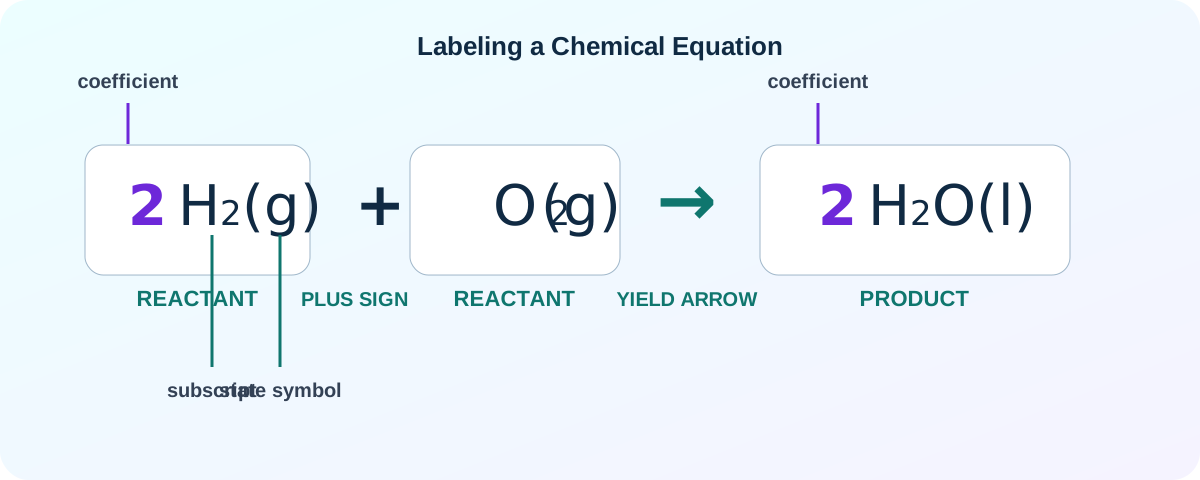
A complete chemical equation communicates the starting substances, resulting substances and the direction of change. Depending on the problem, it may also show coefficients, physical states, ionic charges, catalysts, heat, pressure, light or equilibrium. The labeled picture below separates each part so the equation can be read before it is balanced.
Which type of chemical reaction does this equation represent?
Pattern recognition is useful after the substances have been identified, but a pattern alone does not prove that a reaction occurs. Compare the entered skeleton with these common classroom forms, then use the product assistant and conservation checks to verify the intended equation.
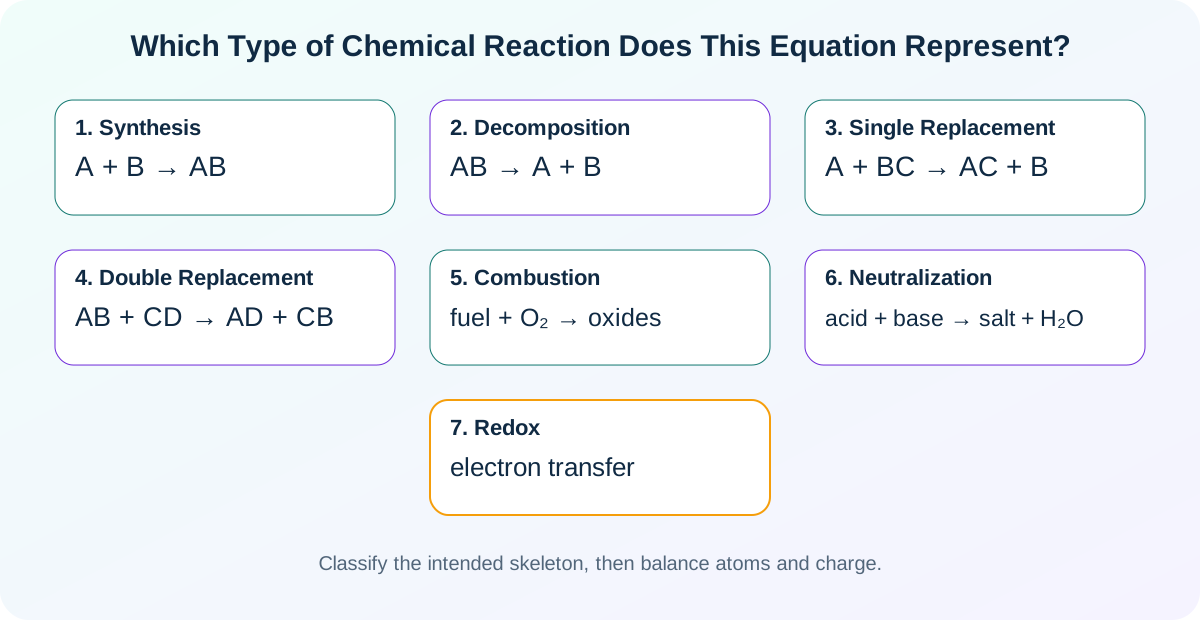
| Reaction type | General pattern | Balanced example | Recognition clue |
|---|---|---|---|
| Synthesis | A + B → AB | 2H2 + O2 → 2H2O | Two or more reactants form one principal product. |
| Decomposition | AB → A + B | 2KClO3 → 2KCl + 3O2 | One compound separates into simpler products. |
| Single replacement | A + BC → AC + B | Zn + 2HCl → ZnCl2 + H2 | An element replaces another element in a compound. |
| Double replacement | AB + CD → AD + CB | AgNO3 + NaCl → AgCl + NaNO3 | Ions exchange partners, often forming a precipitate. |
| Combustion | fuel + O2 → oxides | CH4 + 2O2 → CO2 + 2H2O | A fuel reacts with oxygen; complete hydrocarbon combustion forms carbon dioxide and water. |
| Neutralization | acid + base → salt + water | HCl + NaOH → NaCl + H2O | Hydrogen ions and hydroxide ions combine to form water. |
| Redox | electron transfer | Fe2+ + Ce4+ → Fe3+ + Ce3+ | Oxidation numbers change and both atoms and net charge must balance. |
Read a formula before changing coefficients
The balancer parses symbols, groups, hydrate multipliers, isotope notation and ionic charge. Reading the formula correctly prevents the common mistake of changing a subscript to force conservation.
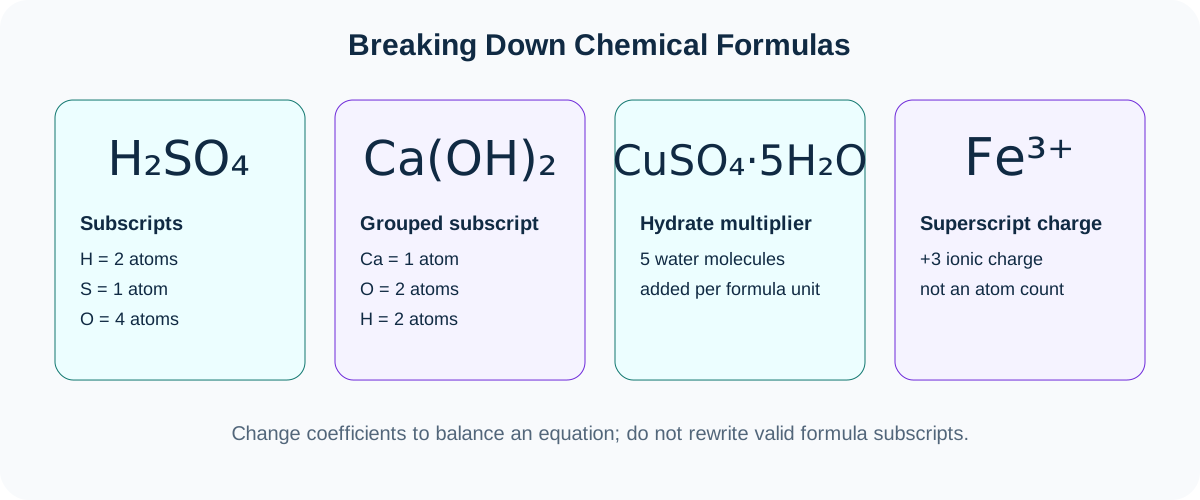
H2SO4
Two hydrogen atoms, one sulfur atom and four oxygen atoms in sulfuric acid. The 2 and 4 are subscripts and remain fixed.
Ca(OH)2
The outside subscript multiplies the entire hydroxide group: one calcium, two oxygen and two hydrogen atoms.
CuSO4·5H2O
The hydrate dot adds five water molecules to each formula unit of copper(II) sulfate pentahydrate.
Fe3+
The superscript is ionic charge, not an atom count. Ionic balancing must conserve both elements and total charge.
Balanced chemical equation examples translated into sentences
These examples show how to translate chemical equations into sentences. They also provide verified skeletons that can be loaded or pasted into the calculator.
Water formation
2H2 + O2 → 2H2O
Two molecules of hydrogen react with one molecule of oxygen to form two molecules of water.
Methane combustion
CH4 + 2O2 → CO2 + 2H2O
One methane molecule reacts with two oxygen molecules to form carbon dioxide and water.
Acid–base neutralization
H2SO4 + 2NaOH → Na2SO4 + 2H2O
Sulfuric acid reacts with sodium hydroxide to form sodium sulfate and water.
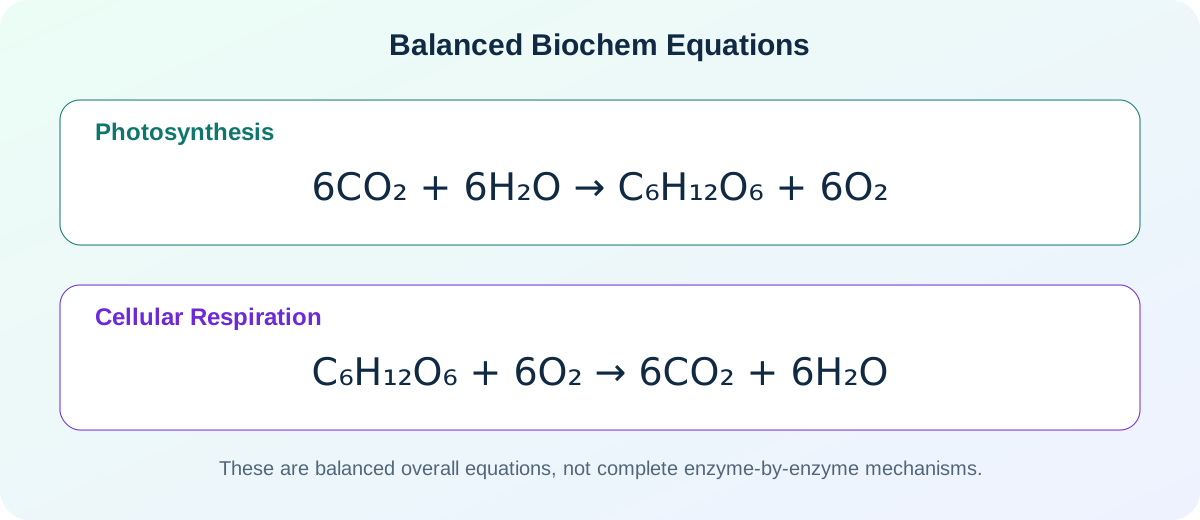
Photosynthesis
6CO2 + 6H2O → C6H12O6 + 6O2
This biochem equation represents carbon dioxide and water forming glucose and oxygen with light-driven biological processes.
Cellular respiration
C6H12O6 + 6O2 → 6CO2 + 6H2O
This overall biochem equation represents glucose reacting with oxygen to form carbon dioxide and water while releasing usable energy through multiple steps.
Net ionic precipitation
Ag+(aq) + Cl−(aq) → AgCl(s)
Aqueous silver ions and chloride ions form solid silver chloride; atoms and total charge are conserved.
Essential words used when writing chemical equations
- Reactant
- A starting substance written on the left side of a forward reaction arrow.
- Product
- A substance formed and written on the right side of a forward reaction arrow.
- Coefficient
- A whole-number multiplier placed before a complete formula to balance the equation.
- Subscript
- A small lower number that specifies composition within one formula unit or molecule.
- Superscript
- A raised symbol used for ionic charge or isotope mass notation.
- Stoichiometry
- The quantitative relationship between substances based on balanced coefficients.
- Catalyst
- A substance that changes reaction rate without appearing as a net-consumed reactant in the overall equation.
- Skeleton equation
- An unbalanced formula equation showing the intended reactants and products.
- Net ionic equation
- An equation that removes spectator ions and shows the species directly involved in change.
- Conservation check
- A comparison confirming equal counts of every element and, when applicable, equal total charge on both sides.
Chemical equations notes PDF: select Print / save notes as PDF above, then choose your browser’s Save as PDF destination. The printed version includes the chemical equation balancer guide, labeled equation picture, reaction-type table, examples and dictionary.
How the chemical equation balancer finds whole-number coefficients
The calculation is based on conservation rather than trial-and-error guessing. The chemical equation balancer treats each distinct element as a separate constraint and solves all constraints together.
- Parse each species. The formula reader identifies element symbols, subscripts, parenthesized groups, bracketed complexes, hydrate dots, isotope prefixes, physical states and ionic charge. A name that exists in the local dictionary is first converted to its corresponding formula.
- Count atoms in one formula unit. For example, Ca(OH)2 contributes one calcium, two oxygen and two hydrogen atoms. CuSO4·5H2O contributes the atoms in copper sulfate plus five complete water molecules.
- Build a conservation matrix. Reactant counts and product counts are placed in columns with opposite signs. Each row represents an element. Ionic charge becomes an additional row when charge conservation is required.
- Solve the null space exactly. The engine uses rational arithmetic so repeating decimals do not create false rounding errors. A valid coefficient vector makes every conservation row equal zero.
- Reduce to the smallest integers. Fractions are multiplied by a common denominator, signs are normalized and the greatest common divisor is removed. The final values are the smallest positive whole-number ratio that satisfies the entered skeleton.
- Audit the result. The report recounts each element and net charge on both sides. This independent table makes it easy to see whether a copied equation, manually entered coefficient or ionic skeleton is incomplete.
More than one mathematical solution can exist when a skeleton contains redundant or freely adjustable species. In that situation, chemistry must define the intended reaction. The calculator balances the equation supplied by the user; it does not invent a mechanism or claim that every mathematically balanced pathway is chemically favored.
Common chemical equation mistakes and how to correct them
Use this checklist before accepting a result, especially when a worksheet asks for a general chemical equation, a labeled chemical equation picture or a sentence interpretation.
Changing a subscript
Do not change H2O into H2O2 to balance oxygen. That creates a different substance. Adjust the coefficient before the complete formula.
Omitting a species
If no coefficient set conserves all elements, the skeleton may be missing water, hydrogen ions, hydroxide ions, electrons or another required reactant or product.
Ignoring ionic charge
An ionic equation can have equal atom counts and still be wrong. Compare total charge on the reactant and product sides, including electrons.
Splitting polyatomic ions incorrectly
A polyatomic ion may remain intact in a reaction, but the solver still counts its individual elements. Parentheses must be placed correctly so outside subscripts multiply the entire group.
Confusing plus signs with charge
Use spaces around separator plus signs in pasted ionic equations. A plus sign attached to a species represents positive charge; a separated plus sign joins two substances.
Dropping physical states
State symbols do not change atom balance, but they can distinguish dissolved ions, gases, liquids and precipitates and are essential in many net ionic equations.
Assuming one product pathway
Identical reactants can form different products under different temperatures, catalysts, solvents, concentrations or structures. Treat suggestions as editable reaction skeletons.
Reading coefficients as grams
Balanced coefficients express particle or mole ratios. Convert those ratios to mass with molar masses and then evaluate limiting reagent and yield separately.
What this chemical equation balancer calculates
The calculator converts the entered reaction into a conservation matrix, solves the exact rational null space and reduces the answer to the smallest positive whole-number stoichiometric coefficients. It verifies every element and, for ionic equations, the total charge on both sides.
Subscripts, superscripts and coefficients
Subscripts identify the composition of a substance and must never be changed merely to balance an equation. Superscripts show ionic charge or isotope notation. Stoichiometric coefficients are the numbers placed before complete formulas and are the values adjusted by the balancer.
Chemical names and common names
The built-in local dictionary recognizes hundreds of common elements, acids, bases, salts, ions, gases, organic compounds and hydrates. A formula may still be structurally ambiguous, so each row includes an optional exact-name override.
Common product pathways
The product assistant checks the entered reactants against a curated local library of established reaction skeletons, including combustion, neutralization, precipitation, decomposition, displacement, carbonate–acid and selected ionic redox reactions. Apply a pathway, edit any species or state, then balance and verify it.
Catalysts and reaction conditions
Catalysts, heat, light, solvent and pressure can be displayed with the reaction arrow. They are not automatically treated as consumed reactants. Add a catalyst as a reactant or product only when the reaction mechanism or net equation actually requires it.
Supported notation
- Plain or typographic formulas:
H2OandH₂O. - Ionic charges:
Fe^3+,Fe³⁺,SO4{2-}andSO₄²⁻. - Nested groups:
Ca(OH)2andK4[Fe(CN)6]. - Hydrates:
CuSO4·5H2O. - Isotope prefixes:
^14C,[14]Cand¹⁴C. - Electrons and states:
e^-,(s),(l),(g)and(aq).
Balancing confirms conservation; it does not prove that a reaction is feasible, safe, spontaneous or fast, and it cannot determine an arbitrary product or catalyst from formulas alone. Use a trusted chemistry source for the intended reaction skeleton and laboratory safety.
Chemical Equation Balancer Guide: How to Balance Chemical Equations
The chemical equation balancer above gives an exact coefficient set, but a complete chemistry solution also explains what the symbols mean, why the coefficients work, when charge must be conserved, and how the balanced result becomes a mole ratio. This article is written for United States high-school chemistry, AP Chemistry, introductory college chemistry, laboratory calculations and independent study. Use the solver first, then use the guide below to understand the method, verify the result and apply the coefficients correctly.
Quick answer: how to balance a chemical equation
Write correct formulas for every reactant and product, count each element on both sides, place coefficients before complete formulas, reduce the coefficients to the smallest whole-number ratio, and verify every atom again. For ionic equations, also verify total charge. Never change a subscript merely to force an equation to balance, because a changed subscript represents a different substance.
A chemical equation is a symbolic sentence. The left side identifies the starting substances, the arrow expresses the direction or relationship, and the right side identifies the substances formed. A balanced chemical equation satisfies conservation of each element. When ions or electrons are shown, it also satisfies conservation of net electric charge. The numerical coefficients then describe relative numbers of particles or relative amounts in moles.
The chemical equation calculator is most reliable when the reaction skeleton is chemically meaningful. Mathematics can find coefficients for an entered skeleton, but mathematics alone cannot prove that a reaction occurs, choose a unique organic product, supply missing redox species, determine a catalyst, or establish laboratory safety. The product assistant therefore offers only curated common pathways and keeps every field editable.
What this page helps you do
- Understand what a chemical equation is and what a chemical equation describes.
- Identify reactants, products, coefficients, subscripts, states, charges and reaction conditions.
- Learn how to balance chemical equations step by step by inspection and by algebra.
- Check whether a chemical equation is balanced and explain why balancing is required.
- Write chemical equations from word descriptions and translate equations into sentences.
- Balance molecular, ionic, net ionic, redox, combustion, precipitation and biochemical equations.
- Use balanced coefficients for stoichiometry, limiting-reactant and yield calculations.
Chemical formula balancer vs chemical equation balancer
People sometimes search for a chemical formula balancer, chemical formula balance calculator or online chemical formula balancer. In chemistry, the precise task is usually balancing a chemical equation. A chemical formula such as H2O or Ca(OH)2 describes one substance. A chemical equation combines formulas for reactants and products and uses coefficients so the same atoms appear on both sides.
If you want to balance chemical formulas, first check whether the formulas themselves are chemically correct. The solver should not change H2O into H2O2, alter an ionic charge, or rewrite an internal subscript simply to make the counts match. Those changes create a different substance. Instead, enter the correct formulas and let the chemical equation balancer change only the coefficients placed before complete species.
Chemical formula
Represents the composition of a single substance. Examples include H2O, CO2, NaCl and Al2(SO4)3. Subscripts belong to the identity or composition of that substance.
Chemical equation
Represents a reaction or chemical change by placing reactants on the left and products on the right. Coefficients are adjusted to conserve each element and, when required, electric charge.
The phrase chemical equation vs formula describes this exact distinction: a formula identifies a substance, while an equation represents a reaction. For example, the unbalanced equation H2 + O2 → H2O contains correct chemical formulas but incorrect stoichiometric amounts. The balanced equation is 2H2 + O2 → 2H2O. The formulas remain unchanged; only the coefficients change. This distinction is important in worksheets, AP Chemistry questions, stoichiometry problems and laboratory calculations.
So if your search was “chemical formula balancer,” this page is the correct tool when your actual goal is to balance a reaction. Enter formulas or recognized chemical names in the reaction builder, add the products, and select Balance and identify. The calculator then reports the smallest whole-number coefficient ratio and checks the element inventory on both sides.
What is a chemical equation, and what does it describe?
A chemical equation is a compact symbolic representation of a chemical change. It records the formulas of starting substances and resulting substances, connects them with an arrow, and may include coefficients, physical states, ionic charges, catalysts, heat, light, pressure or solvent conditions.
In the general chemical equation aA + bB → cC + dD, A and B are reactants, C and D are products, and the lowercase letters are stoichiometric coefficients. The plus sign separates distinct substances on the same side. The arrow can mean yields, reacts to form, proceeds toward, or—when a reversible or equilibrium arrow is used—indicates that both directions are relevant.
What does a chemical equation tell us? First, it identifies composition through chemical formulas. Second, it identifies the relative particle or mole ratio through coefficients. Third, it can show physical state: solid (s), liquid (l), gas (g) or aqueous (aq). Fourth, it can display reaction conditions. Fifth, after balancing, it confirms that the written skeleton is consistent with conservation of matter. An ionic equation can additionally confirm conservation of charge.
What does a chemical equation not tell us by itself? It usually does not specify reaction rate, activation energy, equilibrium position, percent yield, mechanism, safety, product purity or whether an entered reaction is feasible. The arrow is not proof that the event occurs under ordinary conditions. A balanced equation is a valid accounting statement for the chosen skeleton, not a complete experimental report.
A word equation uses names, such as “hydrogen plus oxygen yields water.” A formula equation replaces names with formulas: H2 + O2 → H2O. A balanced formula equation adds coefficients: 2H2 + O2 → 2H2O. The final version states a ratio of two hydrogen molecules to one oxygen molecule to two water molecules, or two moles of hydrogen to one mole of oxygen to two moles of water.
Students often ask what makes a chemical equation balanced. The test is not that the same number of substances appears on each side. The test is that the total number of atoms of every element is equal on both sides after each formula is multiplied by its coefficient. For an ionic reaction, the algebraic sum of charges must also be equal. A correct chemical equation balancer performs both checks and reports them explicitly.
Parts of a chemical equation: reactants, products, coefficients and symbols
Labeling a chemical equation becomes easy when every visual feature is connected to one job. The calculator’s formatted result keeps coefficients full size, renders atom counts as subscripts, renders ionic charge as a superscript and keeps state symbols beside the correct species.
Reactants
Reactants are the starting substances written on the left side of a forward arrow. They are not always completely consumed; an excess reactant may remain after the limiting reactant is used.
Products
Products are the substances written on the right side. A product in the equation is not automatically the only product observed experimentally, and a side product may require a different skeleton.
Coefficient
A coefficient is the whole-number multiplier placed before a complete formula. It multiplies every atom and every charge in that species and supplies the mole ratio used in stoichiometry.
Subscript
A subscript is part of a chemical formula. In H2O, the 2 means two hydrogen atoms per water molecule. Changing it changes the identity or composition of the substance.
Superscript
A superscript commonly represents ionic charge or isotope mass. Fe3+ is an iron(III) ion; the 3 is not an atom count. Ionic balancing must include this charge.
Plus sign
A separated plus sign joins distinct substances. A plus sign attached to a species can indicate positive charge, which is why spaces are useful when pasting ionic equations.
Reaction arrow
A single arrow normally means yields. A double arrow can indicate reversibility or equilibrium. Conditions can be written above or below the arrow rather than treated as consumed species.
Physical state
State symbols distinguish solids, liquids, gases and aqueous species. They do not change atom counts, but they are essential for precipitation and net ionic interpretation.
What parts are present in every chemical equation? At minimum, an equation has a reactant side, a product side and an arrow that separates them. Plus signs are needed when more than one species appears on a side. Coefficients may be omitted when their value is one. State symbols, charges and conditions are included only when relevant, although omitting them can make an equation less informative.
What do coefficients represent in a chemical equation? They represent relative numbers of formula units, molecules, ions or moles. They do not directly represent grams. For 2H2 + O2 → 2H2O, the ratio is 2:1:2. A mass relationship requires multiplying each amount in moles by its molar mass.
What is the difference between a coefficient and a subscript? The coefficient applies to the entire species and can be adjusted during balancing. The subscript is internal to the formula and is fixed once the correct substance is chosen. Changing 2H2O to H2O2 does not “simplify” balancing; it replaces two water molecules with one hydrogen peroxide molecule.
How to write a chemical equation before balancing it
A chemical equation balancer can solve coefficients only after the substances are represented correctly. Writing the skeleton is therefore a separate chemistry task: identify the substances, write valid formulas, choose the direction, add states when known, and only then balance.
- Identify the reactant names. Read the sentence and list the starting substances. “Magnesium reacts with hydrochloric acid” gives magnesium and hydrochloric acid.
- Identify the product names. Use the reaction description, known reaction pattern or trusted laboratory context. For the example, the products are magnesium chloride and hydrogen gas.
- Write correct formulas. Magnesium is Mg, hydrochloric acid is HCl, magnesium chloride is MgCl2, and hydrogen gas is H2. Ionic compounds must be electrically neutral unless an ion is intentionally written.
- Write the unbalanced skeleton. Mg + HCl → MgCl2 + H2.
- Add physical states and conditions when known. A more complete molecular equation is Mg(s) + HCl(aq) → MgCl2(aq) + H2(g).
- Balance with coefficients. The final equation is Mg + 2HCl → MgCl2 + H2.
How do you write chemical equations for ionic compounds? Determine the ion charges, then select subscripts that make the compound electrically neutral. Calcium is commonly Ca2+ and chloride is Cl−, so calcium chloride is CaCl2. Aluminum is Al3+ and sulfate is SO42−, so aluminum sulfate is Al2(SO4)3. Parentheses are required because the subscript three applies to the entire sulfate ion.
How do you translate chemical equations into sentences? Read the names on the left, say “reacts with” between reactants, interpret the arrow as “yields” or “forms,” and read the products. Include coefficients as relative numbers or moles when quantitative interpretation is needed. For N2 + 3H2 ⇌ 2NH3, a precise sentence is: one mole of nitrogen gas reacts reversibly with three moles of hydrogen gas to form two moles of ammonia, subject to the stated equilibrium conditions.
How do you make a chemical equation from a reaction type alone? A pattern such as single replacement suggests a form like A + BC → AC + B, but it does not guarantee that A can actually replace B. Activity, oxidation state, solubility, acid-base behavior and reaction conditions still matter. The product assistant uses a curated local library rather than blindly rearranging symbols.
How to balance chemical equations step by step by inspection
The inspection method is the standard classroom approach. It works by adjusting one coefficient at a time while preserving every formula. The following sequence answers “what are the steps to balancing a chemical equation?” in a way that can be checked on paper or with the chemical equation balancer.
- Copy the skeleton accurately. Confirm capitalization, parentheses, subscripts, charges and states. A formula error cannot be repaired by coefficient changes.
- Create an atom inventory. List every element and count it on the reactant and product sides using the current coefficients.
- Start with a strategically simple element. Prefer an element that appears in one species on each side. Leave elements that occur in several compounds until later.
- Adjust a coefficient, not a subscript. Multiply a complete formula to make one element’s totals match.
- Recount all affected elements. One coefficient changes every element in that species, so update the complete inventory.
- Treat unchanged polyatomic ions as units when helpful. If sulfate remains sulfate on both sides, counting SO4 groups can reduce work, but the final verification must still conserve S and O individually.
- Balance free elements, hydrogen and oxygen near the end. Diatomic elements and widespread H/O species often become easier after the other coefficients are fixed.
- Clear fractions. If an intermediate coefficient is one-half, multiply every coefficient by two.
- Reduce the ratio. Divide all coefficients by their greatest common divisor so the final set is the smallest whole-number ratio.
- Verify atoms and charge independently. A final audit catches copied formulas, arithmetic errors and unbalanced ionic charge.
Worked inspection example: iron and oxygen
Balance Fe + O2 → Fe2O3. Oxygen appears in units of two on the left and three on the right. Their least common multiple is six, so place 3 before O2 and 2 before Fe2O3. The product side now contains four iron atoms, so place 4 before Fe. The balanced equation is 4Fe + 3O2 → 2Fe2O3.
Worked inspection example: propane combustion
Balance C3H8 + O2 → CO2 + H2O. Balance carbon first by placing 3 before CO2. Balance hydrogen by placing 4 before H2O. The products then contain 3×2 + 4×1 = 10 oxygen atoms, so place 5 before O2. The final equation is C3H8 + 5O2 → 3CO2 + 4H2O.
What is the easiest way to balance a chemical equation? There is no single ordering rule that is fastest for every reaction, but the most reliable shortcut is to begin with a species that contains an element appearing in only one place on each side, preserve unchanged polyatomic ions as groups, and delay hydrogen and oxygen when they occur in many species. The calculator avoids guesswork by solving all conservation constraints simultaneously.
How the chemical equation balancer uses algebra and a conservation matrix
For long equations, inspection can become slow because every changed coefficient affects several counts. The algebraic method assigns an unknown to each species and writes one conservation equation for each element. ChemBalance Pro solves those constraints with exact rational arithmetic and then converts the solution to the smallest positive integers.
Consider aC2H6 + bO2 → cCO2 + dH2O. Carbon conservation gives 2a = c. Hydrogen gives 6a = 2d. Oxygen gives 2b = 2c + d. Setting one free scale value, such as a = 2, gives c = 4, d = 6 and b = 7. The balanced equation is 2C2H6 + 7O2 → 4CO2 + 6H2O.
In matrix form, each column represents a species and each row represents an element. Reactant entries can be positive and product entries negative. A coefficient vector balances the equation when multiplying the matrix by that vector produces a zero vector. This is a null-space problem. If charge conservation is active, net charge becomes an additional row.
Why use rational arithmetic? Decimal row reduction can introduce tiny rounding errors, especially in larger systems. Exact fractions preserve the integer relationships. After solving, the least common multiple of denominators clears the fractions, and the greatest common divisor reduces the result. Sign normalization makes all coefficients positive for the conventional forward equation.
Can a chemical equation have more than one balanced solution? A skeleton with redundant species can have multiple independent coefficient relationships. In linear algebra, the null space then has more than one dimension. Chemistry must supply the intended overall reaction or additional constraints. A calculator should not silently choose an arbitrary pathway and present it as unique. ChemBalance Pro rejects invalid or underconstrained cases rather than claiming certainty.
Why might a valid-looking equation fail to balance? One side may contain an element absent from the other, a formula may be mistyped, a redox skeleton may be missing H+, OH−, H2O or electrons, or the chosen products may not represent a conservable overall reaction. The atom-and-charge report is designed to reveal which constraint cannot be satisfied.
Which type of chemical reaction does this equation represent?
Reaction classification is useful for predicting common products and organizing examples, but the categories overlap. A reaction can be both acid-base and double replacement, or both combustion and redox. Classification describes the pattern visible in the equation; it does not prove feasibility.
Synthesis or combination reactions
Two or more reactants form one principal product: A + B → AB. Examples include 2Mg + O2 → 2MgO and N2 + 3H2 ⇌ 2NH3. The coefficients depend on formula composition, not on the number of written species.
Decomposition reactions
One reactant forms two or more products: AB → A + B. Examples include 2KClO3 → 2KCl + 3O2 and CaCO3 → CaO + CO2. Heat, light, electricity or a catalyst may be written around the arrow.
Single-replacement reactions
An element replaces another component in a compound: A + BC → AC + B. The pattern is useful only when replacement is chemically plausible. Zn + 2HCl → ZnCl2 + H2 is a familiar metal-acid example.
Double-replacement and precipitation reactions
Ions exchange partners: AB + CD → AD + CB. A driving force may be precipitation, gas formation or formation of a weak electrolyte such as water. AgNO3 + NaCl → AgCl(s) + NaNO3 is a precipitation example.
Combustion reactions
A fuel reacts with oxygen. Complete combustion of a hydrocarbon produces carbon dioxide and water; limited oxygen can produce carbon monoxide, soot or mixtures. For methane, complete combustion is CH4 + 2O2 → CO2 + 2H2O.
Acid-base neutralization
An acid and a base react, often producing a salt and water. The net ionic core for a strong acid and strong base is H+ + OH− → H2O. Polyprotic acids require enough hydroxide to neutralize the intended number of acidic protons.
Oxidation-reduction reactions
Oxidation states change and electrons are transferred. Atom balance alone is insufficient; total charge must also match. The half-reaction method is often the clearest manual technique in acidic or basic solution.
How to balance chemical formulas with parentheses, hydrates and charges
Many balancing errors begin before coefficient solving. The formula reader must correctly interpret element capitalization, nested groups, hydrate multipliers, state symbols, isotope prefixes and charge notation. The chemical equation balancer supports plain digits and typographic subscripts or superscripts.
Parentheses and brackets
In Ca(OH)2, the outside 2 multiplies both O and H. The formula contains one calcium, two oxygen and two hydrogen atoms. In Al2(SO4)3, the sulfate group occurs three times, giving two Al, three S and twelve O. Nested brackets such as K4[Fe(CN)6] require each multiplier to be applied to the group it follows.
Hydrates
A hydrate dot joins a salt formula with a whole-number count of water molecules. CuSO4·5H2O contains one Cu, one S, nine O and ten H per formula unit. A dehydration equation can be written CuSO4·5H2O → CuSO4 + 5H2O.
Ionic charge
Charge is separate from composition. Fe3+ contains one Fe atom and a +3 charge. SO42− contains one sulfur, four oxygen and a −2 charge. When charge conservation is enabled, the solver adds a charge row to the conservation system.
State symbols
The parser removes (s), (l), (g) and (aq) before atom counting, then restores them in the formatted output. This keeps the numerical balance independent of state while preserving chemically useful notation.
Coefficients already entered
You can enter a coefficient as a starting value or use the “Check my coefficients” action. The exact balancing action returns the smallest positive whole-number ratio. If your equation is a multiple of the smallest ratio, it is still balanced, but the calculator simplifies it for standard reporting.
How to balance ionic equations and verify charge
An ionic equation can have equal atom counts and still be wrong if the total charge differs. The chemical equation balancer can include charge automatically when ions or electrons are present, or charge conservation can be forced for a deliberate audit.
Start with the balanced molecular equation. For the precipitation of silver chloride:
AgNO3(aq) + NaCl(aq) → AgCl(s) + NaNO3(aq)
Write strong soluble electrolytes as ions:
Ag+(aq) + NO3−(aq) + Na+(aq) + Cl−(aq) → AgCl(s) + Na+(aq) + NO3−(aq)
Cancel spectator ions that appear unchanged on both sides. The net ionic equation is:
Ag+(aq) + Cl−(aq) → AgCl(s)
The atom check gives one Ag and one Cl on each side. The charge check gives +1 + (−1) = 0 on the left and zero for the neutral solid on the right.
How do you balance charges in chemical equations? Do not add charge as if it were an atom. Add the charge of each species multiplied by its coefficient. For example, five Fe2+ ions contribute +10 total charge. Electrons contribute negative charge. In a complete redox equation, electrons introduced in the half-reactions must cancel before the halves are added.
When should an aqueous compound remain intact? Weak electrolytes, liquids, gases and solids are generally not split in a net ionic equation. Solubility and acid strength determine the appropriate representation. The calculator balances the species you enter; it does not automatically decide all dissociation rules.
How to balance redox chemical equations with the half-reaction method
Redox equations require both atom and charge conservation. The half-reaction method separates oxidation from reduction, balances each half, equalizes electrons, adds the halves and simplifies common species.
Redox balancing in acidic solution
- Split the skeleton into oxidation and reduction half-reactions.
- Balance all elements except hydrogen and oxygen.
- Balance oxygen by adding H2O.
- Balance hydrogen by adding H+.
- Balance charge by adding electrons.
- Multiply the half-reactions so the electron counts are equal.
- Add, cancel common species and verify atoms and charge.
For permanganate oxidizing iron(II) in acid, the balanced result is MnO4− + 5Fe2+ + 8H+ → Mn2+ + 5Fe3+ + 4H2O. The left charge is −1 + 10 + 8 = +17, and the right charge is +2 + 15 = +17.
Redox balancing in basic solution
You can first balance as if the medium were acidic, then add OH− to both sides to neutralize H+, convert H+ + OH− to H2O, and cancel excess water. A valid basic-solution example is 2MnO4− + 3SO32− + H2O → 2MnO2 + 3SO42− + 2OH−.
The calculator can balance a complete redox skeleton containing the required aqueous species and electrons. It does not claim to infer every missing H+, OH− or H2O species from an incomplete skeleton. The verified redox examples in the menu provide safe starting patterns.
Use a balanced chemical equation for mole ratios, mass and limiting reactants
A balanced equation is the starting point for stoichiometry. The coefficients are proportional amounts in moles. The updated result report adds a stoichiometric table that combines coefficient, molar mass and mass per coefficient unit.
For 2H2 + O2 → 2H2O, two moles of hydrogen react with one mole of oxygen to produce two moles of water. Using approximate molar masses, the corresponding mass relationship is 4.032 g H2 + 31.998 g O2 → 36.030 g H2O. Small differences in displayed decimal totals can arise from rounded atomic weights, while the atom balance remains exact.
Mass-to-mass workflow
- Convert the given mass to moles using molar mass.
- Multiply by the target coefficient divided by the known coefficient.
- Convert target moles to the requested mass, particles or solution quantity.
Limiting-reactant workflow
Convert every reactant amount to moles and divide each amount by its coefficient. The smallest quotient represents the greatest reaction extent supported by all reactants and therefore identifies the limiting reactant. Multiply that extent by a product coefficient to obtain theoretical product moles.
Percent yield
After calculating theoretical yield from the balanced equation and limiting reactant, compare experimental actual yield using percent yield = actual yield ÷ theoretical yield × 100%. The balancer supplies the ratio; a separate yield calculation supplies the experimental comparison.
Do coefficients represent molecules or moles? They can represent either relative particle counts or relative mole amounts. For ionic equations they can represent ions or formula units. The context determines the particle language, but the ratio remains the same.
Why must chemical equations be balanced?
Chemical equations must be balanced because a reaction rearranges atoms; it does not create or remove element identities within the stated system. The coefficient set must therefore account for every atom on both sides. Ionic equations must also account for net charge.
Why is it important to balance chemical equations before calculations? An unbalanced skeleton gives incorrect mole ratios. Any mass, volume, particle, energy, equilibrium or electrochemical calculation that uses those incorrect ratios can also become incorrect. Balancing is therefore not decorative formatting; it is the numerical foundation of quantitative chemistry.
A balanced equation also supports communication. Another student, teacher or laboratory worker can reproduce the atom inventory, identify the stoichiometric ratio and see whether charge was considered. State symbols and conditions make that communication more complete.
Does a balanced equation prove conservation of mass numerically? Equal atom counts imply equal mass when the same isotopes and atomic masses are used on both sides. The calculator’s stoichiometric mass table provides an additional numerical illustration. In nuclear reactions, however, nuclear notation and mass-energy considerations require a different type of accounting than ordinary chemical-equation balancing.
Why can a chemical equation be balanced but chemically misleading? The formulas may represent an improbable product, the states may be wrong, the conditions may not support the reaction, or the equation may compress a multistep mechanism into an overall result. Balance is necessary, but it is not sufficient evidence for feasibility or mechanism.
How to know if a chemical equation is balanced
A chemical equation is balanced when every element has the same total count on both sides after coefficients are applied. If ions or electrons are included, total charge must also match. The smallest whole-number ratio is the preferred final form.
- Ignore the visual size of formulas and calculate actual atom totals.
- Multiply each subscript by any enclosing group multiplier.
- Multiply the complete formula count by its coefficient.
- Add totals for the same element across all species on a side.
- Compare reactant and product totals element by element.
- Calculate the algebraic charge total when ionic species appear.
- Confirm that the coefficients share no common factor greater than one.
Which of the following chemical equations is balanced? The correct choice is the one that passes the inventory, not necessarily the one with the most coefficients or the same total coefficient sum on each side. For example, 2H2 + O2 → 2H2O has a coefficient sum of three on the left and two on the right, yet it is balanced because both sides contain four H atoms and two O atoms.
How can you tell if a chemical equation is unbalanced? One or more element totals differ, or the net charge differs. A mismatch can also be exposed when no positive coefficient vector exists. The calculator’s audit table marks each conserved item as balanced or mismatched.
Balanced chemical equation examples with short explanations
Use these examples to compare reaction patterns, practice coefficient selection and verify the output of the chemical equation balancer. Each result is written in the smallest whole-number ratio. Conditions and physical states can be added when a specific laboratory problem supplies them.
How to use the examples: paste the unbalanced skeleton into the complete-equation importer, select the appropriate charge setting, and compare the calculator’s atom-and-charge audit with the explanation below.
Synthesis of water
Unbalanced equation: H2 + O2 -> H2O
Balanced equation: 2H2 + O2 -> 2H2O
Balance oxygen by placing 2 before water, then place 2 before hydrogen. The final inventory is four hydrogen atoms and two oxygen atoms on each side.
Why it matters: This example shows why the coefficient changes the number of complete molecules while the subscript in H2 and H2O remains fixed.
Formation of ammonia
Unbalanced equation: N2 + H2 -> NH3
Balanced equation: N2 + 3H2 -> 2NH3
Place 2 before ammonia to match the two nitrogen atoms in N2. The products then contain six hydrogen atoms, so place 3 before H2.
Why it matters: The coefficients 1:3:2 are also the mole ratio used in Haber-process stoichiometry; operating conditions affect equilibrium but not this atom balance.
Calculator check: paste the skeleton into the chemical equation balancer and confirm that every atom total matches before using the coefficients in a mole calculation.
Sodium chloride formation
Unbalanced equation: Na + Cl2 -> NaCl
Balanced equation: 2Na + Cl2 -> 2NaCl
Chlorine is diatomic, so one Cl2 molecule supplies two chlorine atoms. Place 2 before NaCl and then 2 before sodium.
Why it matters: The equation is balanced without changing NaCl to NaCl2, which would represent an incorrect compound.
Iron(III) oxide formation
Unbalanced equation: Fe + O2 -> Fe2O3
Balanced equation: 4Fe + 3O2 -> 2Fe2O3
The least common multiple of two oxygen atoms in O2 and three in Fe2O3 is six. Use 3O2 and 2Fe2O3, then balance four iron atoms.
Why it matters: This is a useful example for learning the least-common-multiple strategy.
Calculator check: Verification step: run the unbalanced form through the chemical equation balancer, then compare its smallest whole-number coefficients with the balanced equation shown here.
Magnesium oxide formation
Unbalanced equation: Mg + O2 -> MgO
Balanced equation: 2Mg + O2 -> 2MgO
Place 2 before MgO to use both oxygen atoms from O2. The products then contain two magnesium atoms, so place 2 before Mg.
Why it matters: A coefficient of one is normally omitted, giving the standard smallest whole-number ratio.
Phosphorus pentoxide formation
Unbalanced equation: P4 + O2 -> P4O10
Balanced equation: P4 + 5O2 -> P4O10
P4 already matches the four phosphorus atoms in P4O10. Ten oxygen atoms on the product side require five O2 molecules.
Why it matters: The molecular formula P4O10 should not be simplified to P2O5 when balancing a molecular equation unless the problem explicitly uses the empirical formula.
Calculator check: Practice check: enter this reaction in the chemical equation balancer and use the atom-and-charge table to identify the first conservation mismatch.
Hydrogen peroxide decomposition
Unbalanced equation: H2O2 -> H2O + O2
Balanced equation: 2H2O2 -> 2H2O + O2
Using 2H2O2 gives four hydrogen and four oxygen atoms. Place 2 before water, leaving two oxygen atoms for one O2.
Why it matters: A catalyst can change the rate, but it does not alter this overall stoichiometric ratio.
Potassium chlorate decomposition
Unbalanced equation: KClO3 -> KCl + O2
Balanced equation: 2KClO3 -> 2KCl + 3O2
The least common multiple of three and two oxygen atoms is six. Use 2KClO3 and 3O2, then place 2 before KCl.
Why it matters: Heat and manganese dioxide are often written near the arrow; the catalyst is not consumed in the overall equation.
Calculator check: Independent check: the chemical equation balancer should return the same coefficient ratio after any common factor is removed.
Calcium carbonate decomposition
Unbalanced equation: CaCO3 -> CaO + CO2
Balanced equation: CaCO3 -> CaO + CO2
The skeleton already contains one Ca, one C and three O atoms on each side, so every coefficient is one.
Why it matters: The chemical equation balancer should recognize an already balanced equation and preserve the smallest ratio.
Sodium bicarbonate decomposition
Unbalanced equation: NaHCO3 -> Na2CO3 + CO2 + H2O
Balanced equation: 2NaHCO3 -> Na2CO3 + CO2 + H2O
Place 2 before sodium bicarbonate to provide two sodium atoms. The resulting totals are two H, two C and six O on both sides.
Why it matters: This equation illustrates a single reactant forming three products during heating.
Calculator check: Result check: use the chemical equation balancer to verify both element conservation and, where ions appear, conservation of net charge.
Mercury(II) oxide decomposition
Unbalanced equation: HgO -> Hg + O2
Balanced equation: 2HgO -> 2Hg + O2
Oxygen leaves as O2, so use two HgO formula units. The mercury count then requires two Hg atoms on the product side.
Why it matters: State symbols and heating conditions make the laboratory description more complete.
Methane combustion
Unbalanced equation: CH4 + O2 -> CO2 + H2O
Balanced equation: CH4 + 2O2 -> CO2 + 2H2O
Balance carbon with one CO2 and hydrogen with two H2O. The products contain four oxygen atoms, requiring two O2 molecules.
Why it matters: This is the standard complete-combustion pathway when enough oxygen is available.
Calculator check: paste the skeleton into the chemical equation balancer and confirm that every atom total matches before using the coefficients in a mole calculation.
Propane combustion
Unbalanced equation: C3H8 + O2 -> CO2 + H2O
Balanced equation: C3H8 + 5O2 -> 3CO2 + 4H2O
Use 3CO2 for carbon and 4H2O for hydrogen. Ten oxygen atoms on the right require 5O2.
Why it matters: The method generalizes to hydrocarbons: balance carbon, then hydrogen, then oxygen.
Ethane combustion
Unbalanced equation: C2H6 + O2 -> CO2 + H2O
Balanced equation: 2C2H6 + 7O2 -> 4CO2 + 6H2O
One ethane would lead to seven-halves O2 after carbon and hydrogen are balanced. Multiply every coefficient by two to clear the fraction.
Why it matters: Fractions are acceptable during work but the final chemical equation uses the smallest whole numbers.
Calculator check: Verification step: run the unbalanced form through the chemical equation balancer, then compare its smallest whole-number coefficients with the balanced equation shown here.
Butane combustion
Unbalanced equation: C4H10 + O2 -> CO2 + H2O
Balanced equation: 2C4H10 + 13O2 -> 8CO2 + 10H2O
Balance one butane as 4CO2 and 5H2O, which requires thirteen-halves O2. Multiply the entire equation by two.
Why it matters: This example demonstrates why odd hydrogen counts in a hydrocarbon often lead to an intermediate oxygen fraction.
Ethanol combustion
Unbalanced equation: C2H5OH + O2 -> CO2 + H2O
Balanced equation: C2H5OH + 3O2 -> 2CO2 + 3H2O
Balance two carbon atoms with 2CO2 and six hydrogen atoms with 3H2O. The products contain seven O atoms; one is already in ethanol, so 3O2 supplies the remaining six.
Why it matters: Oxygen already present in the fuel must be included in the inventory.
Calculator check: Practice check: enter this reaction in the chemical equation balancer and use the atom-and-charge table to identify the first conservation mismatch.
Zinc with hydrochloric acid
Unbalanced equation: Zn + HCl -> ZnCl2 + H2
Balanced equation: Zn + 2HCl -> ZnCl2 + H2
Zinc is already balanced. Two chlorides are required in ZnCl2, so use 2HCl; those two hydrogen atoms form H2.
Why it matters: The equation represents a common metal-acid displacement and gas-forming reaction.
Iron with copper(II) sulfate
Unbalanced equation: Fe + CuSO4 -> FeSO4 + Cu
Balanced equation: Fe + CuSO4 -> FeSO4 + Cu
Every element is already present once, and sulfate remains intact on both sides. All coefficients are one.
Why it matters: Treating an unchanged polyatomic ion as a unit makes inspection especially fast.
Calculator check: Independent check: the chemical equation balancer should return the same coefficient ratio after any common factor is removed.
Chlorine with potassium iodide
Unbalanced equation: Cl2 + KI -> KCl + I2
Balanced equation: Cl2 + 2KI -> 2KCl + I2
Diatomic chlorine and iodine each contain two atoms. Use 2KI and 2KCl to balance potassium and the halogens.
Why it matters: The activity of halogens determines feasibility; balancing alone does not establish whether a replacement occurs.
Aluminum with copper(II) chloride
Unbalanced equation: Al + CuCl2 -> AlCl3 + Cu
Balanced equation: 2Al + 3CuCl2 -> 2AlCl3 + 3Cu
The least common multiple of two chloride ions in CuCl2 and three in AlCl3 is six. Use 3CuCl2 and 2AlCl3, then balance Al and Cu.
Why it matters: This coefficient pattern is easier to obtain by balancing the shared chlorine count first.
Calculator check: Result check: use the chemical equation balancer to verify both element conservation and, where ions appear, conservation of net charge.
Magnesium with steam
Unbalanced equation: Mg + H2O -> MgO + H2
Balanced equation: Mg + H2O -> MgO + H2
One Mg, two H and one O appear on both sides, so the equation is already balanced.
Why it matters: Reaction conditions matter: the products for magnesium with steam differ from descriptions of magnesium in cold water.
Silver chloride precipitation
Unbalanced equation: AgNO3 + NaCl -> AgCl + NaNO3
Balanced equation: AgNO3 + NaCl -> AgCl + NaNO3
The ions exchange partners, and every element is already balanced with coefficients of one.
Why it matters: The net ionic form is Ag+ + Cl- -> AgCl(s), after sodium and nitrate spectators are removed.
Calculator check: paste the skeleton into the chemical equation balancer and confirm that every atom total matches before using the coefficients in a mole calculation.
Barium sulfate precipitation
Unbalanced equation: BaCl2 + Na2SO4 -> BaSO4 + NaCl
Balanced equation: BaCl2 + Na2SO4 -> BaSO4 + 2NaCl
Barium and sulfate are balanced first. Two sodium and two chloride units remain, requiring 2NaCl.
Why it matters: The solid state of BaSO4 is important for identifying the precipitation reaction.
Lead(II) iodide precipitation
Unbalanced equation: Pb(NO3)2 + KI -> PbI2 + KNO3
Balanced equation: Pb(NO3)2 + 2KI -> PbI2 + 2KNO3
Two iodide ions are required for PbI2, so use 2KI. The two nitrate groups then require 2KNO3.
Why it matters: Keeping nitrate as an unchanged group simplifies the inspection method.
Calculator check: Verification step: run the unbalanced form through the chemical equation balancer, then compare its smallest whole-number coefficients with the balanced equation shown here.
Sulfuric acid neutralization
Unbalanced equation: H2SO4 + NaOH -> Na2SO4 + H2O
Balanced equation: H2SO4 + 2NaOH -> Na2SO4 + 2H2O
Two sodium ions are needed for sodium sulfate. Two hydroxide groups then combine with the two acidic hydrogens to form two waters.
Why it matters: Complete neutralization assumes enough base to react with both acidic protons.
Calcium carbonate precipitation
Unbalanced equation: CaCl2 + Na2CO3 -> CaCO3 + NaCl
Balanced equation: CaCl2 + Na2CO3 -> CaCO3 + 2NaCl
Calcium and carbonate form one CaCO3. Two sodium and two chloride units require 2NaCl.
Why it matters: Physical states distinguish the precipitate from the soluble spectator ions.
Calculator check: Practice check: enter this reaction in the chemical equation balancer and use the atom-and-charge table to identify the first conservation mismatch.
Carbonate with hydrochloric acid
Unbalanced equation: Na2CO3 + HCl -> NaCl + H2O + CO2
Balanced equation: Na2CO3 + 2HCl -> 2NaCl + H2O + CO2
Use 2HCl to supply two chloride ions for 2NaCl and two hydrogen atoms for water. Carbon and oxygen then match CO2 and H2O.
Why it matters: Carbonic acid is often treated as a transient intermediate that decomposes to carbon dioxide and water.
Bicarbonate with hydrochloric acid
Unbalanced equation: NaHCO3 + HCl -> NaCl + H2O + CO2
Balanced equation: NaHCO3 + HCl -> NaCl + H2O + CO2
The equation is already balanced: one Na, two H, one C, three O and one Cl occur on each side.
Why it matters: This familiar acid-bicarbonate reaction produces carbon dioxide gas.
Calculator check: Independent check: the chemical equation balancer should return the same coefficient ratio after any common factor is removed.
Ammonium chloride with sodium hydroxide
Unbalanced equation: NH4Cl + NaOH -> NH3 + NaCl + H2O
Balanced equation: NH4Cl + NaOH -> NH3 + NaCl + H2O
Count N, H, Cl, Na and O. The left contains five H atoms; three appear in NH3 and two in H2O.
Why it matters: The equation is balanced with all coefficients one and illustrates ammonia formation from an ammonium salt and strong base.
Iron(II) sulfide with acid
Unbalanced equation: FeS + HCl -> FeCl2 + H2S
Balanced equation: FeS + 2HCl -> FeCl2 + H2S
Two chloride ions are needed for FeCl2, so use 2HCl. The two hydrogen atoms then form H2S.
Why it matters: State and safety information are important in practice because hydrogen sulfide is hazardous; balancing does not provide a safety procedure.
Calculator check: Result check: use the chemical equation balancer to verify both element conservation and, where ions appear, conservation of net charge.
Silver chloride net ionic
Unbalanced equation: Ag+ + Cl- -> AgCl
Balanced equation: Ag+ + Cl- -> AgCl
One silver ion and one chloride ion form neutral silver chloride. The atom totals and net charge of zero match.
Why it matters: This is the concise net ionic equation behind many silver-chloride precipitation problems.
Barium sulfate net ionic
Unbalanced equation: Ba^2+ + SO4^2- -> BaSO4
Balanced equation: Ba^2+ + SO4^2- -> BaSO4
One barium ion and one sulfate ion combine. Charges +2 and -2 sum to zero, matching the neutral solid.
Why it matters: The sulfate group remains intact, but the solver still verifies S and O separately.
Calculator check: paste the skeleton into the chemical equation balancer and confirm that every atom total matches before using the coefficients in a mole calculation.
Strong acid-strong base net ionic
Unbalanced equation: H+ + OH- -> H2O
Balanced equation: H+ + OH- -> H2O
One hydrogen ion and one hydroxide ion form one water molecule. The total charge is zero on both sides.
Why it matters: This equation is the shared net ionic core of many strong acid-strong base neutralizations.
Carbonate net ionic with acid
Unbalanced equation: CO3^2- + H+ -> CO2 + H2O
Balanced equation: CO3^2- + 2H+ -> CO2 + H2O
Two H+ ions are required to provide the two hydrogen atoms in water and to neutralize the -2 carbonate charge.
Why it matters: Carbon and three oxygen atoms are conserved as CO2 plus H2O.
Calculator check: Verification step: run the unbalanced form through the chemical equation balancer, then compare its smallest whole-number coefficients with the balanced equation shown here.
Ammonium and hydroxide
Unbalanced equation: NH4+ + OH- -> NH3 + H2O
Balanced equation: NH4+ + OH- -> NH3 + H2O
The equation has one N, five H and one O on each side. Charges +1 and -1 sum to zero.
Why it matters: This is a useful example of a net ionic equation that produces a weak base and water.
Permanganate and iron(II) in acid
Unbalanced equation: MnO4^- + Fe^2+ + H+ -> Mn^2+ + Fe^3+ + H2O
Balanced equation: MnO4^- + 5Fe^2+ + 8H+ -> Mn^2+ + 5Fe^3+ + 4H2O
The half-reaction method supplies four waters and eight H+ for permanganate reduction, then matches five electrons with iron(II) oxidation.
Why it matters: The final left and right charges are both +17, demonstrating why a charge audit is essential.
Calculator check: Practice check: enter this reaction in the chemical equation balancer and use the atom-and-charge table to identify the first conservation mismatch.
Dichromate and iodide in acid
Unbalanced equation: Cr2O7^2- + I- + H+ -> Cr^3+ + I2 + H2O
Balanced equation: Cr2O7^2- + 6I- + 14H+ -> 2Cr^3+ + 3I2 + 7H2O
Balance chromium, oxygen with water, hydrogen with H+, and charge with electrons; then combine with iodide oxidation.
Why it matters: The equation conserves two Cr, seven O, fourteen H and total charge +6 on both sides.
Permanganate and oxalate in acid
Unbalanced equation: MnO4^- + C2O4^2- + H+ -> Mn^2+ + CO2 + H2O
Balanced equation: 2MnO4^- + 5C2O4^2- + 16H+ -> 2Mn^2+ + 10CO2 + 8H2O
Two permanganate reductions consume ten electrons, which are supplied by five oxalate oxidations. Water and H+ balance O and H.
Why it matters: The final charge is +4 on each side, and all carbon appears as carbon dioxide.
Calculator check: Independent check: the chemical equation balancer should return the same coefficient ratio after any common factor is removed.
Hypochlorite and iodide in acid
Unbalanced equation: ClO- + I- + H+ -> Cl- + I2 + H2O
Balanced equation: ClO- + 2I- + 2H+ -> Cl- + I2 + H2O
Iodide is oxidized to iodine while hypochlorite is reduced to chloride. Two H+ and one water balance H and O.
Why it matters: The charge total is -1 on both sides.
Permanganate and sulfite in base
Unbalanced equation: MnO4^- + SO3^2- + H2O -> MnO2 + SO4^2- + OH-
Balanced equation: 2MnO4^- + 3SO3^2- + H2O -> 2MnO2 + 3SO4^2- + 2OH-
In basic solution, hydroxide appears in the final result. The coefficients conserve Mn, S, O, H and a total charge of -8.
Why it matters: The example shows why acidic and basic redox equations can have different balancing species.
Calculator check: Result check: use the chemical equation balancer to verify both element conservation and, where ions appear, conservation of net charge.
Photosynthesis overall equation
Unbalanced equation: CO2 + H2O -> C6H12O6 + O2
Balanced equation: 6CO2 + 6H2O -> C6H12O6 + 6O2
Six carbon dioxide molecules provide six carbon atoms, and six waters provide twelve hydrogen atoms. Oxygen then balances with six O2.
Why it matters: This is an overall biochemical equation, not a claim that photosynthesis occurs in a single elementary step.
Cellular respiration overall equation
Unbalanced equation: C6H12O6 + O2 -> CO2 + H2O
Balanced equation: C6H12O6 + 6O2 -> 6CO2 + 6H2O
Balance six carbon atoms with 6CO2 and twelve hydrogen atoms with 6H2O. Oxygen then requires 6O2.
Why it matters: The equation is the overall reverse composition pattern of photosynthesis, while actual pathways contain many enzyme-controlled steps.
Calculator check: paste the skeleton into the chemical equation balancer and confirm that every atom total matches before using the coefficients in a mole calculation.
Alcoholic fermentation
Unbalanced equation: C6H12O6 -> C2H5OH + CO2
Balanced equation: C6H12O6 -> 2C2H5OH + 2CO2
Two ethanol molecules contain four carbon atoms and two carbon dioxide molecules contain the remaining two. Hydrogen and oxygen also match.
Why it matters: The overall equation summarizes a biological process without displaying every intermediate.
Lactic acid fermentation
Unbalanced equation: C6H12O6 -> C3H6O3
Balanced equation: C6H12O6 -> 2C3H6O3
Two lactic-acid molecules contain six C, twelve H and six O, matching one glucose molecule.
Why it matters: The simple 1:2 ratio is already the smallest whole-number relationship.
Calculator check: Verification step: run the unbalanced form through the chemical equation balancer, then compare its smallest whole-number coefficients with the balanced equation shown here.
Copper(II) sulfate pentahydrate dehydration
Unbalanced equation: CuSO4·5H2O -> CuSO4 + H2O
Balanced equation: CuSO4·5H2O -> CuSO4 + 5H2O
The hydrate dot indicates five water molecules per formula unit, so five waters appear as products.
Why it matters: The salt portion remains unchanged while water of crystallization is removed by heating.
Cobalt(II) chloride hexahydrate dehydration
Unbalanced equation: CoCl2·6H2O -> CoCl2 + H2O
Balanced equation: CoCl2·6H2O -> CoCl2 + 6H2O
The multiplier six applies to complete water molecules. One anhydrous CoCl2 remains.
Why it matters: The atom inventory includes twelve H and six hydrate O atoms in addition to the salt composition.
Calculator check: Practice check: enter this reaction in the chemical equation balancer and use the atom-and-charge table to identify the first conservation mismatch.
Washing soda dehydration
Unbalanced equation: Na2CO3·10H2O -> Na2CO3 + H2O
Balanced equation: Na2CO3·10H2O -> Na2CO3 + 10H2O
Ten waters of crystallization are released for each formula unit of sodium carbonate decahydrate.
Why it matters: The coefficient ten is determined directly by the hydrate formula, not by guesswork.
Ostwald-process ammonia oxidation
Unbalanced equation: NH3 + O2 -> NO + H2O
Balanced equation: 4NH3 + 5O2 -> 4NO + 6H2O
Use 4NH3 and 4NO to balance nitrogen. Twelve hydrogen atoms require 6H2O, and the products then contain ten oxygen atoms, requiring 5O2.
Why it matters: Catalyst and temperature control product selectivity, so the reaction conditions are part of the chemical context.
Calculator check: Independent check: the chemical equation balancer should return the same coefficient ratio after any common factor is removed.
Aluminum with hydrochloric acid
Unbalanced equation: Al + HCl -> AlCl3 + H2
Balanced equation: 2Al + 6HCl -> 2AlCl3 + 3H2
Use 2AlCl3 to make the chlorine total six, requiring 6HCl. Six hydrogen atoms then form 3H2.
Why it matters: This example combines a metal-acid pattern with an even hydrogen coefficient.
Sodium peroxide and carbon dioxide
Unbalanced equation: Na2O2 + CO2 -> Na2CO3 + O2
Balanced equation: 2Na2O2 + 2CO2 -> 2Na2CO3 + O2
Using two units of each reactant gives four Na, two C and eight O. Two carbonates contain six O, leaving two O for O2.
Why it matters: The balanced equation illustrates oxygen release while carbon dioxide is absorbed.
Calculator check: Result check: use the chemical equation balancer to verify both element conservation and, where ions appear, conservation of net charge.
Thirty chemical equation balancing practice problems
Try each skeleton before opening the answer. Enter the same equation in the chemical equation balancer to compare your coefficients and inspect the atom table. For ionic problems, keep charge notation attached to the species and use spaces around separator plus signs.
1Hydrogen and chlorineH2 + Cl2 -> HCl
Answer: H2 + Cl2 -> 2HCl
Strategy: Balance the diatomic reactants by placing 2 before HCl.
2Lithium nitride formationLi + N2 -> Li3N
Answer: 6Li + N2 -> 2Li3N
Strategy: Use 2Li3N to match N2, then six lithium atoms.
3Aluminum oxide formationAl + O2 -> Al2O3
Answer: 4Al + 3O2 -> 2Al2O3
Strategy: Use the least common multiple of two and three oxygen atoms.
4Sulfur trioxide formationSO2 + O2 -> SO3
Answer: 2SO2 + O2 -> 2SO3
Strategy: Use two sulfur oxides on each side; oxygen then balances.
5Water electrolysisH2O -> H2 + O2
Answer: 2H2O -> 2H2 + O2
Strategy: Use two waters so oxygen can form O2.
6Ammonium dichromate decomposition(NH4)2Cr2O7 -> Cr2O3 + N2 + H2O
Answer: (NH4)2Cr2O7 -> Cr2O3 + N2 + 4H2O
Strategy: Four waters account for eight H and four of the seven O atoms.
7Glucose combustionC6H12O6 + O2 -> CO2 + H2O
Answer: C6H12O6 + 6O2 -> 6CO2 + 6H2O
Strategy: Balance C, H, then O while counting the oxygen already in glucose.
8Acetylene combustionC2H2 + O2 -> CO2 + H2O
Answer: 2C2H2 + 5O2 -> 4CO2 + 2H2O
Strategy: Clear the intermediate one-half water or oxygen coefficient.
9Methanol combustionCH3OH + O2 -> CO2 + H2O
Answer: 2CH3OH + 3O2 -> 2CO2 + 4H2O
Strategy: Two methanol molecules avoid a fractional oxygen coefficient.
10Calcium with waterCa + H2O -> Ca(OH)2 + H2
Answer: Ca + 2H2O -> Ca(OH)2 + H2
Strategy: Two waters supply the hydroxide group and hydrogen gas.
11Copper and silver nitrateCu + AgNO3 -> Cu(NO3)2 + Ag
Answer: Cu + 2AgNO3 -> Cu(NO3)2 + 2Ag
Strategy: Keep nitrate as a unit and use two silver nitrate formula units.
12Bromine and sodium iodideBr2 + NaI -> NaBr + I2
Answer: Br2 + 2NaI -> 2NaBr + I2
Strategy: Balance the two diatomic halogens with coefficients of two on the salts.
13Sodium sulfate and barium nitrateNa2SO4 + Ba(NO3)2 -> BaSO4 + NaNO3
Answer: Na2SO4 + Ba(NO3)2 -> BaSO4 + 2NaNO3
Strategy: The two sodium ions require two sodium nitrate units.
14Iron(III) chloride and sodium hydroxideFeCl3 + NaOH -> Fe(OH)3 + NaCl
Answer: FeCl3 + 3NaOH -> Fe(OH)3 + 3NaCl
Strategy: Three hydroxides and three chlorides set both coefficients.
15Phosphoric acid neutralizationH3PO4 + KOH -> K3PO4 + H2O
Answer: H3PO4 + 3KOH -> K3PO4 + 3H2O
Strategy: Complete neutralization uses three hydroxides for three acidic hydrogens.
16Calcium carbide and waterCaC2 + H2O -> C2H2 + Ca(OH)2
Answer: CaC2 + 2H2O -> C2H2 + Ca(OH)2
Strategy: Two waters supply four H and two O.
17Sodium thiosulfate and acidNa2S2O3 + HCl -> NaCl + SO2 + S + H2O
Answer: Na2S2O3 + 2HCl -> 2NaCl + SO2 + S + H2O
Strategy: Two HCl balance sodium chloride and water; sulfur splits between SO2 and S.
18Copper(II) oxide and sulfuric acidCuO + H2SO4 -> CuSO4 + H2O
Answer: CuO + H2SO4 -> CuSO4 + H2O
Strategy: The molecular equation is already balanced.
19Lead(II) nitrate decompositionPb(NO3)2 -> PbO + NO2 + O2
Answer: 2Pb(NO3)2 -> 2PbO + 4NO2 + O2
Strategy: Use two nitrates to obtain an even oxygen count and four nitrogen dioxides.
20Nitrogen dioxide dimerizationNO2 -> N2O4
Answer: 2NO2 -> N2O4
Strategy: Two nitrogen dioxide molecules form one dinitrogen tetroxide molecule.
21Chlorate and iodide in acidClO3- + I- + H+ -> Cl- + I2 + H2O
Answer: ClO3- + 6I- + 6H+ -> Cl- + 3I2 + 3H2O
Strategy: Use the half-reaction method and verify total charge -1.
22Dichromate and iron(II) in acidCr2O7^2- + Fe^2+ + H+ -> Cr^3+ + Fe^3+ + H2O
Answer: Cr2O7^2- + 6Fe^2+ + 14H+ -> 2Cr^3+ + 6Fe^3+ + 7H2O
Strategy: Six electrons from iron(II) match dichromate reduction.
23Permanganate and hydrogen peroxide in acidMnO4- + H2O2 + H+ -> Mn^2+ + O2 + H2O
Answer: 2MnO4- + 5H2O2 + 6H+ -> 2Mn^2+ + 5O2 + 8H2O
Strategy: Balance oxygen and hydrogen in half-reactions, then cancel ten electrons.
24Chlorine disproportionation in baseCl2 + OH- -> Cl- + ClO- + H2O
Answer: Cl2 + 2OH- -> Cl- + ClO- + H2O
Strategy: One chlorine is reduced and the other oxidized; charge is -2 on both sides.
25Chromium(III) oxidation in baseCr(OH)3 + ClO- + OH- -> CrO4^2- + Cl- + H2O
Answer: 2Cr(OH)3 + 3ClO- + 4OH- -> 2CrO4^2- + 3Cl- + 5H2O
Strategy: A basic-solution redox problem requiring both OH- and water.
26Iron(III) hydroxide precipitationFe^3+ + OH- -> Fe(OH)3
Answer: Fe^3+ + 3OH- -> Fe(OH)3
Strategy: Three hydroxide ions neutralize the +3 charge and supply the formula.
27Calcium phosphate precipitationCa^2+ + PO4^3- -> Ca3(PO4)2
Answer: 3Ca^2+ + 2PO4^3- -> Ca3(PO4)2
Strategy: Charges +6 and -6 cancel, and the subscripts set the 3:2 ratio.
28Copper sulfate hydrate dehydrationCuSO4·5H2O -> CuSO4 + H2O
Answer: CuSO4·5H2O -> CuSO4 + 5H2O
Strategy: Read the hydrate multiplier directly.
29Iron rust simplificationFe + O2 -> Fe2O3
Answer: 4Fe + 3O2 -> 2Fe2O3
Strategy: Use six oxygen atoms and then balance iron.
30Cellular respirationC6H12O6 + O2 -> CO2 + H2O
Answer: C6H12O6 + 6O2 -> 6CO2 + 6H2O
Strategy: Balance carbon and hydrogen before oxygen.
Chemical equation dictionary and balancing glossary
Use this glossary when labeling a chemical equation, reading a result report or translating between a word equation and a formula equation.
- Atom conservation
- The requirement that the total number of atoms of every element is identical on the reactant and product sides after coefficients are applied.
- Balanced equation
- A chemical equation whose atom totals, and required charge totals, match on both sides.
- Chemical equation
- A symbolic representation of reactants, products, stoichiometric coefficients and optional states or conditions.
- Chemical formula
- A notation that identifies elements and their proportions within a substance.
- Chemical reaction
- A process in which substances are transformed through rearrangement of atoms and changes in bonding.
- Coefficient
- A multiplier before a complete formula that supplies the stoichiometric particle or mole ratio.
- Combination reaction
- Another name for a synthesis reaction in which multiple reactants form one principal product.
- Combustion
- A reaction with oxygen; complete hydrocarbon combustion commonly forms carbon dioxide and water.
- Complete ionic equation
- An equation that writes strong soluble electrolytes as separate ions.
- Condition
- Information such as heat, light, temperature, pressure or solvent written around the reaction arrow.
- Conservation matrix
- A table of element counts by species used to solve balancing as a linear algebra problem.
- Decomposition
- A reaction pattern in which one reactant forms two or more products.
- Diatomic element
- An element commonly written as a two-atom molecule in its standard elemental form, such as H2, N2, O2, F2, Cl2, Br2 or I2.
- Double replacement
- A reaction pattern in which ionic partners exchange, often producing a precipitate, gas or weak electrolyte.
- Electron
- A negatively charged particle that appears explicitly in half-reactions and cancels from a complete redox equation.
- Empirical formula
- The simplest whole-number ratio of elements in a compound; it may differ from the molecular formula.
- Excess reactant
- A reactant present in more than the stoichiometric amount required by the limiting reactant.
- Formula unit
- The simplest representative unit of an ionic solid, used instead of the word molecule for many salts.
- Half-reaction
- An oxidation or reduction equation showing electron loss or gain separately.
- Hydrate
- A crystalline compound containing a defined whole-number ratio of water molecules, written with a dot.
- Ionic charge
- The net electric charge on an ion, shown as a superscript and included in charge conservation.
- Limiting reactant
- The reactant that supports the smallest reaction extent and therefore limits theoretical product.
- Molar mass
- The mass of one mole of a substance, usually reported in grams per mole.
- Mole ratio
- A ratio derived directly from balanced coefficients and used to convert between substances.
- Molecular equation
- An equation that writes compounds as complete formulas rather than separating soluble ions.
- Molecular formula
- A formula that gives the actual number of each kind of atom in one molecule.
- Net ionic equation
- The equation remaining after unchanged spectator ions are canceled from a complete ionic equation.
- Null space
- The set of coefficient vectors that make the conservation matrix multiply to zero.
- Oxidation
- Loss of electrons or an increase in oxidation number.
- Oxidation number
- A formal accounting value used to track electron transfer in redox reactions.
- Percent yield
- Actual yield divided by theoretical yield multiplied by 100 percent.
- Physical state
- The phase label (s), (l), (g) or (aq) written beside a species.
- Polyatomic ion
- A charged group of covalently bonded atoms that behaves as a unit in many compounds.
- Precipitate
- A solid that forms from a solution during a reaction.
- Product
- A substance written on the right side of a forward reaction arrow.
- Reactant
- A starting substance written on the left side of a forward reaction arrow.
- Reaction arrow
- The symbol separating reactants from products and indicating yield, reversibility or equilibrium.
- Reaction skeleton
- The unbalanced list of intended reactants and products with correct formulas.
- Reaction type
- A classification such as synthesis, decomposition, replacement, combustion, acid-base or redox.
- Redox reaction
- A reaction involving oxidation and reduction, with electron transfer and oxidation-number changes.
- Reduction
- Gain of electrons or a decrease in oxidation number.
- Spectator ion
- An ion that appears unchanged on both sides of a complete ionic equation.
- State symbol
- A parenthetical phase label attached to a species.
- Stoichiometric coefficient
- The balanced coefficient that defines the relative amount of a species.
- Stoichiometry
- Quantitative relationships between reactants and products based on a balanced equation.
- Subscript
- A lower number within a formula that gives atom or group count and must not be changed during balancing.
- Superscript
- A raised number or sign used for ionic charge or isotope notation.
- Synthesis
- A reaction pattern in which two or more reactants form one principal product.
- Theoretical yield
- The maximum product predicted from a balanced equation and limiting reactant.
- Word equation
- A reaction statement written with chemical names rather than formulas.
Which chemical equation balancing method should you use?
Different equation structures reward different methods. A short molecular equation may be fastest by inspection, while a redox equation in acidic or basic solution needs charge-aware half reactions. The chemical equation balancer can solve the coefficient matrix after the complete skeleton is supplied, but choosing a method helps you understand the result and identify an incomplete reaction statement.
| Equation situation | Recommended method | Why it works | What to verify |
|---|---|---|---|
| Two to four neutral molecular species | Inspection | Atom groups and uncommon elements usually expose the coefficient ratio quickly. | Recount every element and reduce to the smallest whole-number ratio. |
| Repeated polyatomic ions that remain intact | Balance intact groups first | Treating sulfate, nitrate, phosphate or hydroxide as a unit reduces arithmetic. | Confirm that the group truly remains unchanged on both sides. |
| Hydrocarbon or oxygenated-fuel combustion | Carbon, hydrogen, then oxygen | Carbon and hydrogen determine product amounts; oxygen is then solved last. | Double fractional coefficients and simplify the complete set. |
| Five or more species or tightly coupled coefficients | Algebraic or matrix method | One linear equation per element exposes all conservation constraints. | Require a positive nonzero solution and remove any common factor. |
| Ionic equation with unchanged spectator ions | Complete ionic then net ionic method | Dissociation and cancellation reveal the species that actually change. | Conserve atoms and total charge before and after cancellation. |
| Oxidation–reduction in acidic solution | Half-reaction method with H2O, H+ and electrons | Mass and charge are balanced separately before the halves are combined. | Electrons must cancel and no identical species should remain on both sides. |
| Oxidation–reduction in basic solution | Acidic half-reaction method followed by OH− neutralization | Adding equal hydroxide to both sides converts remaining H+ into water. | Cancel excess water and verify final basic-medium charge. |
| Overall biochemical transformation | Matrix method plus biochemical context | Large formulas can be conserved algebraically even when the mechanism has many stages. | Do not infer cofactors, protonation state or pathway steps that were not supplied. |
Inspection is a reasoning method, not guessing
Balancing by inspection means selecting coefficients from visible conservation relationships. Begin with an element that appears in one substance on each side, especially an element inside a complex compound. Leave hydrogen and oxygen until later when they occur in several species. After each coefficient change, recount rather than relying on appearance. The chemical equation balancer provides an independent audit, but a student should still be able to explain which element forced each coefficient.
When the algebraic method is more reliable
Assign one variable to every species. For each element, write an equation equating its total on the reactant side with its total on the product side. Ionic reactions can add a charge equation. The resulting homogeneous system normally has infinitely many scaled solutions; fixing one variable or finding a null-space basis gives a ratio. Multiply by the least common denominator and divide by the greatest common divisor. This is the mathematical foundation used by an exact chemical equation balancer.
When no coefficient solution exists
A failed balance is often useful information. An element may appear on only one side, an ionic charge may be missing, a formula may be mistyped, or the intended redox medium may require water, hydrogen ions or hydroxide ions. Another possibility is that the product skeleton is chemically incomplete. Coefficients cannot create missing atoms. Review formulas and species instead of repeatedly increasing numbers.
How to use a calculator without losing the chemistry
First predict the likely coefficient relationships manually. Next enter the exact skeleton, including charges and states when relevant. Then compare your result with the chemical equation balancer. Finally, explain the conservation table in words: which coefficients made each element equal, whether net charge was included, and why the ratio is already reduced. This workflow combines speed with understanding.
Common chemical equation balancing mistakes and how to correct them
Most incorrect answers come from interpretation errors rather than difficult arithmetic. Use the diagnostic entries below when an equation will not balance, when two answers look different, or when the atom totals seem correct but the ionic charge does not.
Changing a subscript
A subscript belongs to the identity of a substance. Changing H2O to H2O2 does not balance water; it replaces water with hydrogen peroxide. Correct the equation only by placing coefficients before complete formulas. The chemical equation balancer never edits valid internal subscripts to force a result.
Forgetting that coefficients multiply every atom
The coefficient 3 before Ca(OH)2 represents three calcium atoms, six oxygen atoms and six hydrogen atoms. Multiply through parentheses, hydrate groups and every atom in the formula before comparing sides.
Ignoring naturally diatomic elements
Hydrogen, nitrogen, oxygen, fluorine, chlorine, bromine and iodine commonly appear as H2, N2, O2, F2, Cl2, Br2 and I2 in elemental form. Writing O instead of O2 changes the skeleton and produces the wrong coefficient ratio.
Counting a polyatomic group incorrectly
In Al2(SO4)3, the outside 3 multiplies one sulfur and four oxygen atoms, giving three sulfur and twelve oxygen atoms. Expand grouped formulas carefully, or keep an unchanged polyatomic ion together as a balancing unit.
Treating state symbols as atoms
The labels (s), (l), (g) and (aq) describe physical state. The letters inside these parentheses are not sulfur, lithium, gallium or other elements. They affect interpretation and sometimes reaction feasibility, but not atom counts.
Balancing atoms but not ionic charge
An ionic or redox equation must have the same net charge on both sides. Atom equality alone is insufficient. Select automatic or required charge conservation in the chemical equation balancer and inspect the charge row with the element rows.
Splitting a plus sign inside ionic notation
A charge such as Fe3+ is part of one species, whereas a spaced plus sign separates species. When importing a full equation, use spaces around separator plus signs so the parser can distinguish addition from positive charge.
Omitting water, H+ or OH− in a redox skeleton
Acidic and basic half-reaction methods use balancing species supplied by the medium. If oxygen, hydrogen or charge cannot be conserved, the skeleton may need water and the appropriate ions before coefficient solving can succeed.
Leaving electrons in the final combined equation
Electrons are written in half reactions to equalize charge. After multiplying the halves, the number of electrons lost must equal the number gained, and electrons must cancel from the overall equation.
Keeping spectator ions in a net ionic equation
A complete ionic equation may contain ions unchanged on both sides. Cancel identical spectator ions only after atoms and charge are balanced. The remaining net ionic equation should still conserve both.
Accepting a multiple instead of the smallest ratio
2:4:2 and 1:2:1 describe the same relative amounts, but standard balancing requires the smallest positive whole numbers. Divide every coefficient by their greatest common divisor. The chemical equation balancer performs this reduction automatically.
Using decimal coefficients as the final answer
Decimals can appear during reasoning, especially in combustion. Multiply the entire equation by a suitable factor to produce whole numbers, then reduce. Never round one coefficient independently because that destroys exact conservation.
Confusing balancing with predicting products
Balancing determines quantities for a supplied skeleton. It does not prove which products form, which catalyst is best or whether the reaction proceeds. Product prediction requires reaction class, conditions, structure, thermodynamics and sometimes experimental evidence.
Assuming a balanced equation proves safety or feasibility
Conservation is necessary but not sufficient. A balanced equation can represent a reaction that is slow, nonspontaneous, hazardous or dependent on specialized conditions. Use the chemical equation balancer for stoichiometry and verification, not as laboratory safety authorization.
Comparing rounded molar-mass totals too strictly
Reactant and product mass totals calculated from tabulated atomic weights can differ in the last displayed decimals because values are rounded. The exact atom inventory is the primary conservation test; the mass table is a useful stoichiometric interpretation.
Entering a name that does not uniquely identify a structure
One molecular formula can represent several isomers, and some common names are ambiguous. Use the exact-name override when structure matters. The calculator deliberately avoids inventing a unique molecular identity from a formula alone.
Forgetting hydrate water
In CuSO4·5H2O, the dot indicates five waters associated with each formula unit. Count ten hydrogen atoms and five additional oxygen atoms along with the sulfate oxygen. Removing the dot component changes the compound.
Duplicating the same species on one side
Duplicate rows can create redundant variables and obscure the intended smallest solution. Combine identical species unless the problem intentionally distinguishes isotopes, states or separate mechanistic roles.
Using a zero or negative coefficient
A standard chemical equation uses positive coefficients for species that participate. A mathematical null-space vector containing zero or negative entries usually means the chosen skeleton does not describe one ordinary forward reaction as written.
Skipping the final independent audit
After balancing, recount every element from the original formulas and check charge separately. Then confirm that the coefficients share no common factor. A final chemical equation balancer audit catches transcription errors that can survive an otherwise correct method.
Chemical equation balancer frequently asked questions
These answers cover the most common questions students ask after using a chemical equation balancer. Each answer focuses on one chemistry problem so the page remains useful as both a solver and a study reference.
What is a chemical equation?
A chemical equation is a symbolic statement that identifies reactants, products and their relative stoichiometric amounts. Formulas describe composition, an arrow separates the two sides, and coefficients are added so each element is conserved. State symbols, ionic charges, catalysts and conditions may be included when they matter.
What is a balanced chemical equation?
A balanced chemical equation has equal totals for every element on the reactant and product sides after coefficients are applied. If ions or electrons are shown, the algebraic sum of electric charge is also equal. The preferred final coefficients are the smallest positive whole-number ratio.
How do you balance a chemical equation?
Write correct formulas, count each element, adjust coefficients before complete formulas, recount every affected element, clear any fractions, reduce to the smallest whole numbers and perform a final atom-and-charge check. The chemical equation balancer automates the coefficient-solving and verification stages.
What are the steps to balance chemical equations?
The practical sequence is: copy the skeleton accurately, list elements, count atoms, balance a strategically simple element, preserve unchanged polyatomic groups when useful, leave widespread hydrogen and oxygen until later, clear fractions, reduce the ratio and verify all atoms and charges.
Why must chemical equations be balanced?
Balancing is required because chemical reactions rearrange atoms rather than creating or destroying the element inventory represented by the equation. Correct coefficients also supply the mole ratios used in stoichiometry. An unbalanced skeleton cannot support reliable quantitative calculations.
Why is it important to balance chemical equations before stoichiometry?
Stoichiometry uses coefficient ratios to convert between reactants and products. If the coefficient ratio is wrong, calculated moles, masses, gas volumes, particles, limiting reactants and theoretical yields can also be wrong. Balance first, then calculate.
What does a chemical equation describe?
It describes which substances are represented as reactants and products and, after balancing, their relative particle or mole amounts. It can also show states and conditions. It does not by itself establish rate, mechanism, yield, safety or feasibility.
What do coefficients represent in a chemical equation?
Coefficients multiply complete formulas and represent relative numbers of particles or relative amounts in moles. In 2H2 + O2 -> 2H2O, the ratio is two hydrogen units to one oxygen unit to two water units. Coefficients do not directly mean grams.
Can I change subscripts to balance an equation?
No. A subscript is part of a substance’s formula. Changing H2O to H2O2 changes water into hydrogen peroxide. Only coefficients before complete formulas may be adjusted during ordinary balancing.
How do I know when a chemical equation is balanced?
Multiply each formula’s atom counts by its coefficient, add totals for each side and compare every element. For ionic equations, compare total charge as well. The equation is balanced only when every required conservation check matches.
Can an equation be balanced if the coefficient sums differ on the two sides?
Yes. Coefficient sums are not a conservation rule. For 2H2 + O2 -> 2H2O, the left coefficient sum is three and the right sum is two, yet the atom counts are equal. Check atoms and charge, not the sum of coefficients.
How do you write a chemical equation from words?
Identify reactant and product names, write correct formulas, place reactants on the left and products on the right, add state symbols and conditions when known, then balance coefficients. Product prediction requires chemistry knowledge in addition to formula writing.
What are reactants in a chemical equation?
Reactants are the starting substances written to the left of a forward reaction arrow. They may be elements, compounds or ions. In a real mixture, an excess reactant may remain after the limiting reactant is consumed.
What are products in a chemical equation?
Products are the substances written to the right of a forward arrow. The chosen product skeleton must be chemically meaningful; a mathematically balanced product set is not automatically the experimentally favored pathway.
What parts are present in every chemical equation?
Every equation has a reactant side, a product side and an arrow between them. Plus signs separate multiple species. Coefficients, states, charges, catalysts and conditions are included as needed, and a coefficient of one is usually omitted.
What is the first step in balancing a chemical equation?
First verify the reaction skeleton and every formula. A misspelled element symbol, missing species, wrong subscript or incorrect product cannot be fixed by coefficient changes. After the skeleton is correct, create an atom inventory.
What is the easiest way to balance chemical equations?
Begin with an element that appears in one species on each side, keep unchanged polyatomic ions together when possible, and leave hydrogen and oxygen until later if they occur in several species. For complex equations, use the algebraic solver and audit table.
How do you balance combustion equations?
For complete hydrocarbon combustion, balance carbon as CO2, balance hydrogen as H2O, then balance oxygen with O2. If the O2 coefficient is fractional, multiply every coefficient by the denominator. Count any oxygen already present in the fuel.
How do you balance equations with polyatomic ions?
When the same polyatomic ion remains intact on both sides, you can temporarily count it as a group. Parentheses and outside subscripts must be interpreted correctly. The final audit should still verify each element separately.
How do you balance chemical equations with charges?
Multiply each species charge by its coefficient and require equal total charge on both sides in addition to atom conservation. Redox equations may require electrons, H+, OH- or H2O depending on the medium.
Can the chemical equation balancer solve ionic equations?
Yes, when a complete ionic skeleton is entered. It parses common charge formats, adds a charge-conservation row when needed and reports atom and charge totals. It does not automatically decide all dissociation or spectator-ion rules.
Can the chemical equation balancer solve redox equations?
It can solve a complete redox skeleton that contains the species needed for atom and charge conservation, including electrons when used. Some classroom problems first require the half-reaction method to add H+, OH- and H2O for the chosen medium.
What is the difference between a molecular equation and a net ionic equation?
A molecular equation writes compounds as complete formulas. A complete ionic equation separates strong soluble electrolytes into ions. A net ionic equation cancels spectator ions and retains only the species directly involved in the chemical change.
What is a spectator ion?
A spectator ion appears in the same form on both sides of a complete ionic equation and does not participate in the net change. It is canceled when the net ionic equation is written.
What is a skeleton equation?
A skeleton equation lists the intended reactants and products with correct formulas but may not yet have correct coefficients. The chemical equation balancer operates on this skeleton and finds a conservation-compatible coefficient ratio.
What is an unbalanced chemical equation?
An unbalanced equation has at least one element count or required charge total that differs between the reactant and product sides. It may still show the correct substances, but it is not ready for quantitative use.
What is a coefficient in chemistry?
A coefficient is a multiplier placed before a chemical formula. It applies to the complete species, including all atoms and charge. Coefficients are the adjustable numbers used to balance equations.
What is a subscript in a chemical formula?
A subscript is a lower number that specifies how many atoms or groups occur within one formula unit or molecule. It is part of the substance identity and is not changed during balancing.
What do state symbols mean?
The common state symbols are (s) for solid, (l) for liquid, (g) for gas and (aq) for dissolved in water. They do not change atom balance but are important for precipitation, gas evolution and net ionic equations.
Can I enter chemical names instead of formulas?
Yes. ChemBalance Pro recognizes a large local dictionary of common names and preferred chemical names, while still accepting arbitrary valid formulas. Ambiguous structures can be clarified with the editable exact-name field.
Can I paste a full equation?
Yes. Use the complete-equation importer with arrows such as ->, →, <=>, ⇌ or ↔. Put spaces around separator plus signs in ionic equations so a species charge is not mistaken for a separator.
Can the calculator check my own coefficients?
Yes. Enter the coefficients you chose and select the coefficient-check action. The report compares atoms and charge without replacing your values. The balance action separately returns the smallest exact whole-number ratio.
Why did the calculator reduce my coefficients?
Any common multiple of a balanced ratio remains balanced, but standard chemical equations use the smallest positive whole numbers. The solver divides all coefficients by their greatest common divisor.
Why does my equation have no solution?
A formula may be wrong, an element may occur on only one side, a required species may be missing, or the entered products may not form a conservable overall skeleton. Redox problems often need water, H+, OH- or electrons before coefficient solving.
Can the calculator predict products?
It can suggest curated common product pathways for selected reactant combinations and combustion patterns. Suggestions remain editable because product identity can depend on structure, concentration, solvent, temperature, pressure, catalyst and competing reactions.
Does a balanced equation prove that the reaction occurs?
No. Balance proves conservation for the written skeleton. It does not prove spontaneity, equilibrium position, reaction rate, mechanism, selectivity, safety or experimental yield.
Can the calculator determine a catalyst?
No universal catalyst can be inferred from formulas alone. The tool can display a catalyst or condition entered by the user and can load a catalyst with a curated example, but chemistry and experimental context must establish the correct choice.
How are hydrates entered?
Use a hydrate dot and multiplier, such as CuSO4·5H2O. The parser counts the salt and all water molecules. A dehydration equation can then show the anhydrous salt plus the correct number of waters.
How are ionic charges entered?
Common accepted styles include Fe^3+, Fe³⁺, SO4^2-, SO₄²⁻ and brace notation. Keep the charge attached to the species. When pasting a multi-species side, use spaces around separator plus signs.
What is charge conservation?
Charge conservation requires the algebraic sum of ionic charges, multiplied by coefficients, to be equal on both sides. It is independent of atom conservation and is essential for ionic and redox equations.
How does the algebraic balancing method work?
Assign an unknown coefficient to every species, write one linear equation for each element and optionally one for charge, then solve the homogeneous system. Convert the rational solution to the smallest positive integers.
Why does the calculator use exact fractions?
Exact rational arithmetic avoids false mismatches caused by decimal rounding during row reduction. Fractions are cleared with a common denominator before the result is reduced by the greatest common divisor.
Can a chemical equation have multiple valid balances?
A redundant or underconstrained skeleton can have more than one independent solution. Chemistry must specify the intended overall reaction or an additional constraint. A responsible solver should not present an arbitrary solution as uniquely correct.
How do balanced equations relate to limiting reactants?
Convert each reactant amount to moles and divide by its coefficient. The smallest quotient identifies the limiting reactant. That reaction extent, multiplied by a product coefficient, gives theoretical product moles.
How do balanced equations relate to percent yield?
The balanced coefficient ratio converts the limiting reactant to theoretical product. Percent yield is then actual yield divided by theoretical yield times 100 percent. The equation supplies the stoichiometric basis, not the experimental actual yield.
Can a balanced equation use fractional coefficients?
Fractions can appear as intermediate algebraic values, but most chemistry courses expect the final equation to be multiplied by a common denominator and reported as the smallest whole-number ratio.
What is the difference between balancing and simplifying a formula?
Balancing changes coefficients before formulas. Simplifying a chemical formula can change whether it is an empirical or molecular representation and is not a coefficient operation. Never cancel subscripts across an equation.
Does the tool work for biochemical equations?
It can balance complete overall biochemical skeletons such as photosynthesis, respiration and fermentation. An overall balance does not represent every enzyme-controlled intermediate or establish a mechanism.
Can the result be printed or saved as a PDF?
Yes. Use the print or save-notes action and choose Save as PDF in the browser print dialog. The printable layout includes the calculator report and the learning guide while hiding interactive controls.
Are calculations sent to a server?
The equation parsing, exact balancing and result rendering run locally in the browser. The page still loads through WordPress, but entered formulas are not sent to a remote balancing service by this calculator.
Chemical equation balancer questions
Use these answers to verify labels, notation, reaction type and the scientific limits of the chemical equation balancer.
Can I type chemical names instead of formulas?
Yes. Recognized names such as sulfuric acid, sodium chloride, table salt, water and hundreds of other local entries are converted to formulas. Arbitrary valid formulas are also accepted.
What parts are present in every chemical equation?
Every equation has reactants, products and a separating arrow. A fully described equation may also contain coefficients, plus signs, subscripts, physical states, ionic charges, catalysts and reaction conditions.
How do I label a chemical equation?
Label substances before the arrow as reactants and substances after the arrow as products. Label large numbers before formulas as coefficients, lower numbers within formulas as subscripts and raised signs or numbers as charge or isotope notation.
Does it show proper subscripts and superscripts?
Yes. You can type plain digits or use the notation keyboard. Results render atom counts as subscripts, ionic charges and isotopes as superscripts, and coefficients as full-size numbers before each formula.
Which type of chemical reaction does an equation represent?
Compare the skeleton with synthesis, decomposition, single replacement, double replacement, combustion, neutralization and redox patterns. Classification describes a pattern; it does not by itself prove that the reaction occurs under the stated conditions.
Can it balance ionic and redox equations?
It balances an entered ionic skeleton when both atoms and net charge can be conserved, including electrons. Some redox problems first require adding water, hydrogen ions or hydroxide ions according to the chosen medium.
Can it balance biochem equations?
Yes, when a complete overall skeleton is supplied. Examples include photosynthesis and cellular respiration. A balanced overall equation does not replace the detailed enzyme-controlled pathway or prove a biological mechanism.
Can it translate chemical equations into sentences?
The result identifies formulas and recognized names, making it possible to read the equation as reactants forming products. Coefficients can be read as molecule, formula-unit or mole ratios according to context.
Can it suggest products or choose a catalyst?
It can load curated common product pathways when the entered reactants match an established reaction pattern. Suggestions remain editable and may include relevant conditions, but the calculator does not claim that a formula match proves feasibility, selectivity, safety or a unique catalyst.
Does balancing prove the reaction will happen?
No. Balancing proves conservation for the entered skeleton. Feasibility, equilibrium, kinetics, safety, mechanism and product selectivity require additional chemical evidence and appropriate laboratory guidance.